

Is Sanction ransomware virus really dangerous?
If you have been infected with Sanction virus, do not panic. There is a way to eliminate it. In case you are new to ransomware viruses, we have to inform you that these are these types of cyber infections may encrypt your most valuable data using a complex algorithm and prevent you from accessing them for an unlimited time. That is, until you pay the ransom. Sanction, also called the Rush ransomware behaves virtually the same. It uses AES encryption algorithm to lock the files and asks the victims to pay up if they ever want to get their files back. We understand that the information on your computer can be very important but paying the ransom should be your last resort because the cyber criminals may disappear with your money without providing you with the personalized decryption key. Thus, is would be much wiser to remove this virus from the infected device. You can use FortectIntego to speed up the process.
The virus was named likewise for its distinct peculiarity to attach .sanction extension to all affected files. It targets a wide range of various Word, Excel, PowerPoint, audio and video files. Since work-related reports or personal files usually bear extensions of .doc, .jpg, .wma, .mp3, etc, they are most likely to be targeted. Moreover, it seems that the developers of this ransomware are quite discreet. They do not provide any email address for contacting them directly. The ransom note indicates the domain, hxxp://v-crimea.ru/write.php, which you should access and transmit the money.
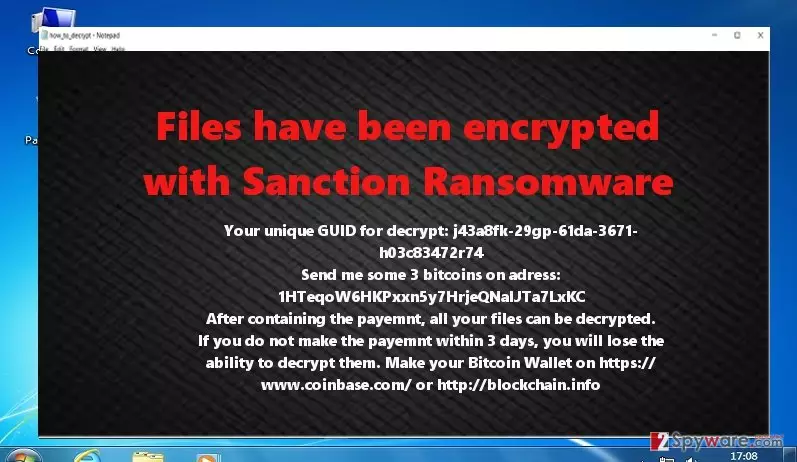
The cyber criminals threaten you to hurry up with the payment since all the encoded files would be lost within three days. However, there are no guarantees that you will recover them even if you remit the payment. Cyber criminals have greatly profited from such malicious activity. They bear no responsibility to return the data to you. Moreover, what is interesting that this threat deletes all shadow copies and even may threaten your back-ups. Recently, the sale of Rush/Sanction ransomware has been announced on the Internet. The right of distributing the virus costs 1500 USD. Some even suspect that this threat is related to notorious threat TeslaCrypt, which was officially ceased a couple of months ago. After all, you should focus on virus removal.
What are the most typical ways this malware infects computers?
Most likely, you have been infected with Sanction malware through spam emails. This method of distribution has been a popular and, unfortunately, profitable way. Though users have been more aware of the dangers lurking in spam, there is still a significantly high number of infected users via this specific technique. Scammers have manifested their mastery and creativity by developing astonishingly persuasive strategies. Do not rush opening the email if it contains a message from Microsoft support team or local tax company encouraging you to fill the form of a possible tax refund. The goal of these emails is to convince you into opening the malicious attachment which contains virus within. Usually, these fake emails bear grammar mistakes, or you might miss some details which are obligatory in the official emails sent from the respective company. Beware of surfing in torrent sharing domains since they also happen to be the target of placing the ransomware.
Sanction ransomware removal suggestions:
Since this threat appears to be quite aggressive and complex, we recommend you to save time and energy by opting for automatic Sanction removal. Once you install an anti-spyware program, run the system scan. The software will remove ransomware within a few minutes. It will also proof-check and monitor the security of the operating system to minimize the risk of potential threats. Unfortunately, the application does not decrypt the files locked by this malware. In order to do that, you might try using data recovery applications. Lastly, if you encounter some difficulties and cannot remove this virus because your antivirus does not launch, take a look at the system recovery guidelines provided below.
Did this guide help?
4 comments
Alex
Im planning to buy the virus since no one is able to stop these hackers.
Emily
Just another ordinary day with a couple of ransomware viruses
Matt2
Im concerned whether any anti-virus can protect the PC...any valuable advice?
Steve
Ill install the new anti-malware app right away. Enough with risking the safety of personal information.