

Why should you stay away from Us.minehp.com?
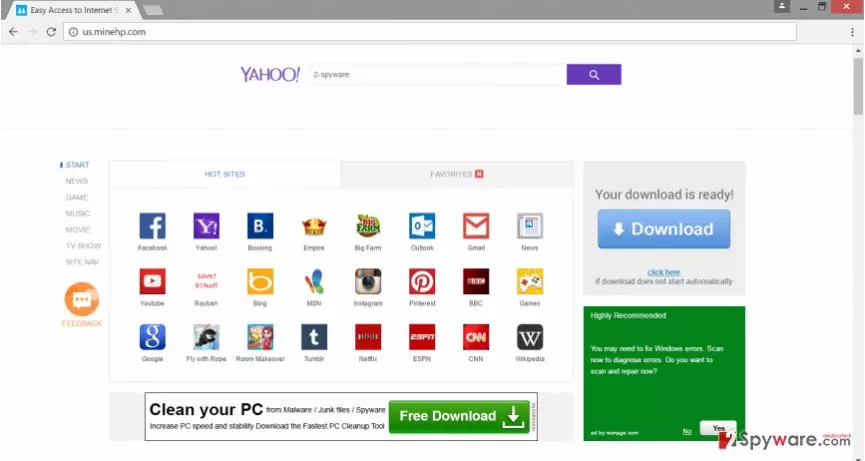
Us.minehp.com virus aims at all popular web browsers[1] and takes full control over them. After infiltration, it alters affected browser’s settings and sets its domain instead of the current homepage and search engine. Therefore, users learn about the attack as soon as their launch their browsers. This browser hijacker is closely related to Minehp.com virus and aggressively offers to use the suspicious search engine that claims to deliver results from Yahoo[2]. It also provides quick access to the bunch of popular social networks, email services, and other websites, news portals. These shortcuts might seem useful for some computer users; however, it’s not the only thing that you will notice on this site. Us.minehp.com browser hijacker also displays misleading advertisements informing about computer-related errors and necessity to download some tools and scan the computer. Inexperienced users might be easily tricked, click on this ads and install or purchase suspicious PC optimizers or antivirus programs[3]. Unfortunately, these programs might include cyber infections and infect your computer with malware. What is more, you might be asked to reveal your personal information[4], such as contact details, address, credit card information, etc. Probably, you can get a feeling that it might lead to serious privacy issues. Hence, don’t let hijacker trick you to visit shady third-party sites. Remove Us.minehp.com as soon as it shows its appearance. FortectIntego will help you to clean your PC and get back control of your browsers.
Browser hijackers might be called as shady marketing tools. The developers generate revenue from pay-per-click and affiliate marketing strategies. The scheme is simple: when you click on the ad or promoted link and visit particular websites, you give a little bit of money for the developers. However, you cannot be sure whether you click on the infected content or not. Indeed, Us.minehp.com redirect problems are quite serious. As you already know, after one click you might end up on a malicious or phishing[5] website. The developers of the browser hijacker do not have any shame and let you browse through the dangerous places online. For this reason, you should start Us.minehp.com removal and prevent them from causing you problems.
How does browser hijacker spread?
Just like any other browser hijacker, Us.minehp.com virus also spreads in the software bundle. It might be attached to any free program that you download from various online sources. Of course, you can prevent all extra applications from sneaking inside the system and opting them out – Advanced/Custom installation mode allows this function. However, users rarely choose these settings and often rely on Quick or Recommended setup. Bear in mind that this method does not reveal about extra applications and do not let to reject their installation. For this reason, you may not notice Us.minehp.com hijack until you open your web browser after rebooting your PC. Do not forget this important tip in the future. Moreover, always choose reliable and official sources for software downloads, and read the Privacy Policy, EULA or other provide documents by the developers. Paying attention to the software installation helps to protect your PC not only from PUPs but malware infections as well.
Two methods for Us.minehp.com elimination
Before Us.minehp.com removal you have to make a decision, whether you want to leave this task to the reputable software or fully participate in virus elimination. The first option is quick and easy. All you have to do is to install one of our suggest anti-malware program below, update it and scan computer’s system. The second method requires investigating computer’ system. You have to find and remove Us.minehp.com along with all its additional components. Some applications may have been installed on your PC and some in the browsers. Don’t forget that you have to check and repair all web browsers that are installed on your computer.
Uninstall from Windows
Uninstall from Windows 10/8:
- Type Control Panel into the Windows search box and open the result.
- Under Programs, select Uninstall a program.


Uninstall from Windows 7/XP:
- Click on Windows Start > Control Panel (Windows XP users should click on Add/Remove Programs).
- In Control Panel, select Programs > Uninstall a program.


Remove the unwanted program:
- In the Programs and Features window, look for any recently installed suspicious entries, select them, and click Uninstall.
- If User Account Control appears, click Yes to confirm, then complete the removal.


Delete from macOS
Remove the unwanted application:
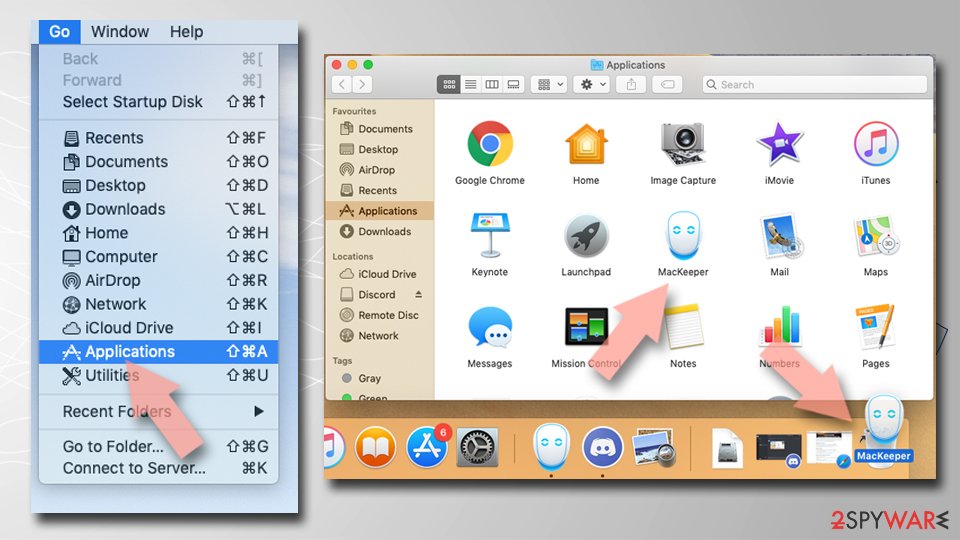
- From the menu bar, select Go > Applications.
- In the Applications folder, look for any suspicious entries, then drag them to Trash (or right-click and pick Move to Trash).

Delete leftover files and folders:
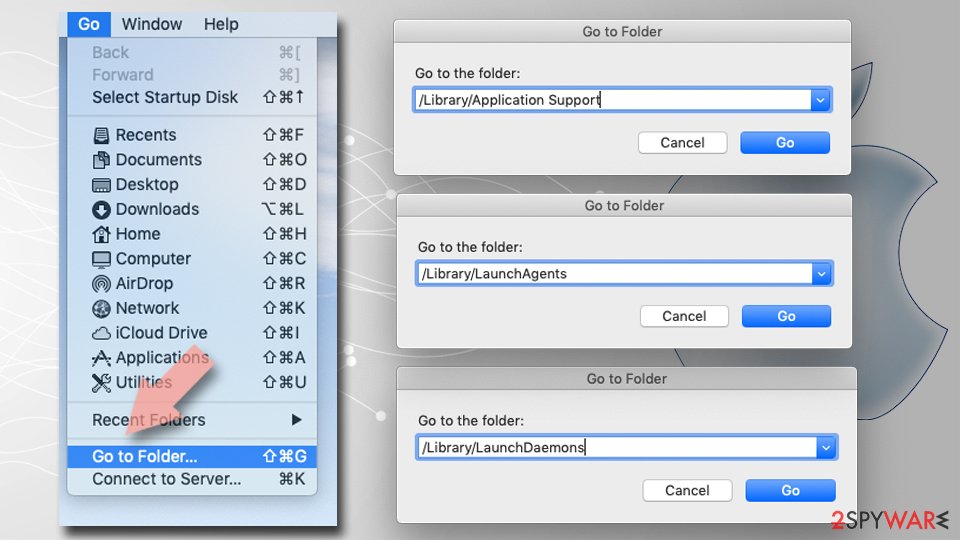
- Select Go > Go to Folder.
- Enter /Library/Application Support and remove any suspicious folders related to the unwanted program.
- Repeat the same check in the /Library/LaunchAgents and /Library/LaunchDaemons folders, deleting any suspicious entries.
- Finally, empty the Trash to permanently remove the leftovers.

Reset Internet Explorer
Remove dangerous add-ons:
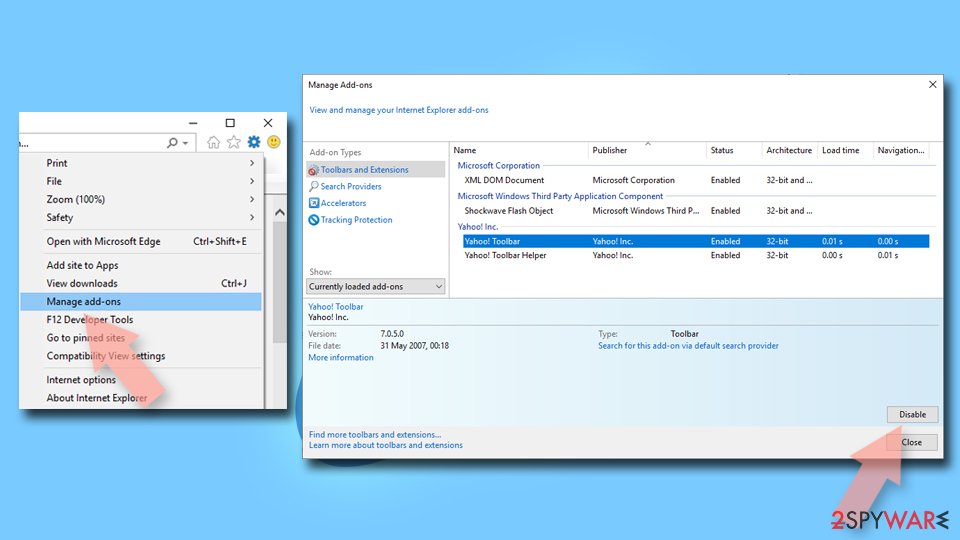
- Open Internet Explorer, click on the Gear icon (IE menu) on the top-right corner of the browser
- Pick Manage Add-ons.
- You will see a Manage Add-ons window. Here, look for suspicious plugins. Click on these entries and select Disable.

Change your homepage if it was altered:
- Open IE and click on the Gear icon.
- Select Internet Options.
- In the General tab, delete the Home page address and replace it by your preferred one (for example, Google.com).
- Click Apply and then select OK.
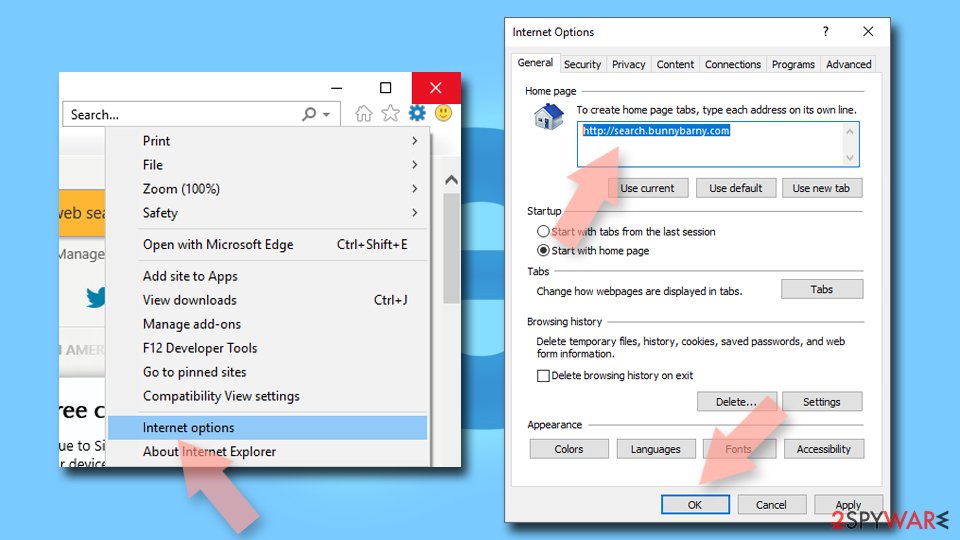

Delete temporary files:
- Press on the Gear icon and select Internet Options.
- Under Browsing history, click Delete...
- Select relevant fields and press Delete.
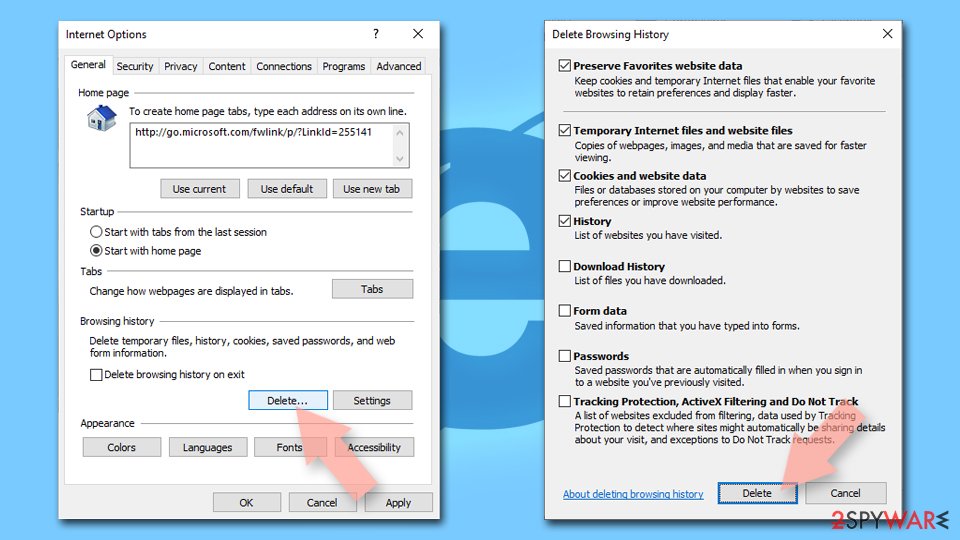

Reset Internet Explorer:
- Click on Gear icon > Internet options and select Advanced tab.
- Select Reset.
- In the new window, check Delete personal settings and select Reset.
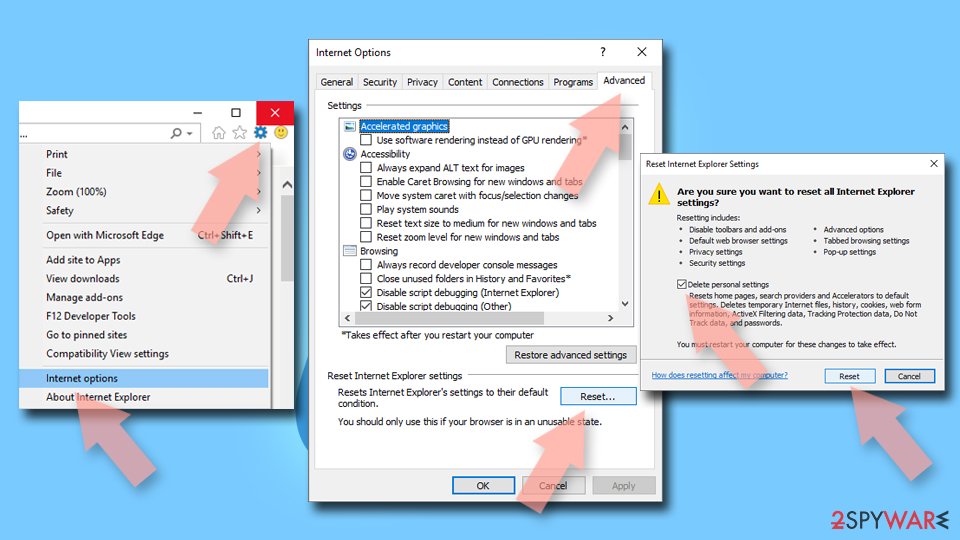

Remove from Microsoft Edge
Delete unwanted extensions from MS Edge:
- Select Menu (three horizontal dots at the top-right of the browser window) and pick Extensions.
- From the list, pick the extension and click on the Gear icon.
- Click Remove.
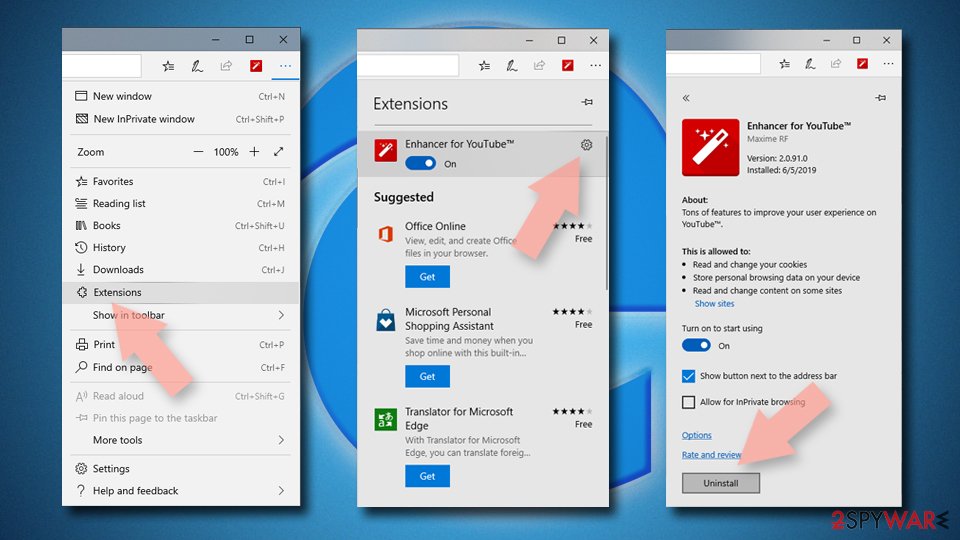

Clear cookies and other browser data:
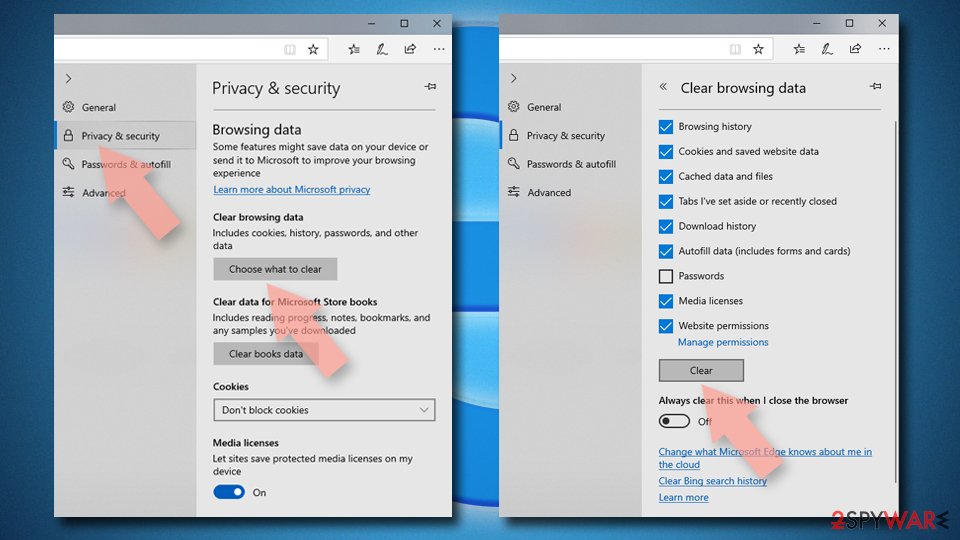
- Click on the Menu (three horizontal dots at the top-right of the browser window) and select Settings > Privacy, search, and services..
- Under Clear browsing data, pick Choose what to clear.
- Select Cookies and other site data and Cached images and files. (apart from passwords, although you might want to include Media licenses as well, if applicable) and click on Clear.

Restore new tab and homepage settings:
- Click the menu icon and choose Settings.
- Then find On startup section.
- Click Remove next to any suspicious startup page.
Reset MS Edge if the above steps did not work:
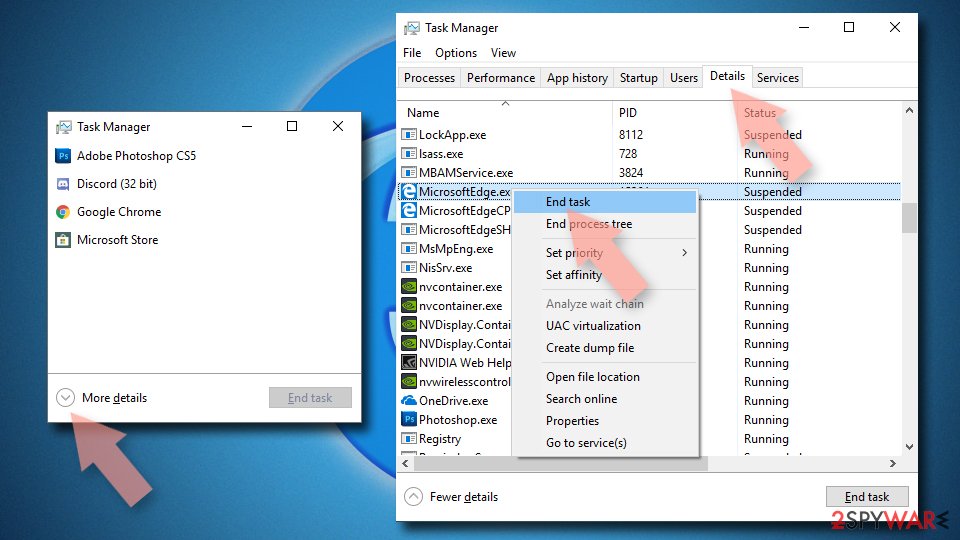
- Press on Ctrl + Shift + Esc to open Task Manager.
- Click on More details arrow at the bottom of the window.
- Select Details tab.
- Now scroll down and locate every entry with Microsoft Edge name in it. Right-click on each of them and select End Task to stop MS Edge from running.

Instructions for Chromium-based Edge
Delete extensions from MS Edge (Chromium):
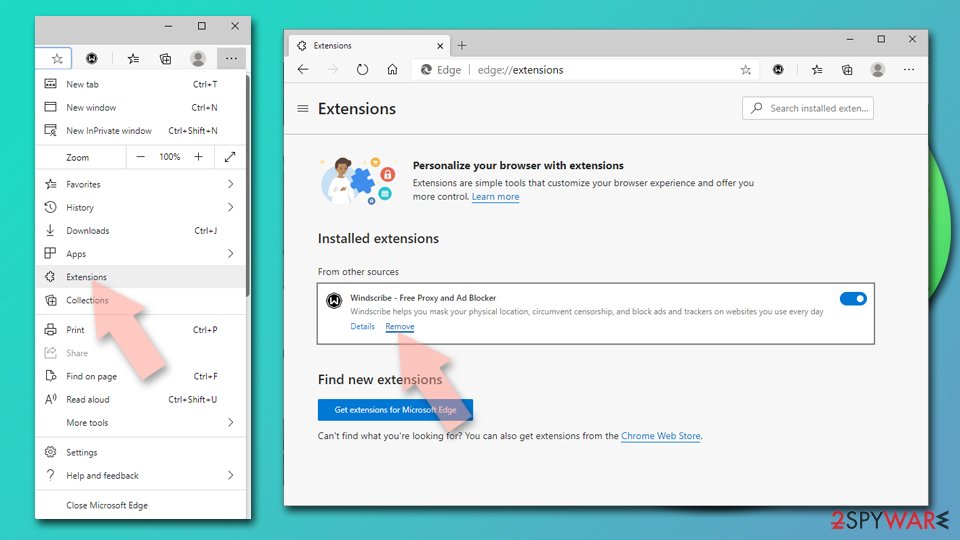
- Open Edge and click select Settings > Extensions.
- Delete unwanted extensions by clicking Remove.

Clear cache and site data:
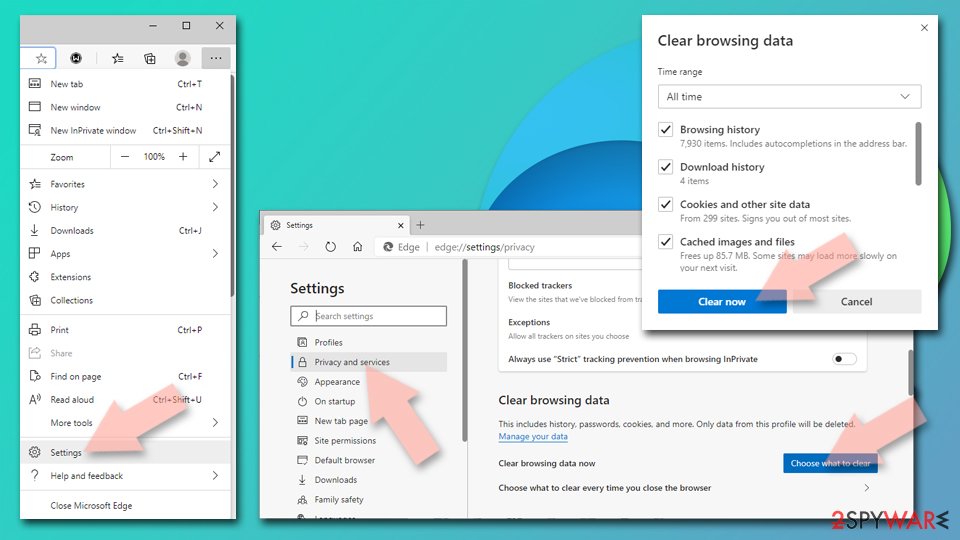
- Click on Menu and go to Settings.
- Select Privacy, search and services.
- Under Clear browsing data, pick Choose what to clear.
- Under Time range, pick All time.
- Select Clear now.

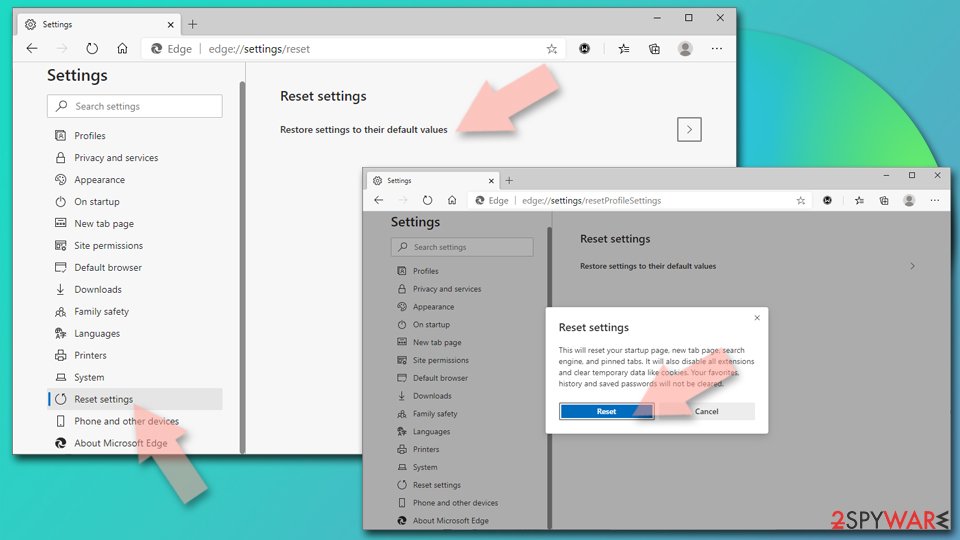
Reset Chromium-based MS Edge:
- Click on Menu and select Settings.
- On the left side, pick Reset settings.
- Select Restore settings to their default values.
- Confirm with Reset.
- This will disable extensions and reset startup pages but will not delete bookmarks, saved passwords, or browsing history.

Remove from Mozilla Firefox (FF)
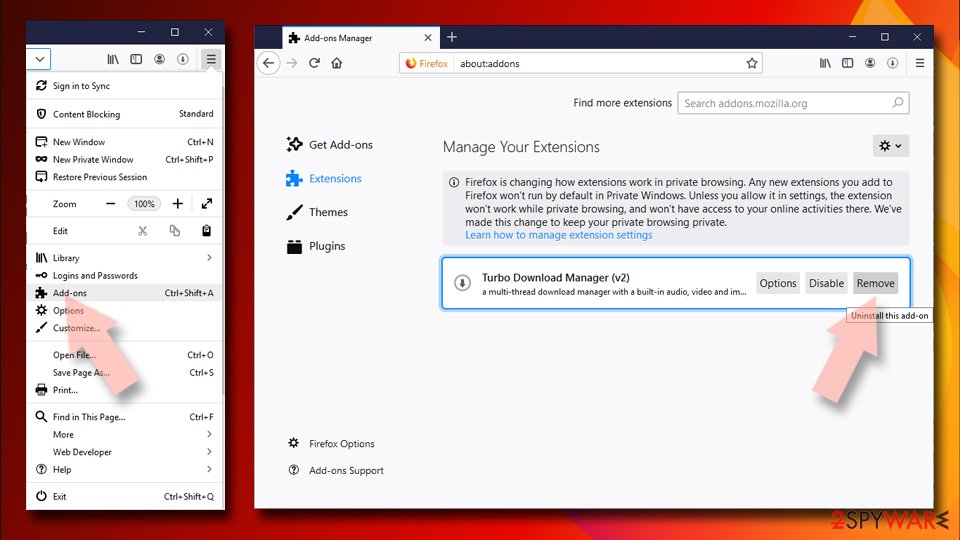
Remove dangerous extensions:
- Open Mozilla Firefox browser and click on the Menu (three horizontal lines at the top-right of the window).
- Select Add-ons.
- In here, select the unwanted extension and click Remove.

Reset the homepage:
- Click three horizontal lines at the top right corner to open the menu.
- Choose Settings.
- Under Home, set your preferred homepage and new tab settings.
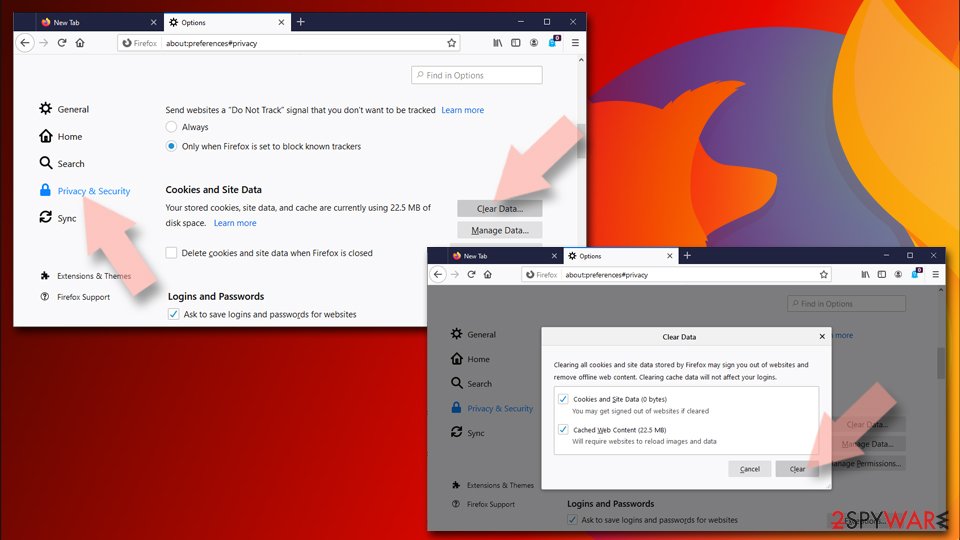
Clear cookies and site data:
- Click Menu and pick Settings.
- Go to Privacy & Security section.
- Scroll down to locate Cookies and Site Data.
- Click on Clear Data...
- Select Cookies and Site Data and Temporary cached files and pages, then click Clear.

Reset Mozilla Firefox
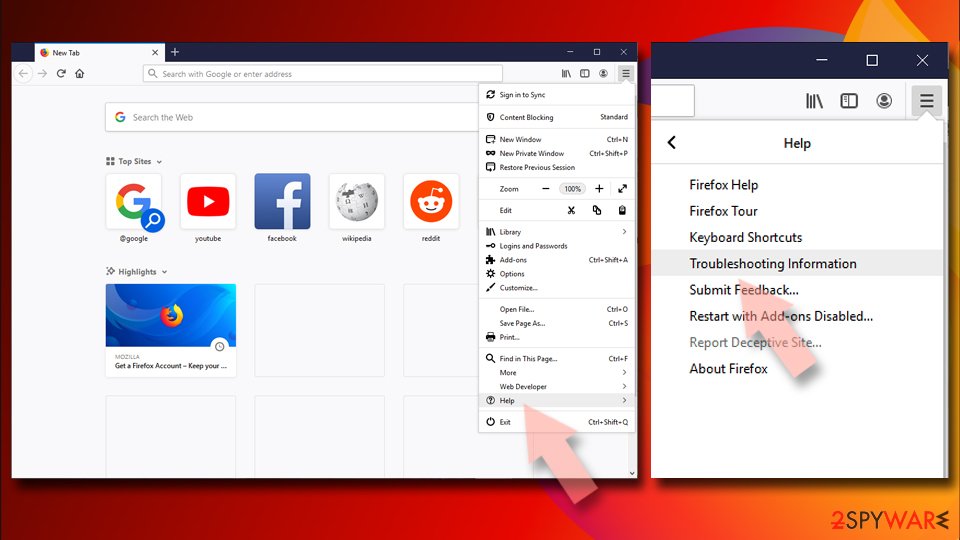
If clearing the browser as explained above did not help, reset Mozilla Firefox:
- Open Mozilla Firefox browser and click the Menu.
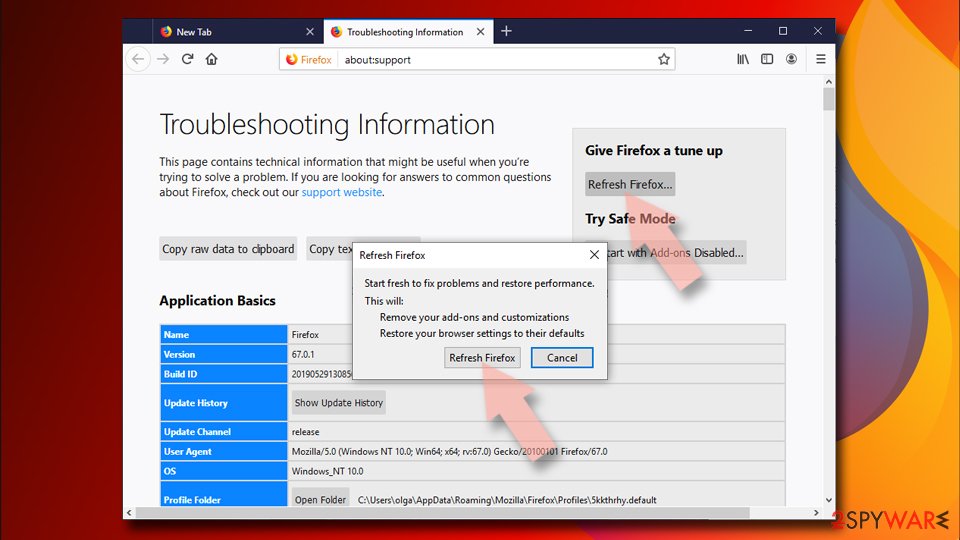
- Go to Help and then choose Troubleshooting Information.
- Under Give Firefox a tune up section, click on Refresh Firefox...
- Once the pop-up shows up, confirm the action by pressing on Refresh Firefox.


Remove from Google Chrome
Delete malicious extensions from Google Chrome:
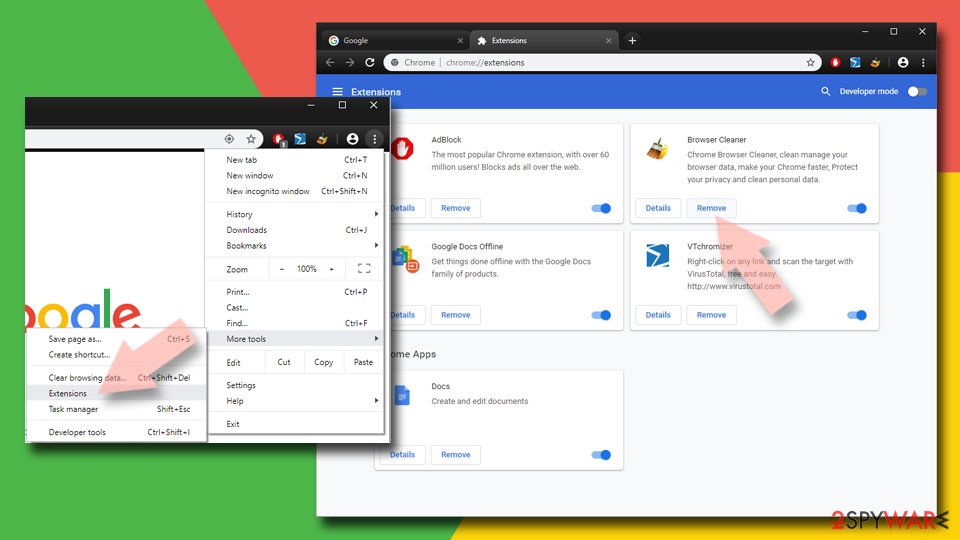
- Open Google Chrome, click on the Menu (three vertical dots at the top-right corner) and select More tools > Extensions.
- In the newly opened window, you will see all the installed extensions. Uninstall all suspicious extensions related to the unwanted program by clicking Remove.
Clear cache and web data from Chrome:
- Click on Menu and pick Settings.
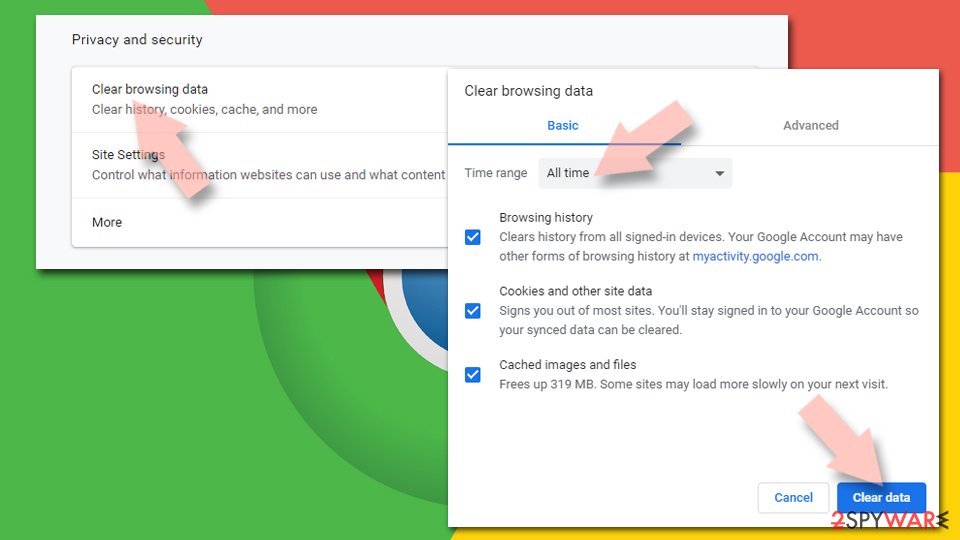
- Under Privacy and security, select Clear browsing data.
- Select Browsing history, Cookies and other site data, as well as Cached images and files.
- Click Clear data.

Change your homepage:
- Click menu and choose Settings.
- Look for a suspicious site in the On startup section.
- Click on Open a specific or set of pages and click on three dots to find the Remove option.
Reset Google Chrome:
If the previous methods did not help you, reset Google Chrome to eliminate all the unwanted components:
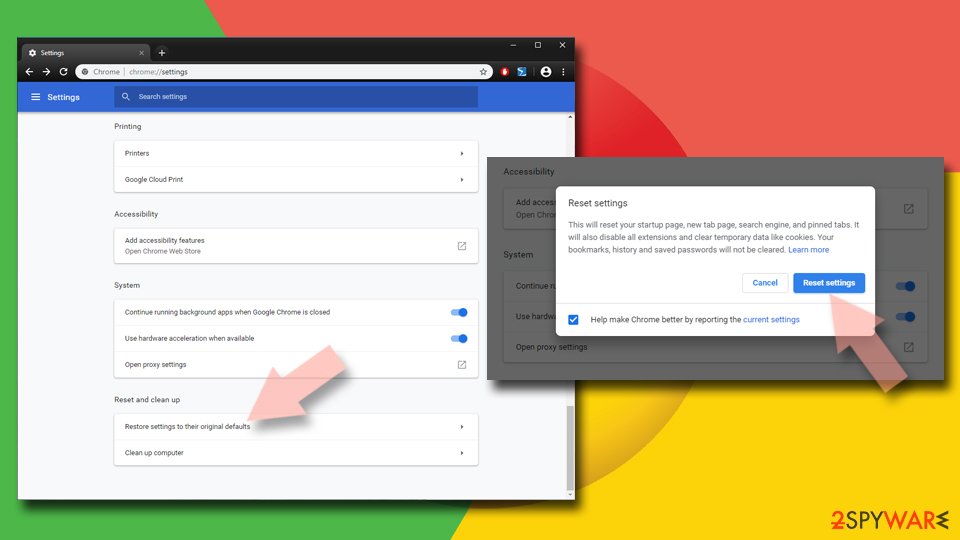
- Click on Menu and select Settings.
- In the Settings, scroll down and click Advanced.
- Scroll down and locate Reset and clean up section.
- Now click Restore settings to their original defaults.
- Confirm with Reset settings.

Delete from Safari
Remove dangerous extensions:
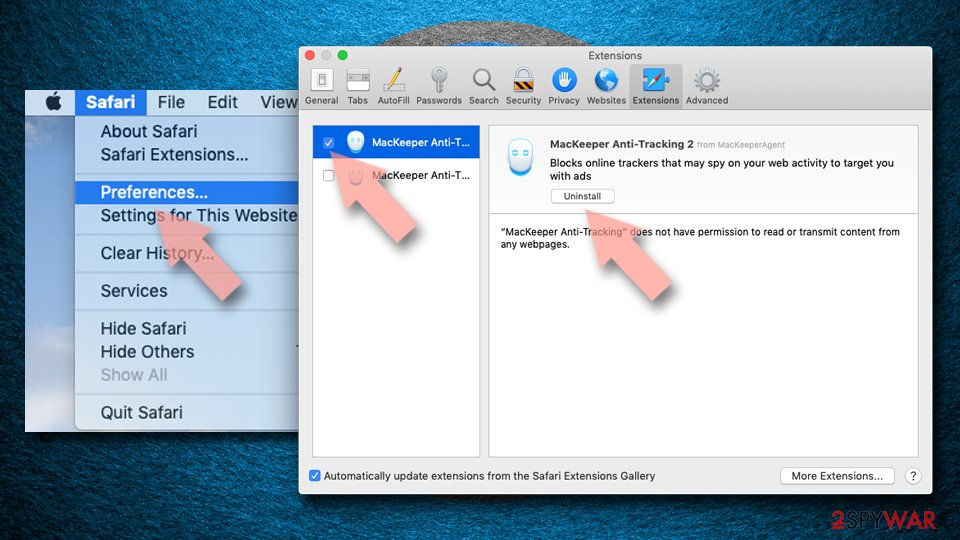
- Open Safari, click Safari in the menu at the top-left of the screen, and select Preferences.
- Go to the Extensions tab, look for any suspicious entries, and click Uninstall to remove them.

Clear history and website data:
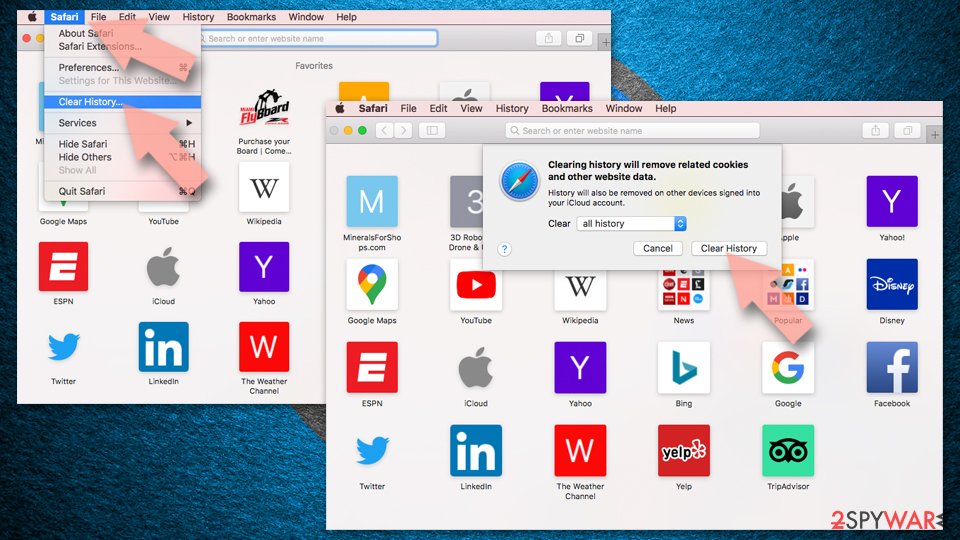
- Click Safari in the menu and pick Clear History.
- Set Clear to all history and confirm with Clear History.

Reset Safari:
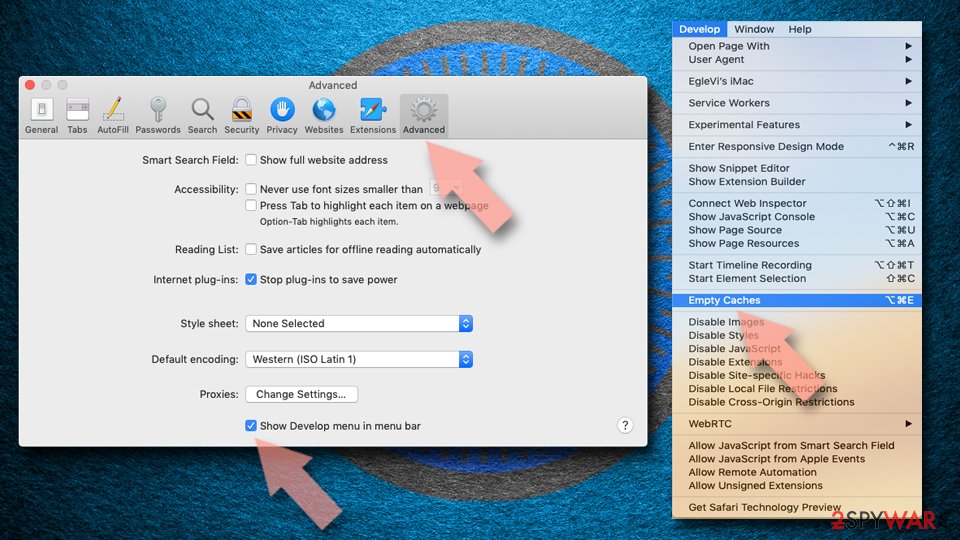
- Click Safari in the menu and select Preferences > Advanced.
- Enable Show Develop menu in menu bar.
- From the menu bar, click Develop and select Empty Caches.

Did this guide help?
3 comments
Milena
Such a strange search engine. Do not recommend using it to anyone
Agnes
Ive been fighting this virus whole weekend. Thanks God I found your site!
Jake
What an annoying program!