

Reasons to ignore “Your PC/Device needs to be repaired” virus alerts
“Your PC/Device needs to be repaired” virus is a tech support scam that will tell you lies about your PC’s condition and make you pay for the services or software you do not really need. Such viruses are not new to the cyber infection arena and have been exploiting users for quite some time now. However, within the past year, they have become especially active. The crooks behind these scams are good psychologists because they know exactly how to approach the users and make them follow their commands. Firstly, they manipulate on what we value the most — the security of our computers. Once the virus installs on the computer it generates a fake, but legitimate-looking BSOD (Blue screen of death) window, notifying the victim about the supposed computer malfunction. BSOD is a common way Windows operating system informs the user about system problems. So, since this notification covers the whole screen like typical BSOD windows do, the less experienced users may easily mistake it for a real system error. That is why you should never jump to conclusions or take reckless action before you haven’t investigated the situation in greater detail. Keep in mind that such notifications should not obstruct you from accessing your computer data and if they do, you probably have something to worry about. Continue reading this article to learn how to remove Your PC/Device Needs to be Repaired lock screen and delete the related malware from your computer.
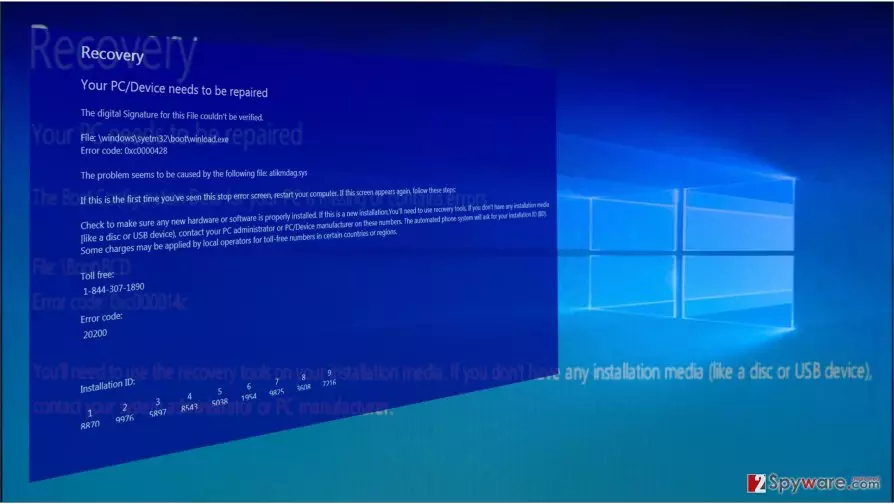
Apart from the locked screen, there are several other indications that suggest Your PC/Device Needs to be Repaired hijack. All you need to do is look at the actual content of the message. Usually, the scammers will paint a very frightening picture of your computer’s condition but provide a solution as well. This particular virus tries to convince you about the digital signature authorization failure and urges you to contact tech support by an indicated number – 1-844-307-1890. Of course, since there is no actual problem, there are no actual support technicians either. By dialing the indicated number, you will be merely put through to a fraudulent salesperson who will use all of his/her wits to talk you into purchasing a tech support subscription you do not need in the first place. Do not waste your time and do not allow the scammers to swindle money from you. Check our expert-prepared instructions at the end of the article and head straight to the Your PC/Device Needs to be Repaired removal.
Versions of this virus:
“Windows Defender has detected Critically Corrupted File System!” virus. If this frightening message is displayed on your computer screen, stating that Your PC/Device ran into a problem and needs to be repaired because of Error code: 0xc0000428, then there are no doubts that your computer has been infected with malware that advertises fake tech support services. In other words, you are dealing with Windows Defender scam. The virus showcases a big blue screen, filled with made-up theories about computer problems and possible fixes. This virus provides a toll-free number 1-844-563-0240 to get in touch with “computer technicians,” which, in reality, are nothing but filthy scams trying to deceive people. These scammers typically talk very politely and can even sound trustworthy, because they kindly ask the victim to explain what happened to the computer and perform various tasks, such as go to Registry Editor, take a look here and there, open MSConfig, change some settings, and so on. In reality, these scammers want to convince the user to provide credit card details, buy useless programs or services, or, in the worst case – get remote access to the system. Windows Defender has detected Critically Corrupted File Syetem! malware should be removed as soon as possible using a trustworthy anti-malware software. It is highly recommended to use removal instructions provided below this article and deactivate the virus first.
Techniques used to infect user’s PC
Otherwise known as potentially unwanted programs (PUPs), such viruses infect computers without much difficulty. They can be sent to you by mail, or you can come across them on insecure domains in forms of software updates or random ads. The problem is, they are often very well disguised, so it may be difficult to notice them yourself. Unfortunately, automatic antivirus utilities are of little help too. They may not necessarily detect the threat and Your PC/Device Needs to be Repaired malware may end up on your computer. Keeping yourself away from unfamiliar domains, suspicious downloads or ads should help you avoid PUPs like the ones we discuss today. Of course, additional system check-up with reputable antivirus software is also a must.
Your PC/Device Needs to be Repaired virus removal:
To remove Your PC/Device Needs to be Repaired virus and stop this error from interfering with your daily browsing you have to choose one of two basic strategies. You can invoke your own skills and eliminate the virus manually, or you can leave the Your PC/Device Needs to be Repaired removal to the professional software. Manual removal instructions are quite complex and may intimidate the less experienced computer users. But if you are willing to opt for this approach anyway or simply need suggestions on how to remove Your PC/Device Needs to be Repaired lock screen, please scroll below.
Did this guide help?
3 comments
Martinson
Pathetic and fake! DELETE IT IMMEDIATELY!!
Elsa
Nice removal instructions ! it took me like 10 minutes to fix this
Bronte00
Can this virus infect macs as well??