

All you need to know about YourOptimizer:
YourOptimizer by Elektro Kod (the program is also known as Your Optimizer) may appear as a legitimate tool which is designed for helping you with your drivers and their updates. However, after installing this program on the system, you may find yourself disappointed. In fact, you should stay away from this program because YourOptimizer removal may cost you a serious amount of money! As security experts from 2-spyware.com report, this application is a potentially unwanted program. Another thing that you need to know is that this software relies on a very sneaky distribution way. Usually, it enters computers bundled with other software (adware, browser hijackers, and similar PUPs) or even as a Flash Player update, so people install your_optimizer_setup.exe and other files that are related to Your Optimizer virus without even knowing it. After doing so, you can be disappointed by annoying notifications caused by this PUP. Typically, they are designed to tell people that they need to fix thousands of different errors on their computers. Please, do NOT fall for such alerts because the real aim of these their appearance is to swindle your money! If you suspect that you are infected with this fake optimization tool, you should ignore its ads and also scan your computer with FortectIntego or similar anti-malware software to remove each of its files.
What is the main aim of this optimizer?
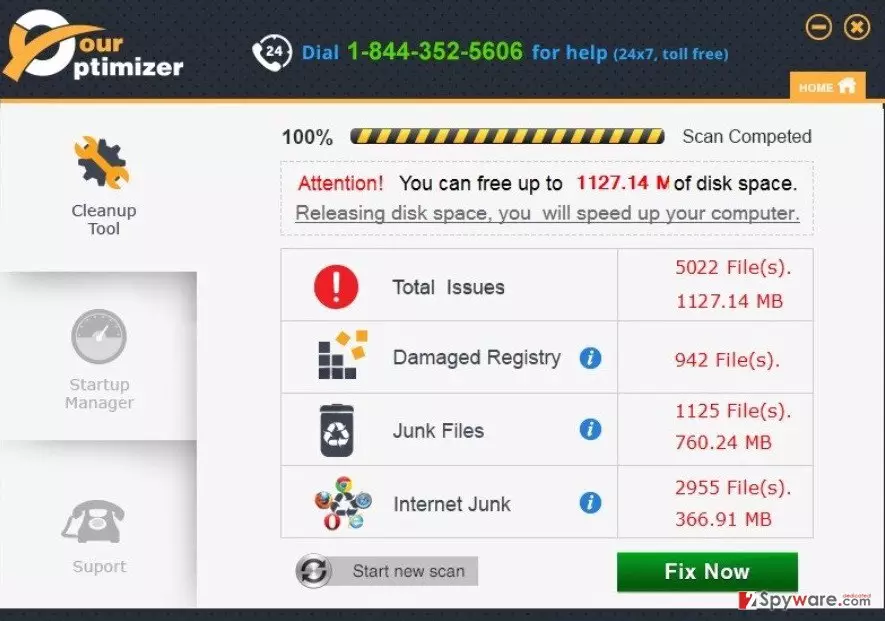
After Your Optimizer enters the system, it starts making changes in your PC system immediately. First of all, it drops its files and hides them within your legitimate files. After doing so, it starts “scanning” your computer and reports about various issues. Typically, this software uses misleading alerts and system error messages stating you need to fix hundreds or even thousands of PC-related issues. It can inform you about junk files, damaged registries, and even Internet junk. By doing this, this program seeks to make you concerned about your computer. Don’t be alarmed. All these messages and alerts are fake and displayed just to trick you into downloading the full version of YourOptimizer. Also, they can be set to convince you that you need to buy an upgrade or similar version of this optimizer. If you fall for its ads and click one of its ads, you can be automatically redirected to the official website of this program, which is considered unsafe. To sum up, it is clear that having this program on your computer causes more than one issue. If you want to avoid unnecessary worries and reduce the risks of exposing your PC to serious security threats, you should remove YourOptimizer from your device now.
How to remove YourOptimizer?
If you are already infected with YourOptimizer virus, the first thing you should know is that you are not alone. The developers of this program have, in fact, left their victims an opportunity to get rid of this program. You can do that with the help of these steps:
1. Click “Start” button;
2. Enter “Control Panel”;
3. Find “YourOptimizer” (it can also be found as “Your Optimizer by Elektro Kod”) and select “Uninstall” function;
4. Finish the process by clicking “OK”.
However, having in mind that the most of the users are tricked into installing this software without knowing that, you should also think about a full system scan with a reliable anti-spyware. This software is very tricky, so it can try to prevent its removal by hiding its files and similar components deep inside your computer. To prevent this, you should install FortectIntego or MalwarebytesMalwarebytes and rely on them while trying to guarantee you a full YourOptimizer removal.
Did this guide help?
Be the first to comment