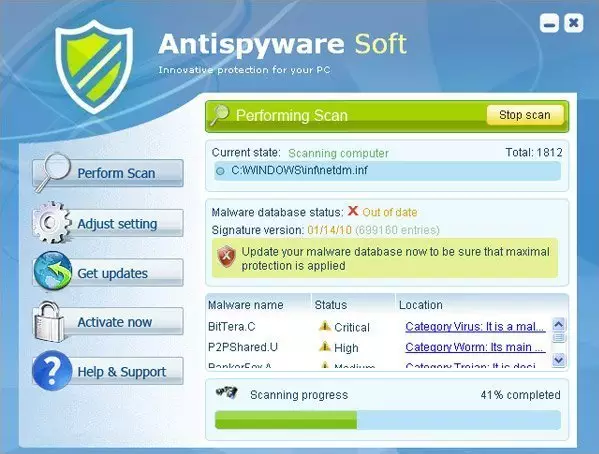
Title: Antispyware Soft

Remove Antispyware Soft. Removal instructions


Also known as: AntispywareSoft, Antispyware Soft Demo
Severity scale:Antispyware Soft severity is 68  (68 / 100)
 
Antispyware Soft is a rogue anti-spyware program from the same family as Antivirus Soft and Antivirus Suite. Just like its predecessors, AntispywareSoft reports false system security threats to make you think that your computer is infected with malicious software. Usually, this fake program is promoted through the use of Trojans or other malware, but it can be also installed on your computer without your consent and knowledge through software vulnerabilities.

Once active, Antispyware Soft runs fake system scan and displays a list of false or non-existing threats to scare you into thinking that your computer is badly infected. Antispyware Soft Demo is a typical scareware, so it won't let you to remove the infections until you purchase the program. Of course, this is nothing more but a scam and you obviously shouldn't purchase it. Instead, please use the removal instructions below to remove Antispyware Soft from your computer as soon as possible.

When running, Antispyware Soft will also display fake security warnings and state that your computer is infected. That's a part of the scam and just like the false scan results, should be ignored. It will also impersonate Windows Security Center and state that your computer is not secure or that your sensitive information can be stolen. It then will recommend you to purchase Antispyware Soft in order to protect yourself. Some of its alers may look like these ones:


Windows Security alert
Windows reports that computer is infected. Antivirus software helps to protect your computer against viruses and other security threats. Click here for the scan you computer. Your system might be at risk now.


Antivirus software alert
Infiltration Alert
Your computer is being attacked by an internet virus. It could be a password-stealing attack, a trojan - dropper or similar.
Details
Attack from: IP Address, port 39096
Attacked Port: 30516
Threat: Win32/Nuqel.E"

The bad news is that this fake program will probably block nearly all legitimate program and of course anti-virus and anti-spyware application in the first place. In order to completely uninstall Antispyware Soft from your computer we strongly recommend you to follow the removal instructions below. Also note that you should scan your computer with legitimate anti-malware software such as Spyware Doctor, because this rogue program may come bundled with other malware where as the manual removal guide was written for Antispyware Soft only.

Antispyware Soft removal instructions

1. Restart your computer. As your computer restarts but before Windows launches, tap "F8" key constantly. Use the arrow keys to highlight the "Safe Mode with Networking" option as shown in the image below, and then press ENTER.


2. Open Internet Explorer. Click on the Tools menu and then select Internet Options.


3. In the the Internet Options window click on the Connections tab. Then click on the LAN settings button.


4. Now you will see Local Area Network (LAN) settings window. Uncheck the checkbox labeled Use a proxy server for your LAN under the Proxy Server section and press OK.


5. Download an automatic removal tool from this page and run a full system scan. Or download it form alternative location.

Related files: [random]tssd.exe

Antispyware Soft properties:
• Changes browser settings
• Shows commercial adverts
• Connects itself to the internet
• Stays resident in background

Antispyware Soft snapshot:
Antispyware Soft removal

Automatic Antispyware Soft removal:

SpyHunter is recommended remover to uninstall Antispyware Soft. You should confirm using free trial that it detects current version of parasite.

Note: Tested and Confirmed means that we have tested spyware remover with multiple versions of Antispyware Soft and got the best results. There might be updated or modified version of particular parasite that require manual killing of parasite process or an update. In such case try other removers in the line.

Manual assistance required means that one or all of removers were unable to remove parasite without some manual intervention, please read manul removal instructions below.

If you failed to remove Antispyware Soft using SpyHunter please report this to us.

We might be affiliated with any product we recommend on the site. Full disclosure in our Agreement of Use.
STOPzilla
Tested and Confirmed! STOPzilla removes Antispyware Soft (2010-04-15 03:59:32)
Malwarebytes Anti Malware
Tested and Confirmed! Malwarebytes Anti Malware removes Antispyware Soft (2010-04-15 03:59:32)
Spyware Doctor
We are testing Spyware Doctor's efficiency at removing Antispyware Soft (2011-12-25 11:03:06)
XoftSpySE Anti Spyware

Antispyware Soft manual removal:

Kill processes:
[random]tssd.exe
Delete registry values:
HKEY_CURRENT_USERSoftwareMicrosoftWindowsCurrentVersionRun ""
HKEY_LOCAL_MACHINESOFTWAREMicrosoftWindowsCurrentVersionRun ""
HKEY_CURRENT_USERSoftwareMicrosoftWindowsCurrentVersionPoliciesAttachments "SaveZoneInformation" = "1"
HKEY_CURRENT_USERSoftwareMicrosoftWindowsCurrentVersionInternet Settings "ProxyServer" = "http=127.0.0.1:5555"
HKEY_CURRENT_USERSoftwareMicrosoftWindowsCurrentVersionPoliciesAssociations "LowRiskFileTypes" = ".exe"
HKEY_CURRENT_USERSoftwareMicrosoftInternet ExplorerDownload "RunInvalidSignatures" = "1"
HKEY_CURRENT_USERSoftwareMicrosoftWindowsCurrentVersionInternet Settings "ProxyOverride" = ""
HKEY_CURRENT_USERSoftwareAvScan
Delete files:
[random]tssd.exe
Information added: 2010-04-15 03:59:32
Information updated: 2011-12-25 08:25:51

Additional resources related to Antispyware Soft:

Attention: If you know or you have a website or page about Antispyware Soft removal, feel free to add a link to this list: add url

more resources
0
0
<Guest>
How can you remove this if the virus won't allow you to access or open anything else?
0
0
linda
helped well loads!! thanks so much.
0
0
^^
This REALLY helped alot. It actually worked, thank you so much!!
0
0
<Guest>
You have to bring up your computer in safe mode like these directions show. You cannot manipulate any of your system in normal mode b/c this virus, bug, etc. takes over and blocks everything.
0
0
<Guest>
Even after following these directions and the Antispyware program says its removed when I log back in to regular mode the virus still is there. Not sure why
0
0
<Guest>
I have the same problem as 23:04:55. I did run PC Tools in safe mode as suggested and it said it was removed, but upon starting in non-safe mode, it was back.
0
0
<Guest>
i tried this, i restarted and i spammed the f8 key like told, but i never got any sort menu, it kept going, "windows vista 64x"?
0
0
<Guest>
lol sorry, ignore my last comment, "01:04:28" i just aparently wasnt mashing it hard enough... tried a couple more times and got it :)
0
0
<Guest>
Please note that Spyware Doctor, which this download leads to, is not a free program. I really wish that this site had mentioned that before I spent 20 minutes downloading something totally usless.
0
0
<Guest>
Help! I have steps 1-4, and even downloaded the Spyware doctor, but when I pull up the screen for spyware doctor, it comes up and stares at me... It won't run scan, no buttons allow me to click on them.. under status it says Checking for a long period of time. Nothing is working. Any ideas??
0
0
<Guest>
did everything then scanned with my AVG antivirus.....didnt remove it guess i've gotta use prescribed software
0
0
<Guest>
ok i selected safe mode with networking but my PC iznt connecting to the net. how do i download the removal software?????

PLEASE HELP!!!!!!!!!!
0
0
<Guest>
you are the best.. you are my savior..
THANK YOU SO MUCH..
This is the only method which works on the net
as far as I know..
THANK YOU SO MUCH..
0
0
<Guest>
wtf!!!??? i have to purchase this sh*t so that it actually removes it!?!?!? complete waste of TIME!!!
0
0
<Guest>
Ad-Aware Free found and removed it for me first scan. Haven't had an issue since.
0
0
<Guest>
I LOVE YOU!!!THANX! Worked perfectly!
0
0
<Guest>
Download your own removal tool, the one on this site makes you pay to remove the threats after they have been found!!
0
0
<Guest>
Do I need to repeat the internet explorer proxy step for google chrome and firefox as well?
0
0
<Guest>
thanks i think my computer has a few battle wounds from me hitting it because that was pissing me off that was awsome thank you very much worked easy
0
0
<Guest>
Aaah works grear! Thnx!! Did as u said and downloaded malware and made a scan in safe mode! works like hell!!
0
0
<Guest>
Tried to follow instructions. Now get a message saying "disk read error occurred", restrat using ctrl+alt+del . Now can't start the computer. How to solve?
0
0
<Guest>
thank you!!!!!!!!!

great help indeed!!!!!!!!!!!!!
0
0
<Guest>
the internet on my laptop isn't working so I can't download the removal what should I do?
0
0
<Guest>
my avg popped up and removed it
0
0
manne
please remove the popup program and malmvware anty virus to.and the spy program also

remove everthing please.!!!!!!!!!!!!!!!!!!!!!!!!!!!!!!!!!!!!!!!!!!!!!!!!!
0
0
<Guest>
Mmmkay, in the past few months, I've been dealing with this kind of thing several times. This process has always worked before and now it's suddenly just.. not. :| WAT DO?
0
0
<Guest>
This worked GREAT!!

Thank you so much!!!
0
0
I hate Malware
So glad to rid of this one.
Knocked out most of my drivers and wouldn't let me start any applications.
0
0
<Guest>
hey, i got this today... stop all processes and would not allow any scans or restore points from inside WINDOWS 7. I FORCES A SHUT DOWN AND ONCE SYSTEM INITIATED TO REPAIR WINDOWS IT WENT TO A RESTORE. all those who are freaking out, relax, be patient.

IT WILL BE OK.
0
0
<Guest>
Unfortunatelly, the recommended program for antispyware-soft removal requires purchasing the full version before for actually removing the files from the computer. Is this the only way this works?
0
0
<Guest>
If you cannot exit out via C Alt Del, Hard Shut down, that usually brings up the screen to select safe mode anyways.
0
0
<Guest>
WOW thank you so much! now my computer won't pop out with those stupid ads!
0
0
<Guest>
thank you sir!!
0
0
<Guest>
Hey spyware Doctor now requires you to pay for it, I've found that Malwarebytes program works the best for this kind of removal and its free.
0
0
GoldSabre
I followed the instructions to the letter, and Spyware Doctor did indeed find all of the infected files. Only problem is, I can't remove them without paying for the full version. What gives? Can anybody help me out with what program to download?
0
0
<Guest>
the recommended software costs money. Follow steps 1 - 4. Run a windows search for 'System Restore' and execute a restoration. Windows will remove all new junk back to a certain checkpoint. it worked for me. good luck
0
0
firehedgehog
I used the malwarebytes program and it was good, i suggest u use quick scan to find the program. mind you, even after my comp restarted after getting rid of it i suggest running the program again in the normal area :D Thanks guys, i was totally freaked when i discovered soft on my comp
0
0
<Guest>
thank you guys worked really good..
0
0
Kagi
I would advise using the Registry Edit version of removal while in safe mode. I had no problems this way, and it only took about 10 minutes, instead of waiting through a lengthly virus scan.
0
0
<Guest>
I followed first 4 steps, but didnèt want to start downloading new software so I just ran a system restore (windows vista) and now my computer is back to normal.
0
0
courtkneethanksu
SAVED. MY. LIFE.
0
0
<Guest>
This was a strong virus. I couldn't even go to regedit, task manager, or add or remove programs. Luckily I got rid of it.
0
0
<Guest>
how did you finally get rid of it i have the same problem
0
0
<Guest>
I've checked about about 5 different sites, all listing the same solutions. It still continued to come up as soon as I started the pc.
0
0
<Guest>
I followed the manual steps. things are looking good so far.
Thank you very much for those solutions. The manual items didn't match up quite exactly but close enough and so far I believe everything worked.
Thanks again. Those who post these solutions are lifesavers.
0
0
Guest31337
thank you for the manual steps, worked out great for me, made me so mad about this bs.
0
0
<Guest>
tried this... the onlyway i finally got rid of it...

complete factory restore..... lost EVERYTHING..

luckily i could back up a few things in safe mode...
0
0
<Guest>
i had this rogue software too.

i just did a system restoration and...tada...my system is running well again!
0
0
<Guest>
THANK YOU SO MUCH!~
0
0
<Guest>
Running a full scan with Malwarebytes untill so far this have taiken 1H 39Min so i whas wondering do i need to do a full scan or can i just do a quik scan? and btw im doing this in safe mode do i have to do it again in windows normal mode after to? :s
0
0
<Guest>
if you have vista it might be easier to do a system restore i restored it to about a week ago and its gone
0
0
<Guest>
Malwarebytes generally works just as well, and it has a free version. If you can't get the antispyware soft removal program, then simply download Malwarebytes. Malwarebytes can also be used in more than just one situation.
0
0
dan
great instructions. thanks heaps.
0
0
<Guest>
Worked great. I followed the first 4 steps then used malwarebytes to do a quick scan to find the viruses.deleted them then restarted. i than ran a full scan to be sure and it was all clear.thanks heaps
0
0
<Guest>
Boo! I got hit with this virus as well... I tried going into Safe Mode, but after i hit (enter) to go into Safe Mode, my laptop freezes...Any way to get around that?
0
0
<Guest>
Worked great!! thanks
0
0
<Guest>
Thank you so much for this tutorial on how to get rid of this nasty little thing. worked great!
0
0
<Guest>killswytchuk
Thx a lot for the removal instructions! Really helped a lot! Keep up the gd work!
0
0
NinjiChop
What do the "" mean when deleting the virus using regedit ?
0
0
<Guest>
i wonder if you can make all this working from a guest account.
0
0
<Guest>
The free version of Malwarebytes got rid of the Antispyware Soft nasties for me. My Vista laptop still booted up very slowly, so I created a restore point to 12 hrs earlier and had to reinstall my avira anti virus software, but now everything is back to normal. Thank you so much for the info.
0
0
<Guest>
I think I have everything deleted, but when i look under the startup section under the System Configuration Utility, there is still a startup item there called ybabpyvtssd. It's unchecked, and everything seems to be working fine, but I'm still worried. What do i do?
0
0
<Guest>
If I look to the dates of the visitor comment this bad thing seems to be very active. Damn to it!!!
But thanks to you!!!
0
0
<Guest>
It is very active. Writing these viruses should be punishable by death! However, THANK YOU VERY MUCH spyware . com, your advice was fantastic and worked great. Thanks again!
0
0
<Guest>
Thank you so much for your information. I just follow your intruction and manual deleted a registor key, reboot the machine. It is back to normal.
I am almost going to by the antispyware soft. Thank a lot.
0
0
<Guest>
thank you so much to the good samaritan who provided this program...it was about to ruin my spring break, but you helped get rid of this "antispyware soft" bullshit...THANK YOU!
0
0
<Guest>
You ROCK!!!!
0
0
<Guest>
thanks a million
0
0
<Guest>
I followed the steps exactly to the letter but the file isn't there! Is there anywhere else it could be?
0
0
JdA
Thanks a lot. Malwarebytes is easy to use, fast and efficient. To be recommended against antispyware soft.
0
0
<Guest>
Hey thanks alot. Had to get this damn thing off my parents computer.
Malwarebytes worked great.
unfortune people got nothing better to do then create this crap.
Thanks again!!!
0
0
<Guest>
Malwarebytes worked best and was free compared to Spware Doctor tssd file on mine was aitmqxwtssd.exe and the reg entries were alktvmix so manual instructions may vary
Thanks for posting this.
0
0
<Guest>
thanks to whoever posted this...you're awesome!!!! instructions were perfect! you saved me alot of time and headache. thanks again!!!
0
0
Jude
I have installed it and run a scan but it's saying that in order to fix the threats i need to register, is there any way that i can fix them without registering? and what do i do now? My computer still wont let me go onto internet explorer.
0
0
<Guest>
Thanks very much for the instructions. I have managed to manually remove the threat. Just to say that on the last registry key, I found a directory called avsuite rather than AvScan, but this seemed to be full of rubbish, so I removed this. Thanks again.
0
0
<Guest>
OMG THANK YOU SO MUCH
0
0
<Guest>
I hope that this works!
0
0
<Guest>
Malware Bytes works. I have more than one install of Windows though. I booted into my XP drive, installed Malware Bytes - scanned the drive my Win7 is on, removed the "infections" and all good :)
0
0
<Guest>
Yay!! It worked!! Thanks!!
0
0
<Guest>
Malware works great ! Run it in safe mode to get rid of the antispyware torjan
0
0
KRAZYPIG
Omg thank you all sooo much i was really about to go crazy and so buy a new PC
0
0
got rid of em
thank you sooooooooooo much...the second link for malbytes worked an all 11 of the viruses on my xp pc are gone...thank you so much...god bless
0
0
<Guest>
thanks alot I was lost without this forum why do people want to crash other people omputer it just dont make sense
0
0
<Guest>
[ dir /s *ssd.exe ]

Thanks for the above tip, that did the final trick for me
0
0
trueabe
k no is this hoenstly legit..?
0
0
<Guest>
mmk cool, if this break my computer even more im gunna kill myself.
seriously. i have my resume, music, pictures & EVERYTHING on this laptop
if this messes up im just going to go die.
0
0
<Guest>
testing for legitimacy
0
0
<Guest>
Thanks for the info - I started in safe mode and did a system restore to the day before and my computer is now operating find. What a bunch of *%*holes toprey on people like this.
0
0
<Guest>
Thankz a million!!!!
Your easy 2 follow steps worked great! Im Dutch and know nothing about computers and thankz 2 u it was easy!

Now lets think of something to make the people who make money off this virus pay!!!

Greetings and Thankz again!
0
0
<Guest>
I can't view this page in safe mode...
0
0
DarenI
The above manual removal instructions worked perfect! For those who need a little more help finding the main file to delete, try using the following from a command prompt window while in Safe Mode --> dir /s *ssd.exe
0
0
<Guest>
thank you
0
0
<Guest>
you rock. many thanks!
0
0
rodiii
Spyware Doctor is perfectly legitimate software
0
0
<Guest>
YOU HAVE GOT TO BE KIDDING. The original trojan program asked me to register and pay to remove, now this Spyware removal is asking me to register and pay to remove. Could somebody tell me who and what to trust on the Internet?!?!?!?!?!
0
0
<Guest>
it says u can uninstall it u tard
0
0
Amy
THANKS SO MUCH=)
0
0
<Guest>
Thank you for posting this, it saved my computer, you can't imagine how grateful I am.
0
0
Smiley
Thank you so much for this, it was driving me mental but after following your instructions to go onto safe mode I did a system restore and now I am saved!!!
0
0
<Guest>
SERIOUSLY! like that other comment- who's the villan here? Spyware Doctor is asking the EXACT SAME THING that the other program is-- that you register and pay before it will fix your computer! Cyber extortion is all the rage these days. Who know's who's telling the truth!
0
0
<Guest>
thanks for this
0
0
lkky
thhanks
0
0
<Guest>
My machine was/is infected by Antispyware Soft. After deleting the registry entries, things seemed to return to normal. However, Malwarebytes never found anything and I was unable to locate [random]tssd.exe.
0
0
Dennis
I don't understand the part of how to terminate a process...how do I know which process to terminate? I have found the file using the dir /s *ssd.exe command in the command prompt. should I just delete it or do I still have to do the terminate process step first?
0
0
<Guest> Tyler
I followed the steps and now i'm getting blue screens when trying to load window normally... any thoughts?
0
0
<Guest>
Call me a tard....on manual deletion, when the instruction says "" at the end, does that mean delete all entries. on first registry instruction, mine shows four items...(default); ctfmon.exe; Desktop Maestro; msnmsgr

Do I delete all? Or just the default?? Don't want to screw anything up.
0
0
Katherine
I followed Steps #1 through #4 and for Step #5, I downloaded the Malwarebytes software that was recommended under "Other Programs to remove Antispyware Soft." It was free and totally took care of the Antispyware Soft problem. Thanks!
0
0
Dennis
ok...i just figured out which process to terminate. it is the *ssd.exe on the task manager. it would appear if under the safe mode. so switch to the regular and terminate the process then do all the other steps. that's how I done.
0
0
Dennis
woudn't*
0
0
<Guest>
thank you so much! these instructions were really helpful and did the trick.
0
0
<Guest>
really helped fellas just look for the right files. thanks guys of 2-spyware
0
0
<Guest>
Google Spybot Search & Destroy... it is free... and it worked for me.
0
0
<Guest>
Great, thanks, this works... =^.^=
0
0
<Guest>
All I did was to reconfigure to an earlier date and it removed the antivirus soft program that was infesting my system !
0
0
<Guest>
Looked for AvScan but found none; filename was changed to avsoft and avsuite
0
0
<Guest>
i want the number to the company since i had to do a restore on my pc it locked me out of everything and i had programs i payed for and i want to talk to them.
0
0
Frynge
my apologies, the page ate my formatting. let me try this again:
it was renamed as thus: (random letters).exe-(random numbers).pf.
0
0
<Guest>
thankyou so much, followed steps 1-4 and then downloaded malwarebytes anti malware and now its fine. thanks again
0
0
angrynow
I tried to follow these insructions but now my pc wont start in any mode at all...not safe mode....not last config...none of them...it tries to load but then i get the same page but it says windows failed to succesfully load and nothing at all works.

My pc is dead now :(
0
0
Not a techie
I have the same question as another commenter... in the instructions to delete registry values, what do the quotation marks mean?
0
0
Just me...
System restore to a previous date worked for me too.
0
0
<Guest>
This program is good. It blocks internet explorer completely, making access to sites like this impossible. It also may occasionally display an adult site, which is just another cover for it. It also somehow is disabling my task manager. WHAT.
0
0
<Guest>
For those of you that downloaded and ran the Malwarebytes software on your computer to resolve this issue, did you run Malwarebytes in Safe Mode with Networking?

Thanks
0
0
<Guest>
While I think i got it off, it somehow locked Internet explorer. HELP.
0
0
<Guest>
I downloaded the Malwarebytes software and it wouldnt run on normal start up so i went on safemode and ran it and it got rid of it quite quickly and its all working fine now
0
0
<Guest>
Downloaded the remover suggested only to find that it can locate the files but won't remove them until I pay for it.

How exactly am I supposed to know this isn't exactly like what I'm trying to get rid of?
0
0
<Guest>
Omfg thank you guys so much. that spyware was pissing me off I knew it was a scam. thanks guys
0
0
<Guest>
Well I have malware on my computer and I have scanned my computer twice in safe mode and its come back both times even though the scan found crap. Any ideas?
0
0
<Guest>
Everything is working fine now except for IE 8, it will open but will not go to any website, any ideas?
0
0
<Guest>
you guys need to stop clicking on the ducky to win a free ipod
0
0
<Guest>
This completely hijacks your computer and access to the internet so you can't look for sites like these... at first i couldn't even start up task manager, but you can delete the process by starting task manager ASAP after a reboot. Have fun clearing the rest of this crap off your computer.
0
0
<Guest>
The downloaded remover is actually Spyware Doctor which is perfectly legit program as far as I know, so I guess I'll give it a try.
0
0
<Guest>
this has happened twice on my pc now 0_0 i didnt even download it!
first time, it didnt let me do anything, but when i took it to get fixed, it dissapeared! the pc guys said it they can hide deep in the hard drive, and could come back and it has, good bye $500...
0
0
<Guest>
i have followed your steps and everything worked fine!!!!!!!!!!!!!!!!!!!!!
i have downloaded malware protection.

THANK U!
0
0
<Guest>
I swear some loser out there has too much time on his hands. Really? Like come on, u spent all this time creating this virus? I feel bad for those who actually paid the man, with all his typos on the page and phony info...
0
0
<Guest>
i dont like this
0
0
OZBluey76
Used the MalwareBytes' Anti-Malware Program - seems to haved fixed it however I can't open my Windows Firewall on XP. Help?
0
0
<Guest>
Along with not being able to Open Windows Firewall right now on XP, I can't connect with Internet Explorer either on Windows XP but can connect just fine to my Internet Explorer on Windows 7. Help please...
0
0
<Guest>
my god just been attacked by this evil thing!!!!!

in a panic i ran task manager and windows defender and tried shut down the unidentified programs, with names like 'asam'

i will now try to completely remove it..
0
0
<Guest>
the people who designed this cant even spell-'protect you computer'- am i supposed to believe thats from windows?
0
0
<Guest>
Just wanted to post and say a huge THANKS! Really good to know that for every malicious $hitwad out there, there are still good citizens like yourself to help out.
0
0
<Guest>
You have to freaking buy it?
0
0
<Guest>
PC Doctor will find many things, but it'll want $ before doing anything about them.
Be forewarned.

(It wants to establish itself as your 'protector', but it still couldn't pinpoint antispyware-soft. And it's slow)
0
0
<Guest>
I was attacked by this spyware today twice. It is related to CONDUIT and DVDVideoSoft.
0
0
Sea Camel
Malwarebytes worked for me as well. No back into running regular windows rather than safe mode and problem appears to be fixed. Doing a full scan with Symantec Endpoint Protection as well. I can't believe Endpoint let the "Antispyware Soft" malware install itself.
0
0
<not_a_guest>
Note to self: do not grant access to anything that requests it through the pop-up info bar on sites like filestube. Got the virus this way. Had to restore the system several times ("repair your computer") until it succeeded on a restore point made on 4/27/10.
0
0
<Guest>
Some adult sites give this virus to you, when it asked for confirmation if I was 18 or older, when i clicked it, my pc went very slow and then i got the virus.
0
0
<Guest>
Could not find tssd.exe but did find cycyebqtssd.exe and removed it ok.
0
0
<Guest>
The File is actually ssd.exe. It appears in TaskMgr when you're in Safe Mode with Networking or Safe Mode.
0
0
MATTY
IT DOSNT WORK
0
0
<Guest>
You can also use Spybot Search and Destroy, It worked for me. I haven't tried your suggestion, Iam definate it will work as well.
0
0
Mike
I just got hit by this and the file name it was using was vjdmhlutssd.exe, I restarted my computer in safe mode with networking, and deleted that file and the .pf file that it also created it my windows directory. Computer is running fine now!
0
0
Isaac
Thank you for this step by step procedure! I followed all the steps, downloaded the malware, did a full scan and it fixed everything. Now my computers back to normal. Thank you again.
0
0
<Guest>
as soon as i saw java start running i knew somthing was getting into my computer and it did h8 you java just like all the others i knew this antispyware soft was full of it but it wouldnt let me do anything my whole computer was locked up glad i found this place helped loads
0
0
Kenny
Thank you so much. By starting my computer in safe mode, I was able to run my own antivirus software without 'Antispyware Soft' hijacking all my files.
0
0
Harold
Thank you very much. Your directions helped solve the problem.
0
0
<Guest>
i got this virus, contacted nortons to remove it. while it seems to have removed everything attached to it, nortons still cannot reinstall internet explorer. is this a symptom of the virus still being on the computer?
0
0
<Guest>
Testing
0
0
The Bobster
Manual removal instructions didn't work, as I couldn't find the file or registry keys. I wasted 2 hrs on downloading and running Spyware Dr. only to find that they charge you for virus removal. Malwarebytes only worked after I downloaded the latest update. But it did work.
0
0
<Guest>
do i have to do the manual removal as well.(if i already had malware bites do the rest?)
0
0
<Guest>
So which scan do I use full scan or the interlly scan or something?
0
0
<Guest>
How long does the process take? I"m trying it now....from what i can see from the comments below, this is hit or miss, i need to be a hit
0
0
<Guest>
The malware program is located in your temp folder. I am at work now, but if I remember right is User => temp => (some off the wall folder name) => to the .exe file. I deleted it in Safe mode and it stopped the malware, but now my IE will not work. Firefox works fine though.
0
0
<Guest>
I also just wrote the comment below this on. The authors post didn't help me at all. Also if you want to know what the file is called go into the "program start up" options and see what programs start when you turn on your computer. It is right there.
0
0
<Guest>
oh my god thank you so much for getting this up. i was so worried about all this (i am so not good at computers) and you just saved everything on my laptop! thank you!
0
0
<Guest>
Half these links you have to buy ur protection. I hate when things scan for you but it wont remove it unless u purchase something. Nothing in this life is free apperently, and nobody is above that. :(
0
0
It works!
Make SURE you run in SAFE MODE! This will remove it! :) And even if YOU DONT USE Internet Explorer, Do the set up above to removing proxy server settings. Also removing registry works and downloading mbam and running will update itself.
0
0
<Guest>Brady
This thing shut off my internet. And this didnt help at all
0
0
<Guest>
I tried this but the proxy server box it says to uncheck is already unchecked..so I dont know how to get my internet back to working so i can download something to get the virus off the computer...i am using my computer at work at the moment..someone please explain whats going on :(
0
0
<Guest>
just get ccleaner. run in safe mode like the aurthur says to run ccleaner and thats it. it will clean the registry for you I just ran it I no longer have this virus on my computer and the best part is its FREE!!!
0
0
<Guest>
Appears to have worked like a charm. Thanks for the wonderful help.
0
0
<Guest>
I downloaded the recommended software, but the "Antispyware Soft" still pops up and I cannot even use IE.
I see no process with the above name.
It won't let me remove or delete the above named registries.

Any suggestions?

Sean
0
0
<Guest>
it will not let me have any access to the internet...help
0
0
ashley
it will not let me access the internet at all! help
0
0
<Guest>
I am not a computer lover at all... but following those steps for someone like myself worked wonderfully. Thank you all for sharing your knowledge and breaking it down for people who do not consider themselves very computer savvy!!
0
0
<Guest>
should i run an viris scan first or run it after ive followed the steps?
0
0
<Guest>
how come you forget to mention that you have to PAY for Spyware Doctore!!!
0
0
<Guest>
Can I use McAfee to run a scan instead of the other spyware removal?
0
0
<Guest>
Did all of the things you stated and my sons computer is still infected. Is it because he as Vista??? How do we get rid of it????
0
0
<Guest>
well sure, it works in safe mode with networking, but when i went back to normal mode the 'antispyware soft was still there. This virus is starting to get on my nerves.
0
0
<Guest>
Guys you have to uncheck the box. Even though it is not working, you can go to tools and change that. Ktthnx
0
0
<Guest>
I got rid of Antispyware Soft by doing a System Restore to a date before it first started.
0
0
<Guest>
I found that disabling my wireless connection allowed me to access my usual anitvirus and anti spyware software.
0
0
<Guest>
The manual removal really helped me..Thanks
0
0
<Guest>
FYI: If you download and run STOPzilla be advised that it is not free and costs $9.95.
0
0
<Guest>
once downloaded cannot upload says to try again later
0
0
<Guest>
Avira anti virus does NOT detect this virus, manually deletion is the only option.
0
0
<Guest>
This pos killed my desktop and i cant get it to stay in safe mode or anything else. just get a blue screen and cant reload os. running vista 64
0
0
<Guest>
seems to be a more "agressive" form that pulls up "bad" internet sites.
0
0
<Guest>
thanks for the info
0
0
<Guest>
How do you restore task manger after an attack that shuts all task mgr. properties,
And it also shut down my http: https: or any port that accesses IE.

Post Comment:

Attention: Use this form only if you have additional information about Antispyware Soft parasite, its removal instructions, additional resources or behavior. By clicking "post comment" button you agree not to post any copyrighted, unlawful, harmful, threatening, abusive, harassing, defamatory, vulgar, obscene, profane, hateful, racially, ethnically or otherwise objectionable material of any kind.
Home page Name


«


* All field required
Related news:
Similar parasites:
Related articles:
Related discussions:
Compare spyware removers
Compare free products

HijackThis Log Analyzer Beta 2 HijackThis Log Analyzer Beta 2

I failed to remove Antispyware Soft using SpyHunter.

Email


Close

Spreading the knowledge:

It is very hard to fight Computer parasites alone in internet space. If you have a website we would be more than happy if you would help us to spread the knowledge about latest threats. You can help your visitors to manage their Computer system manually without aditional expences. Knowledge is the power, we just need to spread it.
add text box
rss feed
help other