

Antivirus Action – fake antivirus software that tries to scam you by showing bogus alerts on your screen
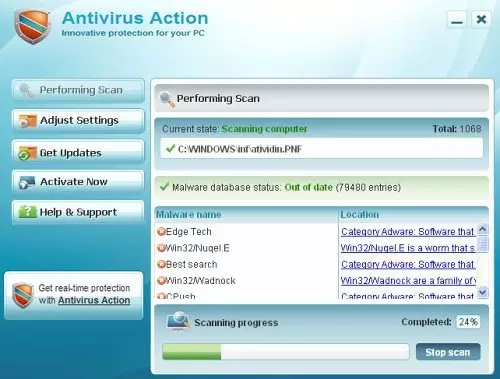
Antivirus Action is high-risk rogue spyware that appears to be created after its infamous forerunner Security Suite which is known to have infected thousands of PCs. The app is presented as a useful tool that would protect and detect various parasites, including Trojans, rootkits, viruses, ransomware, etc.
However, the program is considered to be scareware that infects a Windows computer and shows users fake notifications about malware infections. The goal of these alerts is to make victims purchase a fake license for this software, consequently resulting in financial losses, so make sure you never buy it. If you have found Antivirus Action performing scans on your device, you should immediately take care of its removal.
| Name | Antivirus Action |
| Type | Rogue antivirus, malware |
| Operation principle | Takes over Windows and shows fake notifications about malware infections, constantly threatening users in various ways. They are then prompted to buy the program's “license,” making victims spend money on this malicious program |
| Danger | Monetary losses, installation of other malware, redirects to malicious websites via the browser, personal data disclosure etc. |
| Removal | Rogue anti-spyware software can be difficult to eliminate, so accessing Safe Mode with Networking and using SpyHunterCombo Cleaner or another reputable anti-malware might be necessary |
| System fix | If you start experiencing crashes, errors, BSODs and similar issues after malware elimination, it is a sign that Windows files were corrupted during the infection – rely on FortectIntego to fix that for you |
The program is usually distributed through fake video codecs or misleading online scanners, which can be found on various malicious websites on the internet. Similar scareware and fake anti-spyware apps such as BlockDefense, WiniFixer, and PC Antivirus Pro use identical tactics for distribution.
Once installed, malware would change Windows completely – some system files might also be affected and damaged during this time. This might cause system instability and crashes later. If that is the case for you, perform a full system scan with FortectIntego to fix virus damage automatically after Antivirus Action removal.
The malware is equipped with not only typical capabilities, such as secret infiltration, annoying system scanners, or fake alerts. Here are a few examples of what can it do once the infection is complete:
- Completely prevent users from accessing most websites online
- Redirect to malicious websites as soon as the browser is opened
- Enable itself to be booted with every Windows launch
- Block all security and other beneficial software, detecting it as malicious, etc.
AntivirusAction starts its misinformation stage where infected system is completely bombarded by virus detection alerts. These notifications continuously interrupt when people browse the web, and every time they appear they declare about numerous viruses detected, for example:
Security Warning
Application cannot be executed. The file notepad.exe is infected. Do you want to activate your antivirus software now.
Windows Security Alert
Windows reports that computer is infected. Antivirus software helps to protect your computer against viruses and other security threats. Click here for the scan your computer. Your system might be at risk now.
Program creators' strategy is clear and obvious: being a commercial project, it asks paying the money for its so-called services and offers you to update to its Lite, Standard, or Ultimate “versions.” However, this scam has no spyware detection or removal engine, so it won’t be able to remove any computer virus.
In addition to the above-mentioned facts, this virus has a great impact on the computer’s performance, so you should eliminate it as soon as it gets on your computer. It’s highly recommended to use reliable anti-spyware (for example, SpyHunterCombo Cleaner) and remove Antivirus Action with all its additional files.
Do not believe fake online alerts
Online scams are particularly prevalent, and cybercriminals use social engineering to make them more believable. They often use familiar brand names, logos, formatting, and other attributes that can be easily interconnected with well-known companies, such as Microsoft or Google. Sadly, many people fail to recognize fakery and believe that these notifications are alerts are real. Consequently, they end up disclosing their personal information, purchase useless software or install malware on their systems.
Therefore, your first line of defense is a robust security program that has real-time security features and web protection enabled. Most of such apps would recognize deception and would show a warning if a malicious website is accessed. Besides, you should also stick to official websites when trying to download software or its updates – a suspicious URL is what can easily tell you that the site is not legitimate, even if it may look like one.
Restore your LAN settings and delete the infection in Safe Mode
When trying to eliminate this infection, you may find yourself disabled from the Internet. Here are some special notes to bring it back and remove Antivirus Action:
- Access Safe Mode with Networking as explained below
- Open Internet Explorer. Click on the Tools menu and then select Internet Options.
- In the the Internet Options window click on the Connections tab.
- Then click on the LAN settings button.
- Now you will see Local Area Network (LAN) settings window. Uncheck the checkbox labeled Use a proxy server for your LAN under the Proxy Server section and press OK.
Finally, perform a full system scan with SpyHunterCombo Cleaner and then fix virus damage automatically with FortectIntego repair software. Otherwise, you might have to reinstall Windows altogether.
Did this guide help?
Be the first to comment