

How active is Hidden Tear ransomware?
HiddenTear ransomware virus is not your usual ransomware infection. It is a proof-of-concept ransomware which was introduced by Turkish IT specialist Utku Sen for educational purposes. In the beginning of its appearance, this malware was infecting computers just to teach their owners a lesson about cyber security. However, just like any other tool, it got into crooks’ hands and now can lead its victims into serous troubles. The latest its version, which requires 0.05 Bitcoin, or $60, is called Digisom ransomware virus. It appends [3_random_characters].x file extension and disables the target files. HiddenTear virus has also been linked to Educrypt ransomware which was one of the first educational ransomware releases. However, now it seems that its name was changed to CerberTear virus that appends .cerber file extension to each of affected files. This educational ransomware seems to be almost identical to Cerber virus, so make sure you follow removal steps that are given in its guide if infected with this cyber threat.
Essentially, the ransomware works very similarly to its predecessor. It infiltrates the system disguised as a legitimate application and blocks access to the user’s files by encrypting them. The encrypted files can be recognized from the unusual extension .isis added instead of the usual ones. Then, this malware drops a “ransom” note, just like the regular ransomware virus would do. This note does not require the victim to pay for the locked files or threaten to delete them if the ransom is not paid in time. However, if you thought that HiddenTear removal can recover your files, you are wrong. The README.txt file features a message that goes something along these lines:
Well hello there, seems you have a virus! Well you are going to get the decryptor which is here http://www.filedropper(.)com/decrypter_1 Don’t Download Random Sh*t On The Internet A Hidden .txt File Has Been Created With The Decrypt Password! Find It!..
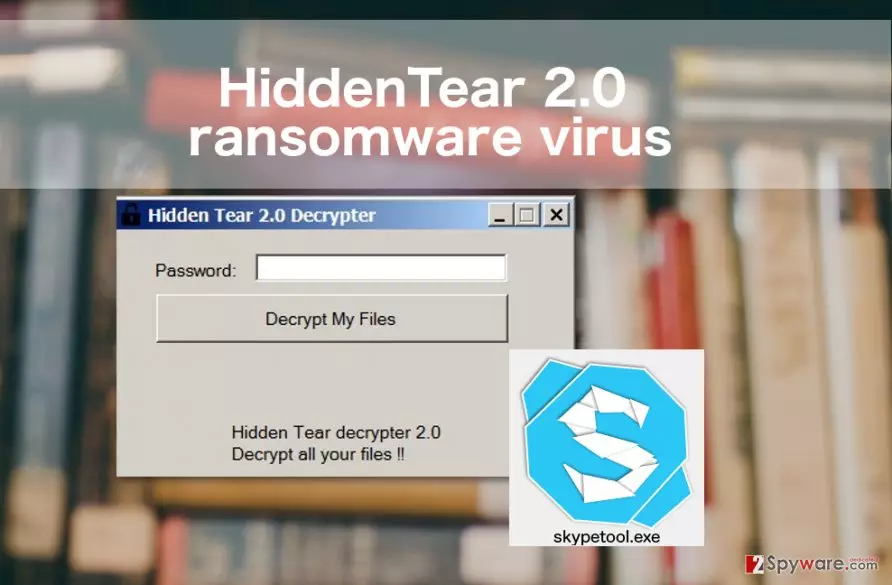
The file you are looking for is called “DecryptPassword.txt”, and you may easily find it in My Documents folder. The decryption tool has been tested, and it appears to be fully functional. After running it, the files on the computer are encrypted, and the virus eliminates itself from the system. Can you consider yourself lucky if you have been infected with HiddenTear ransomware? Yes and no. In a way, you are lucky because you did not lose your files or money to a malicious virus. On the other hand, this infection is a reminder that your behavior online is rather questionable, and you can contaminate your computer with more serious infections if you do not change your bad habits. So, if you have already decided to remove HiddenTear virus from your computer, do not hesitate from scanning your computer with some reputable antivirus utility just to make sure your computer is free from viruses. We recommend running a scan with FortectIntego.
How can I get infected?
HiddenTear ransomware virus has been spread hidden under the fake Skype application called the “skypetool.exe.” This tool can be distributed on malicious websites disguised as a software update, lottery winning announcement or a download button. The malicious file can also access your system through deceptive email attachments in which it may be presented as an invoice information, speeding ticket or other supposedly important document. If accidentally downloaded this software, you should not ignore it and hurry to remove it from your device. Even if the current version of the virus is not malicious, cyber criminals may easily modify it and stop giving away the decryption key that easily.
HiddenTear ransomware removal from the system
As we have already pointed out previously, you can remove HiddenTear 2.0 and other educational ransomware using a special tool offered by the creators of this eduware. If, for some reason, this tool does not work, it might be that you are dealing with malware which has a different aim. In this case, you can use FortectIntego, SpyHunterCombo Cleaner or some other professional antivirus software to remove malicious files from your computer. HiddenTear removal requires installing the tool, updating it to the full version and running a full system scan. In case the virus has evolved, you can use steps below to disable it. Make sure you try both methods to block ransomware and initiate a full HiddenTear 2.0 removal.
Did this guide help?
Be the first to comment