

Mobef ransomware has a new version released
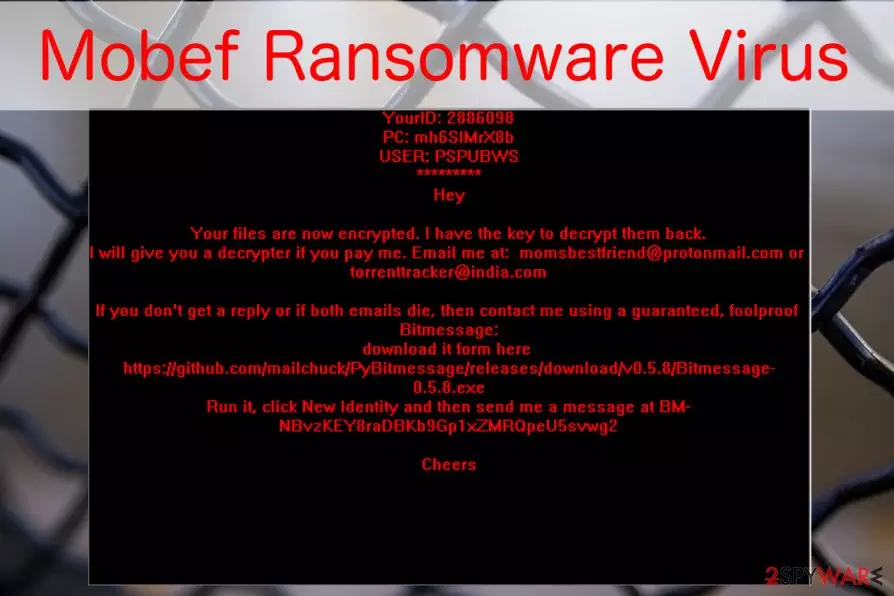
Mobef ransomware is a file-encrypting cyber threat which aims to encode files on the targeted computers using a combination of AES, RSA, and DES algorithms[1]. Afterward, victims are unable to open documents with .keyh0les, .Lokmann.Key993, or .keyx extensions. The latest version is known as Mobef-Salam ransomware and targets people from Italy.
After Mobef is done encrypting, it drops a ransom note, labeled date-of-infection-INFECTION.TXT (e.g., 5-3-2016-INFECTION.TXT), or IMPORTANT.README.txt, to the folders of the computer, which contain infected files.
In this document, the victim is introduced to the current situation and provided with a solution to the issues: in exchange of the files, he/she has to pay 4 Bitcoins, which equals around $ 1,824.32. However, the ransom note of the newest version does not indicate a particular amount of the ransom.
The momsbestfriend@protonmail.com and torrenttracker@india.com email addresses are also provided in the note for further communication with the criminals. It is not recommended to pay the ransom since there is no guarantee that the perpetrators will return the data after remitting the payment[2].
Though the original version of the malware appeared last year, since then a couple of new versions have been introduced. They ceased appending distinguishable extensions. Note that the previous version Kriptoki drops KRIPTOKI.DONOTDELETE and PLEASEREAD.THISMSG files and also presents alternative email addresses:
- gaetano.olsen@protonmail.com;
- gaetano.olsen@inbox.lv;
- gaetano.olsen@india.com;
- gaetano.olsen@pobox.sk;
This variation is known to target mostly Spanish and Turkish[3] users. However, residents of other countries should not let their guard as well. Be aware that the newest version named Mobef-Salam virus is designed to infiltrate on the computers located in Italy. Victims receive a READ.4YOU ransom note which is different from the previous variants.

The ransom-demanding message of the latest version not only contains numerous grammar mistakes but also indicates maktoob786@takfir24.net email address for contact purposes. Despite the fact that neither of these ransomware versions are decryptable, we strongly encourage you to remove Mobef. FortectIntego or MalwarebytesMalwarebytes will be of assistance in this situation.
If you are not aware how to start Mobef removal or the ransomware is simply blocking the installation of the antivirus, feel free to follow the instructions at the end of this article. They are designed to help regular computer users get rid of this cyber threat safely.
Also, after you uninstall Mobef virus, check the decryption steps which should be useful when trying to recover files encrypted by this ransomware. You will find them at the end of this article as well.
Ransomware infiltration procedure
Similar to other malicious file-encrypting viruses, the developers of this cyber threat are also employing the most common distribution techniques. They benefit from people who are reckless online and click on malware-laden ads, browse in less than reliable websites or download third-party software without checking it first.
Although, the most widely used distribution technique is malspam campaigns which help the criminals to infiltrate ransomware. It comes attached to the emails as a regular looking file. In reality, this file is a carrier of this malicious virus and, once opened, activates the ransomware.
Because of the mentioned reasons, you should be very careful while browsing online — do not click on suspicious ads and refrain from downloading email attachments that are sent to you by unknown senders. Most importantly, equip your machine with reputable antivirus software to lessen the chance of the ransomware attack.
Learn how to uninstall Mobef from your computer
Unfortunately, it is impossible to remove Mobef without any assistance. Likewise, you either need to visit an IT technician or employ a professional malware removal software like FortectIntego, SpyHunterCombo Cleaner, or MalwarebytesMalwarebytes. Even though it is the easiest way to uninstall the ransomware, it might still block the installation of the antivirus.
If such situation occurs, do not hesitate to use the below instructions to complete Mobef removal. Do not forget to scan your system afterward. When the virus is removed from your computer, you can try decrypting your files with data recovery software. If you have any questions regarding this virus removal, please contact us in the Ask Us section of our page.
Did this guide help?
4 comments
blingMotor
This ransomware sucks!! It delete HALF of the files on my computer. It could have deleted more if not for SpyHunter. Luckily it managed to stop it
Natalie
These instructions were really helpful to get my antivirus scanning the pc! Too bad there are no instructions how to recover the files...
TennerQuiff
I did not manage to remove it. But i dont care, no important files were lost :) Ill be installing a better antivirus in my new PC though
ropeLinger
Thank you for keeping us updated!