

PC Antispyware 2010 – a bogus tool with fake virus scan reports
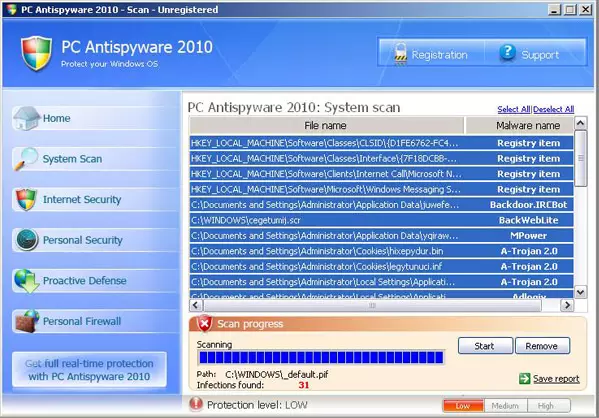
PC Antispyware 2010 is another rogue security program from the same family as WinReanimator, PC Security 2009, and Home Antivirus 2010. Mainly, the bogus application is promoted through the use of Trojan Braviax, but other delivery techniques are plausible.
This Trojan virus displays fake security alerts about possible or supposedly existing malware infections. The main goal of this rogue antispyware software is to coerce you into purchasing the program. You should uninstall it from your PC immediately if it is already infected.
| name | PC Antispyware 2010 |
|---|---|
| Type | Rogue antispyware |
| Purpose | Trick people into buying its paid version by showing fictitious virus scans and infections notifications |
| Risks | Infections with hazardous cyber threats, money loss |
| Elimination | Use our instructions below to remove this bogus security software safely |
| System health | After successful removal, run system diagnostics with the FortectIntego app to resolve any system irregularities |
PC Antispyware 2010 can also be promoted on various misleading websites that provide fake online anti-malware scanners, or it may be download and installed manually. Once active, it will be configured to scan your computer each time you log on to Windows.
Of course, you can't change the way this program works. The scan results are false and are being shown only to convince you that your computer is seriously infected. To make things worse, the bogus security tool will display alarmist alerts about computer threats.
These alerts look like legitimate ones, so it might be difficult to determine the difference between them. However, a reputable security application won't scan your computer without your permission. What is more, PC_Antispyware 2010 will block antivirus programs to protect itself from being detected and removed.
Likely, you won't be able to download and install other security programs as well. The rogue program will hijack Internet Explorer, Mozilla Firefox, or other web browsers and redirect you to various misleading websites that promote malware.
All things considered, it should be obvious that this application is a scam that must be deleted as soon as possible.
Please use the removal guide posted below to eliminate this threat from your computer. Better yet, scan it with a proper anti-malware tool, which would remove the bogus software automatically. If it doesn't allow to open a security tool, do that in Safe Mode with Networking.
Uninstall from Windows
Uninstall from Windows 10/8:
- Type Control Panel into the Windows search box and open the result.
- Under Programs, select Uninstall a program.


Uninstall from Windows 7/XP:
- Click on Windows Start > Control Panel (Windows XP users should click on Add/Remove Programs).
- In Control Panel, select Programs > Uninstall a program.


Remove the unwanted program:
- In the Programs and Features window, look for any recently installed suspicious entries, select them, and click Uninstall.
- If User Account Control appears, click Yes to confirm, then complete the removal.


Did this guide help?
Be the first to comment