

Zayka ransomware steps in the market as yet another Cryptomix version
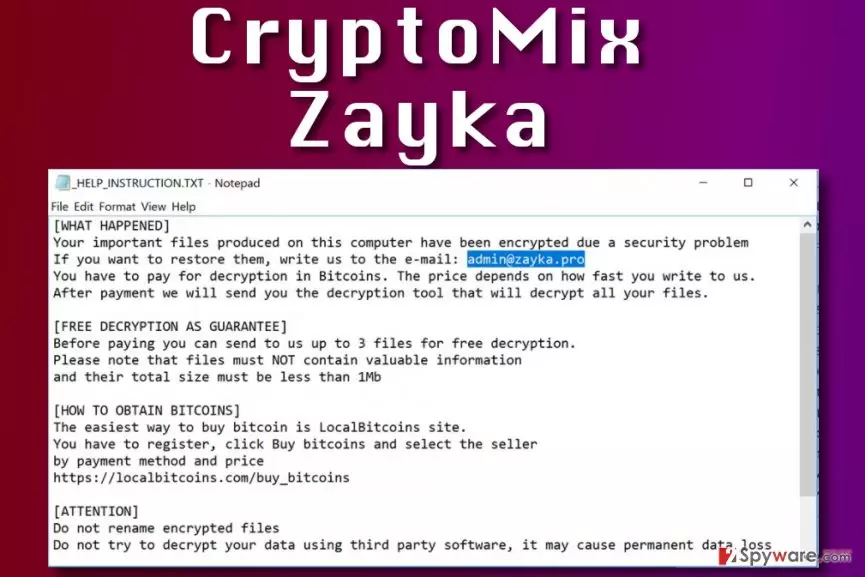
Zayka ransomware is a new CryptoMix virus variant. It is a malicious computer program that encrypts all valuable files on the system and demands a ransom. The ransomware corrupts original filenames and adds .ZAYKA file extensions to files. Following that, it drops a _HELP_INSTRUCTION.TXT file with guidelines on how to decrypt the locked files.
The ransomware asks to write to admin@zayka.pro to get instructions on how to restore files. Like any other ransomware-type virus, it asks to pay the ransom price in Bitcoins[1]. Just like previous CryptoMix versions, it suggests testing the decryption key on three small files (less than 1Mb in total size).
It goes without saying that we do not recommend paying the ransom to cybercriminals. Although they do not state the price of the decryption tool in the ransom note, it can reach up to 2000 US dollars in Bitcoin. Clearly, you shouldn’t risk such sum of money because the criminals might still not let you access your files afterward.
The Zayka malware emerged around the same time when the Noob ransomware appeared. CryptoMix developers have a tendency to switch file extensions they use[2] – they have already used .azer, .exte, .mole02 or .cryptoshield file extensions.
While some variants are decryptable, Zayka and Noob ransomware aren’t (at least at the moment of writing). However, you should still try out data recovery options we present. You can find them below the article.
Before you try any data recovery options, we strongly suggest that you remove Zayka virus first. Removing the virus guarantees that your attempts to decrypt data won’t be interrupted. You may also want to consider using one of security products we recommend – FortectIntego or SpyHunterCombo Cleaner. Before you launch or install them, reboot your PC using Zayka removal instructions provided below the article.

Distribution of CryptoMix-based viruses
Zayka and other viruses from the same ransomware group are mostly distributed via RDP attacks, malicious spam, and other traditional techniques used for malware distribution. Just like any other virus, these ransomware programs get transmitted with the help of social engineering attacks, forcing the victims open malicious files without realizing that they contain malware.
To avoid ransomware viruses, you have to follow these simple rules:
- Inspect every email you receive before opening files or links attached to them. Criminals nowadays do everything to make the message body appear legitimate and convincing, however, the address of the sender is what unveils an attempt to scam you. A valid email address should look similar to this: [employees name and/or surname]@[company’s official website address].com. The email address shouldn’t include a lot of numbers or other suspicious symbols. For example, john-amazon-help@protonmail.ru is clearly not someone working at Amazon.
- Choose strong passwords for accounts with a remote desktop access privilege. Never use easy-to-guess passwords such as 123456789.
- Use a powerful anti-malware software to ward off malware.
- Create a data backup (copies of your files) and move it to an external data storage device. Unplug it from your PC and keep it in a safe place.
Remove Zayka file extension virus and restore your files
Do not delay Zayka removal or you won’t have a chance to test data recovery tools available today. You can find a list of them below the article. Before you remove Zayka virus, we strongly suggest booting your PC in a different mode than it is now – you must use Safe Mode with Networking in order to successfully eliminate the virus.
We also want to point out that attempts to remove ransomware manually often result in failure. It is no regular program, and it is impossible to remove it via Control Panel. To find files and settings associated with the virus, you must perform a complete system scan using a powerful anti-malware tool.
This ransomware tends to infect French-speaking countries. If you speak this language, you can find a lot of useful information about malware in LesVirus.fr site[3].
Did this guide help?
Be the first to comment