
Shlayer Trojan virus: what it is and how to remove it
Shlayer Trojan virus is malicious software that targets Mac users and is typically installed via BitTorrent file sharing sites or fake Adobe Flash updates. Also known as OSX/Shlayer or Crossrider, the threat is especially dangerous because it establishes configuration profiles which increase the persistence and users struggle when trying to get rid of it.
Facts checked October 7, 2026. Removal steps tested on Windows 11 (26H2) and checked against Microsoft's and the browser makers' current documentation. Sections marked as our earlier report are the original text: they describe the threat as it was then and have not been reviewed since. The 2026 status, the removal steps and the questions are current.
Automatic
Get a free scan and check if your PC is infected.
Fortect finds malware, unwanted programs and the Windows damage they leave behind, and repairs it in one pass.
An automatic scan checks installed programs, startup items and browser extensions for anything that came with Shlayer Trojan virus.
Do it yourself · free Remove Shlayer Trojan virus yourself 5 steps, about 15 minutes, no software needed.
Start the steps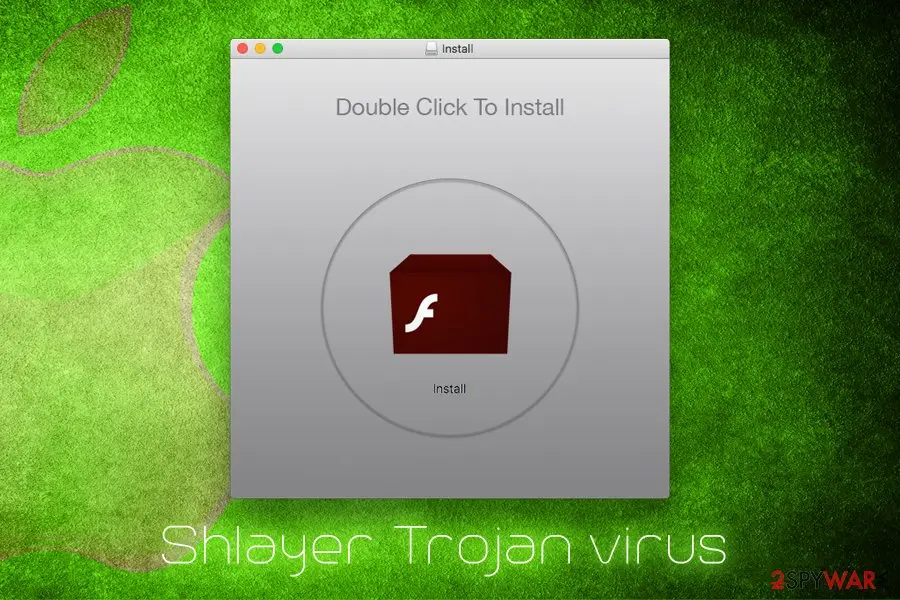
Shlayer Trojan virus: summary
| Distribution | Fake Adobe Flash updates, cracks, BitTorrent sites |
|---|---|
| Name | Shlayer Trojan virus |
| Also known as | OSX/Shlayer, Crossrider |
| Type | Trojan horse, adware |
| Affected systems | macOS |
| First discovered | 2018 |
| Removal | Scan the PC with security software to find and remove the malware and anything installed with it. Fortect scans Windows for malware and repairs the system files and settings it damaged. Remove it nowTo use the full-featured product, you have to purchase a license for Fortect. The scan is free. |
Show 7 more facts
| Symptoms | Aggressive pop-ups lead to insecure sites, the computer is filled with programs the user never installed, altered search engine and homepage, etc. |
|---|---|
| Recently discovered features | Disabling macOS Gatekeeper security agent to distribute malicious payloads |
| Detection names | No Microsoft detection name is known |
| Damage | Not recorded in the old report |
| Evidence | 6 write-ups by security sites; details still limited |
| First seen | 15 February 2019 |
| Facts checked | 7 October 2026 |
What Shlayer Trojan virus does on an infected PC
From our report of Feb 2019 · not reviewed since
Shlayer Trojan virus is the threat that disables Gatekeeper to run malicious payloads on macOS devices
Shlayer Trojan virus is malicious software that targets Mac users and is typically installed via BitTorrent file sharing sites or fake Adobe Flash updates.
Also known as OSX/Shlayer or Crossrider, the threat is especially dangerous because it establishes configuration profiles which increase the persistence and users struggle when trying to get rid of it. The most recent variant of the virus that spreads via rogue Flash Player updates focuses on disabling the macOS Gatekeeper security agent.
The discovery was made by TAU researchers, and according to them, versions from 10.10.5 to 10/12/.3 can get affected by this updated version. The malicious installer uses DMG, .pkg, .iso, .or zip file formats.
The primary purpose of Shlayer Trojan virus is to download and install various potentially unwanted programs, such as Advanced Mac Cleaner or Mac Cleanup Pro.
Initially, Apple does not allow automatic installations of apps that do not come from Apple store, but Shlayer Trojan enables such functionality and macOS gets filled with bloatware that degrade the operation of the device. It is also known that the malware changes Google Chrome's or other browser's search engine to Chumsearch.com.
Shlayer Trojan virus is one of the most well-known malware that is designed for Macs. Users typically wonder around BitTorrent sites and download a crack for legitimate software. It is not surprising that such illegal tools are often malicious, and most of the security applications will detect the file as malware, regardless of its functionality.
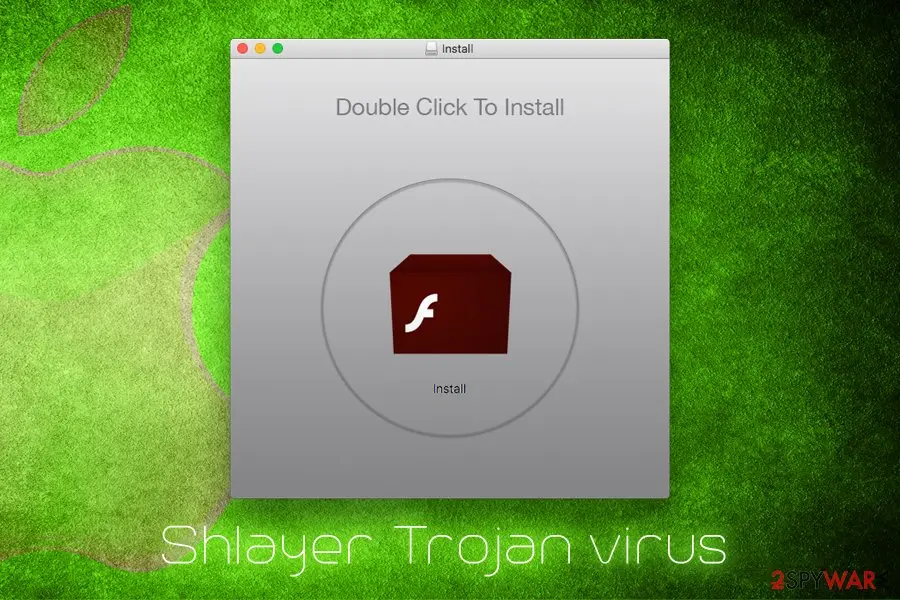
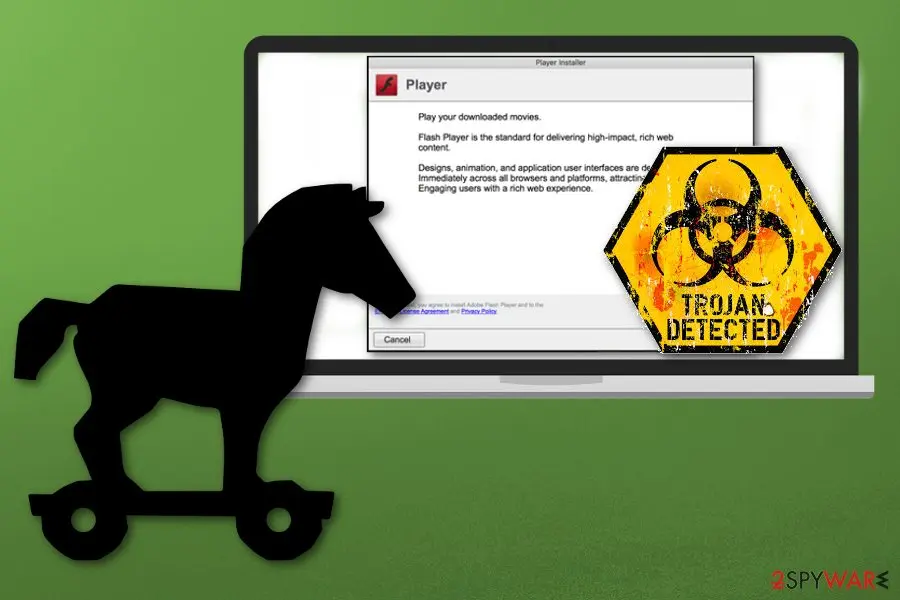
Alternatively, users might get infected when they get redirected to a malicious site that prompts them to update Adobe Flash. When Shlayer Trojan virus is launched, it will display two installation methods: Express (recommended) or Custom Installation (expert). If the latter is chosen, users can see what is actually being installed:
Shlayer Trojan virus installer will install the following onto the macOS:
Once installed, Shlayer Trojan virus will perform the scan using Advanced Mac Cleaner and activate Siri's voice that says that the computer has multiple problems (which is obviously a lie).
As typical to scareware, it will show numerous issues and, users who want to fix them need to pay a hefty $107 for it. As evident, users should ignore these warning and remove Shlayer Trojan virus together with the unwanted programs that it installed.
However, even after Shlayer Trojan virus removal, users will not be able to get rid of all the traces left by PUPs because it sets up a malicious configuration profile that lingers until the profile is deleted. We explain below how to accomplish that. Until then, users will still see Chumsearch.com as their main page on Safari and Chrome.
In February 2019, Carbon Black's Threat Analysis Unit discovered a campaign with additional features. This time Shlayer Trojan virus spreading via rogue Flash Player updates. This aggressive campaign now is not targeting BitTorrent users and spreading malware more worldly.
As researchers reported, samples discovered during their analysis affects most of the newest versions:
Attackers use the legitimate code signing through Apple's developer program and that allows them to bypass MacOS's restrictions and warnings that are enforced using gatekeeper. However, Shlayer virus still uses shell scripts to deploy secondary payloads, run commands and execute scripts.
The final payload collects information from the system, creates a unique ID for the infected device and downloads other malware from the remote server. That secondary malware payload is an .app executable, as TAU report writes:
Shlayer Trojan virus can read and transmit the data you type while the malware is installed. It means that your name, passwords, and even banking details are at risk of the exposure. In addition, users will suffer from constant ads and redirects during their web browsing.
To detect the unwanted software on your device, check your applications folder. If you see any apps you never installed or the ones mentioned above - you should be concerned. The best way to protect your Mac is by employing reputable security software.
- Advanced Mac Cleaner;
- Chumsearch.com browser hijacker;
- MyShopCoupon;
- MyMacUpdater;
- mediaDownloader
- Adobe Player
From our report of Feb 2019 · not reviewed since
Forget Adobe Flash or never install its updates from third-party sites
Adobe Flash is an outdated platform and is barely used anymore, as it will be shut down in 2020.
The player is known to have multiple security flaws, and have been abused by cybercriminals for years (fake updates). Besides, most modern browsers have the feature already built-in, so there is no need to download Adobe Flash.
Additionally, set it to click-to-run mode, so that it would not launch automatically on dangerous sites.
As it is typical of malware, it is widely spread on BitTorrent sites. Therefore, experts recommend staying away from them. However, if you will be torrenting, keep in mind the following:
- Do not download cracks or keygens;
- Employ security software and keep it updated;
- Enable Firewall;
- Download ad-blocking software;
- Keep your system and software updated;
- Read comments before downloading;
- Scan each unknown file with anti-malware software.
From our report of Feb 2019 · not reviewed since
More from our earlier report on Shlayer Trojan virus
- To revert the damage done by the virus, scan your Mac with
- Custom installation (expert) Install Adobe Flash Player & MyShopcoupon.
- Install Adobe Flash Player & MyShopcoupon.
- Samples discovered by TAU have been seen to affect versions of macOS from 10.10.5 to 10.14.3.
- To this point, all discovered samples of this malware have targeted only macOS.
- The malware employs multiple levels of obfuscation and is capable of privilege escalation.
- This allows the whitelisted software to run without user intervention even if the system is set to disallow unknown applications downloaded from the internet.
How to remove Shlayer Trojan virus
A loader's job is to install other malware, so treat the PC as infected with more than one program until the scans are clean.
Step 1: Delete scheduled tasks that bring it back
Programs like Shlayer Trojan virus add a scheduled task so they return after an uninstall or reopen a page at every sign-in. Start Task Scheduler, open Task Scheduler Library and sort by Last Run Time to see what ran recently.
On the Actions tab, a program in a user folder, a script or a web address is a warning sign; right-click such a task and choose Delete.
Tasks with names copying Google, Edge or Windows updaters but pointing to an odd folder are typical. The tool looks the same in Windows 11 and Windows 10.

Windows 11: Task Scheduler Library, the task selected, the Actions tab shows the file it runs. Full procedure with screenshots: Remove what malware leaves behind in Windows
Step 2: Remove it from startup
Press Ctrl + Shift + Esc to open Task Manager and select Startup apps (Windows 11) or the Startup tab (Windows 10). Disable entries you do not recognise, especially ones with no publisher or with a name that copies a Windows component.
Right-click an entry and choose Open file location to see where it runs from: programs in
%AppData%or%Temp%deserve a closer look. Some entries are not listed there but in the registry Run keys, which the procedure below shows how to check.Full procedure with screenshots: Stop apps from opening at startup On uGetFix
Step 3: Delete the folders left behind
Uninstalling often leaves the program's folders, and some threats reinstall themselves from them.
Press Windows + R, type
%LocalAppData%and press Enter, then do the same for%AppData%and %ProgramData%, and look for folders named after Shlayer Trojan virus, its publisher or created on the day the problem started.Delete those folders, and check
C:\Program FilesandC:\Program Files (x86)too.If Windows says a file is in use, end it in Task Manager or delete the folder after a restart in Safe Mode. The folders are the same in Windows 11 and Windows 10.
Full procedure with screenshots: Remove what malware leaves behind in Windows
Step 4: Scan the PC, then run the offline scan
A scan finds the parts of Shlayer Trojan virus that the manual steps cannot see. In Windows Security > Virus & threat protection > Scan options, start a Full scan and quarantine what it reports.
Follow it with Microsoft Defender Antivirus (offline scan) > Scan now, which restarts the PC and checks the disk while Windows and the malware are not running.
It takes about 15 minutes and works the same in Windows 11 and Windows 10. If either scan finds something, run the full scan again after removal until it comes back clean.

Windows 11: Windows Security > Virus & threat protection > Scan options. Full procedure with screenshots: Run a Microsoft Defender Offline scan
Step 5: Change passwords from another device and sign out other sessions
Shlayer Trojan virus can copy saved passwords, cookies and session tokens and send them out in seconds, so cleaning the PC does not undo the theft.
Change your passwords on a device that was never infected, starting with the e-mail account, since every other reset goes through it. On each account, end all other sessions and check the recovery e-mail, phone number and forwarding rules.
Then turn on two-step verification. Sign in on the Windows 11 or Windows 10 PC again only after the offline scan is clean.
Full procedure with screenshots: Turn on two-step verification / secure a hacked account
Instructions for each browser and system
The detailed steps for every browser and system this guide covers. Open the one you use.
Remove from Google Chrome
Delete malicious extensions from Google Chrome:
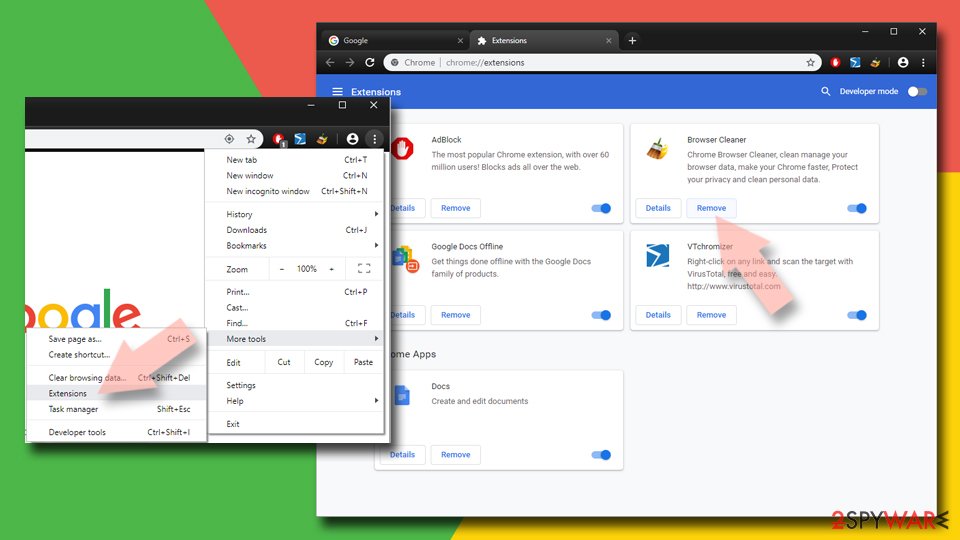
- Open Google Chrome, click on the Menu (three vertical dots at the top-right corner) and select More tools > Extensions.
- In the newly opened window, you will see all the installed extensions. Uninstall all suspicious extensions related to the unwanted program by clicking Remove.
Clear cache and web data from Chrome:
- Click on Menu and pick Settings.
- Under Privacy and security, select Clear browsing data.
- Select Browsing history, Cookies and other site data, as well as Cached images and files.
- Click Clear data.
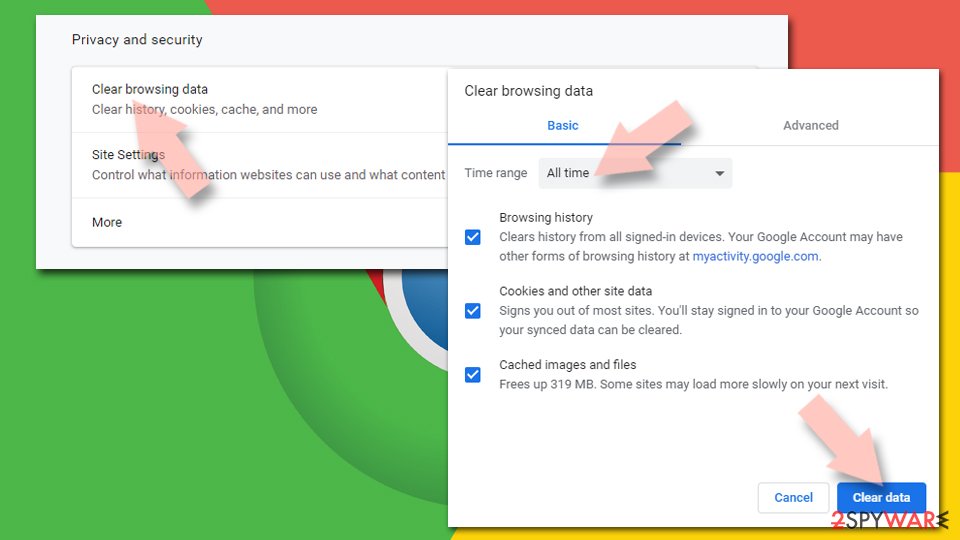
Change your homepage:
- Click menu and choose Settings.
- Look for a suspicious site in the On startup section.
- Click on Open a specific or set of pages and click on three dots to find the Remove option.
Reset Google Chrome:
If the previous methods did not help you, reset Google Chrome to eliminate all the unwanted components:
- Click on Menu and select Settings.
- In the Settings, scroll down and click Advanced.
- Scroll down and locate Reset and clean up section.
- Now click Restore settings to their original defaults.
- Confirm with Reset settings.
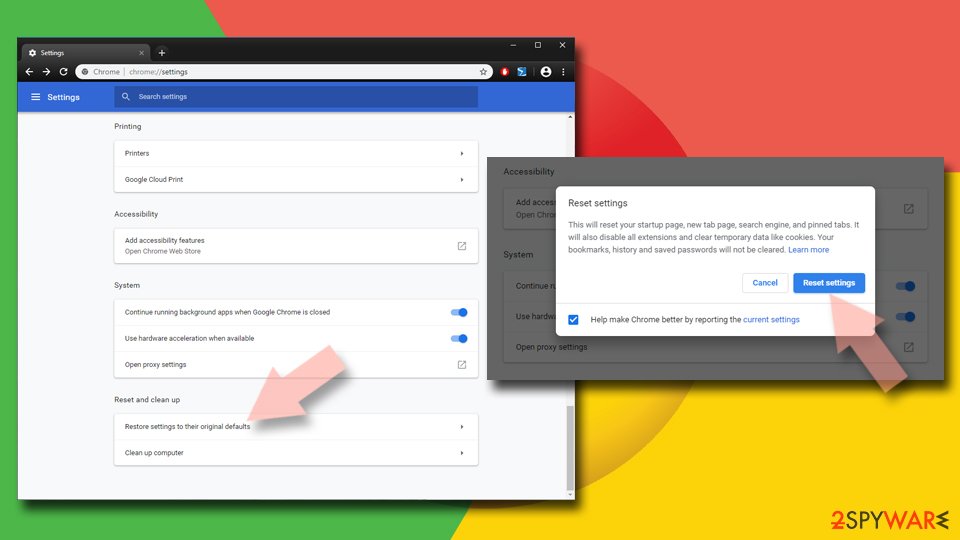
Remove from Microsoft Edge
To make sure all the settings are reset on MS Edge, follow these instructions:
Delete unwanted extensions from MS Edge:
- Select Menu (three horizontal dots at the top-right of the browser window) and pick Extensions.
- From the list, pick the extension and click on the Gear icon.
- Click Remove.
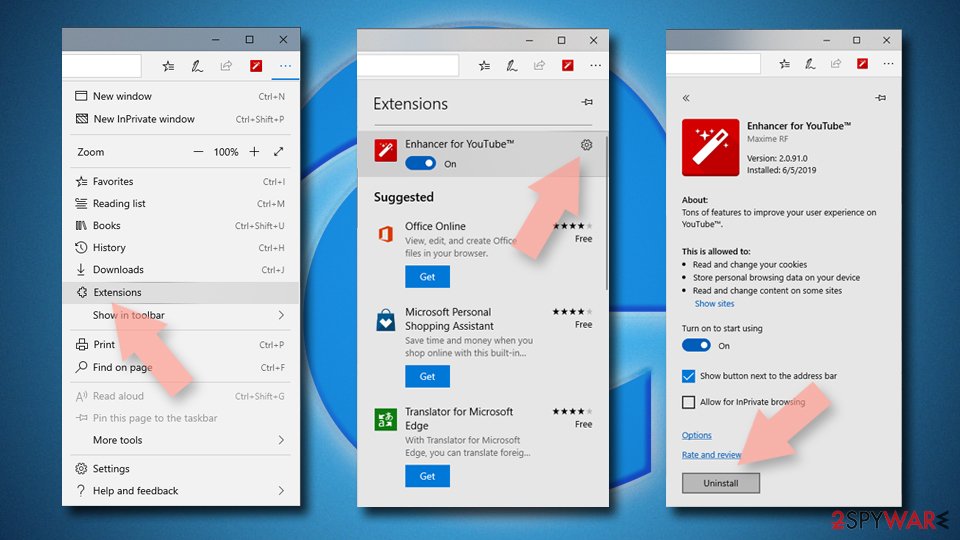
Clear cookies and other browser data:
- Click on the Menu (three horizontal dots at the top-right of the browser window) and select Settings > Privacy, search, and services..
- Under Clear browsing data, pick Choose what to clear.
- Select Cookies and other site data and Cached images and files. (apart from passwords, although you might want to include Media licenses as well, if applicable) and click on Clear.
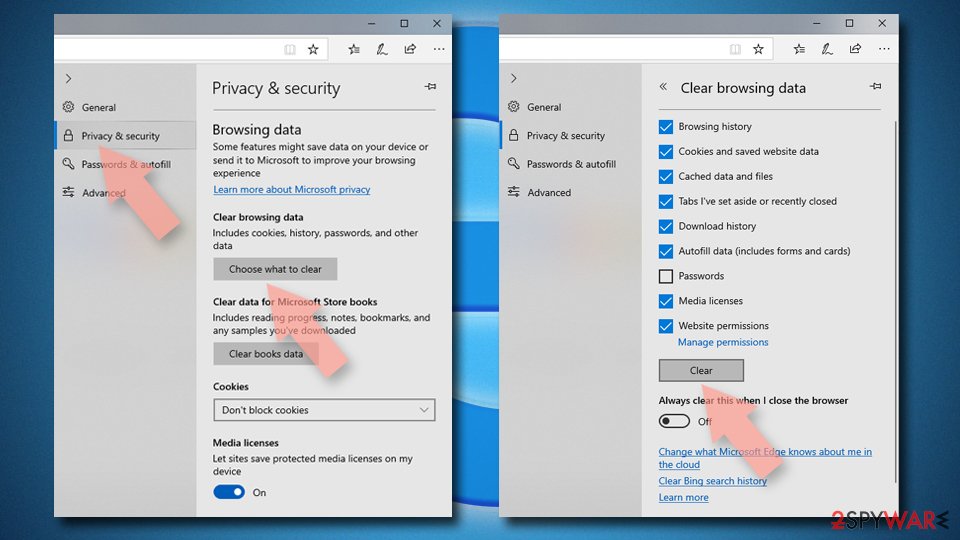
Restore new tab and homepage settings:
- Click the menu icon and choose Settings.
- Then find On startup section.
- Click Remove next to any suspicious startup page.
Reset MS Edge if the above steps did not work:
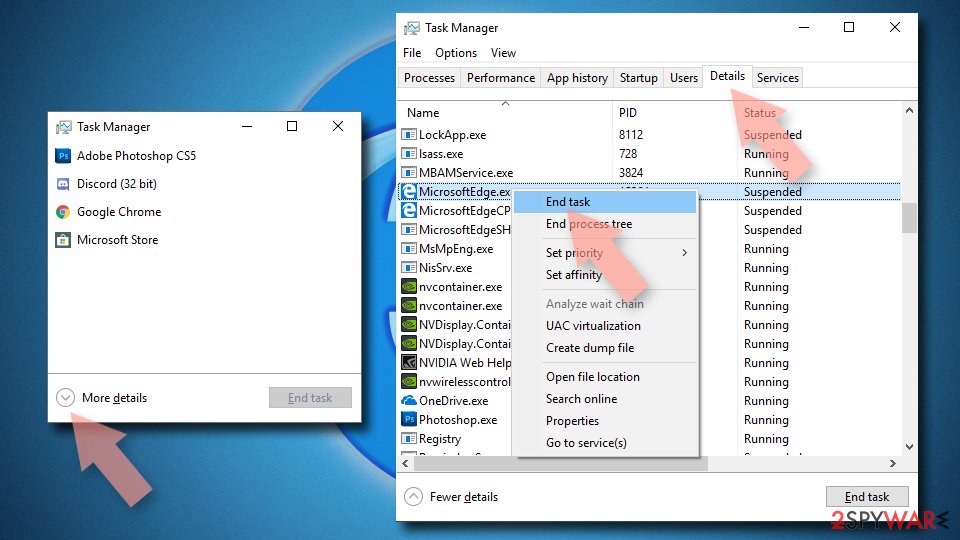
- Press on Ctrl + Shift + Esc to open Task Manager.
- Click on More details arrow at the bottom of the window.
- Select Details tab.
- Now scroll down and locate every entry with Microsoft Edge name in it. Right-click on each of them and select End Task to stop MS Edge from running.
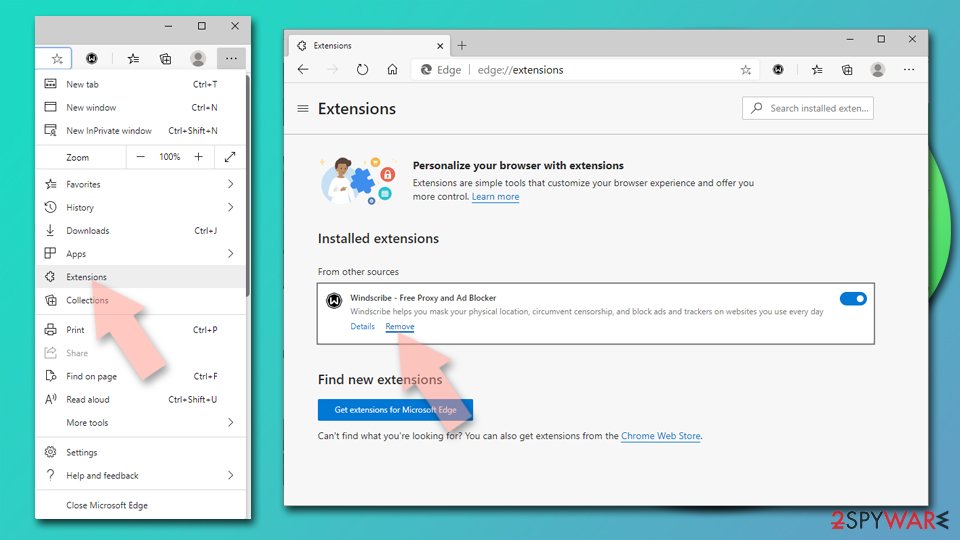
Delete extensions from MS Edge (Chromium):
- Open Edge and click select Settings > Extensions.
- Delete unwanted extensions by clicking Remove.
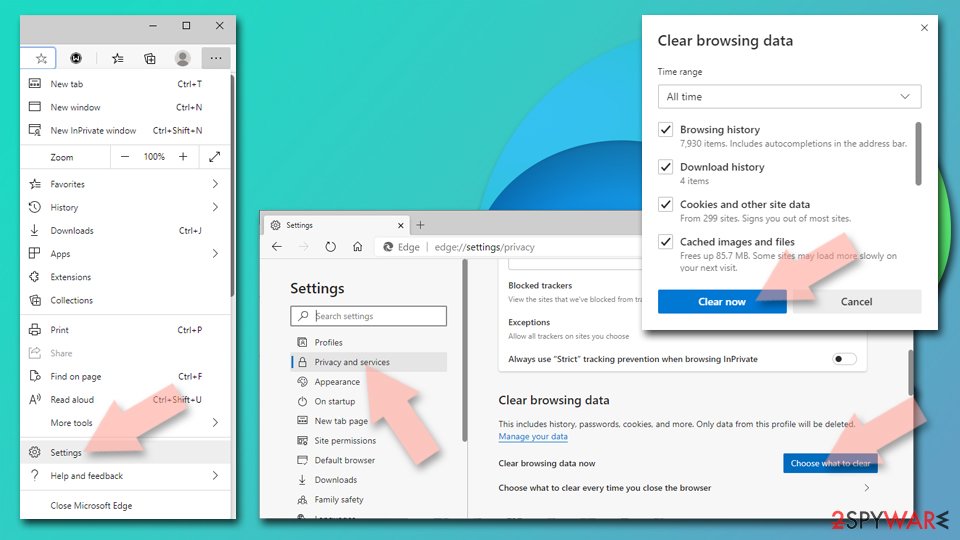
Clear cache and site data:
- Click on Menu and go to Settings.
- Select Privacy, search and services.
- Under Clear browsing data, pick Choose what to clear.
- Under Time range, pick All time.
- Select Clear now.
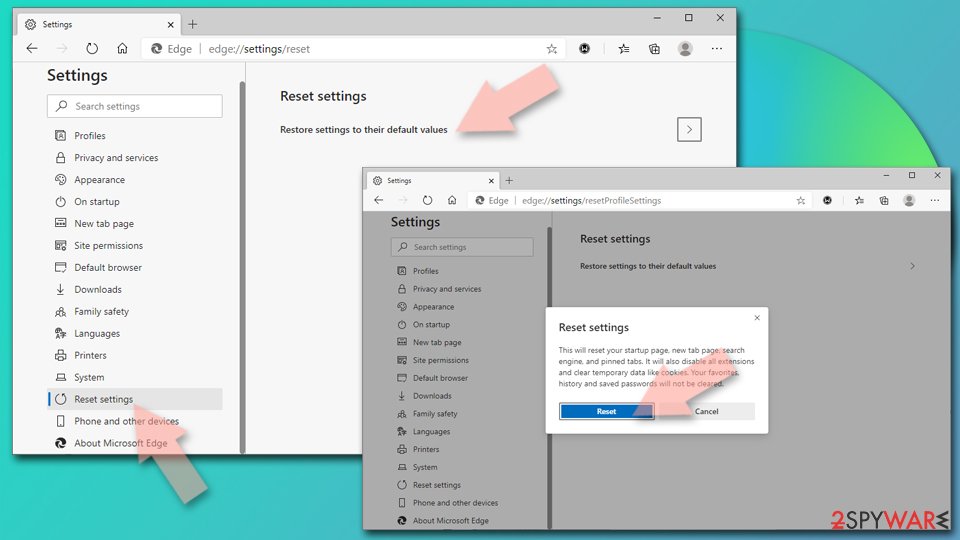
Reset Chromium-based MS Edge:
- Click on Menu and select Settings.
- On the left side, pick Reset settings.
- Select Restore settings to their default values.
- Confirm with Reset.
- This will disable extensions and reset startup pages but will not delete bookmarks, saved passwords, or browsing history.
Remove from Mozilla Firefox (FF)
Remove dangerous extensions:
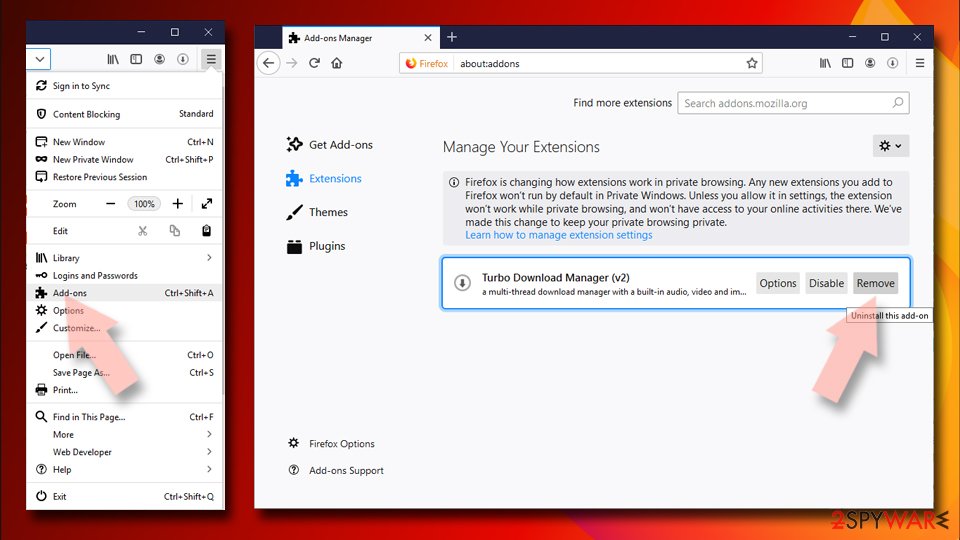
- Open Mozilla Firefox browser and click on the Menu (three horizontal lines at the top-right of the window).
- Select Add-ons.
- In here, select the unwanted extension and click Remove.
Reset the homepage:
- Click three horizontal lines at the top right corner to open the menu.
- Choose Settings.
- Under Home, set your preferred homepage and new tab settings.
Clear cookies and site data:
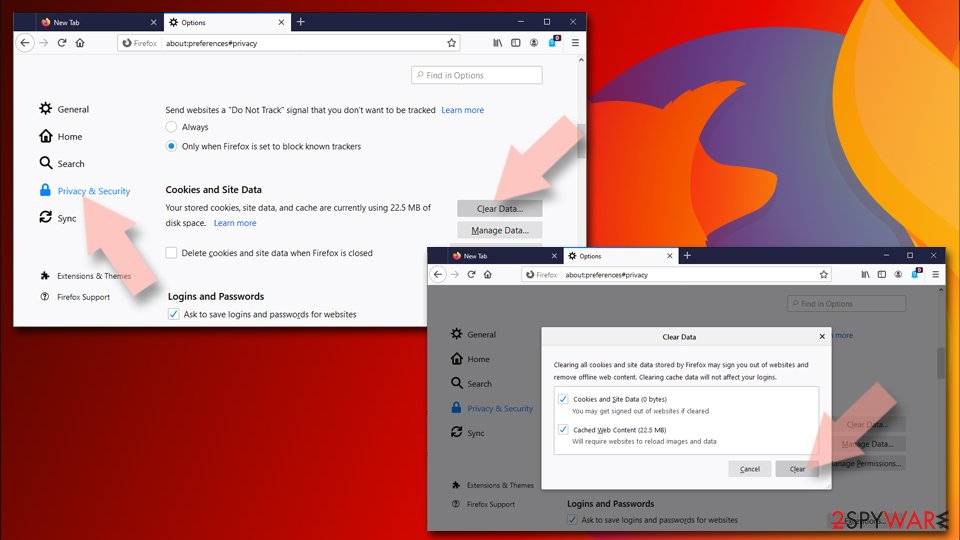
- Click Menu and pick Settings.
- Go to Privacy & Security section.
- Scroll down to locate Cookies and Site Data.
- Click on Clear Data...
- Select Cookies and Site Data and Temporary cached files and pages, then click Clear.
Reset Mozilla Firefox
If clearing the browser as explained above did not help, reset Mozilla Firefox:
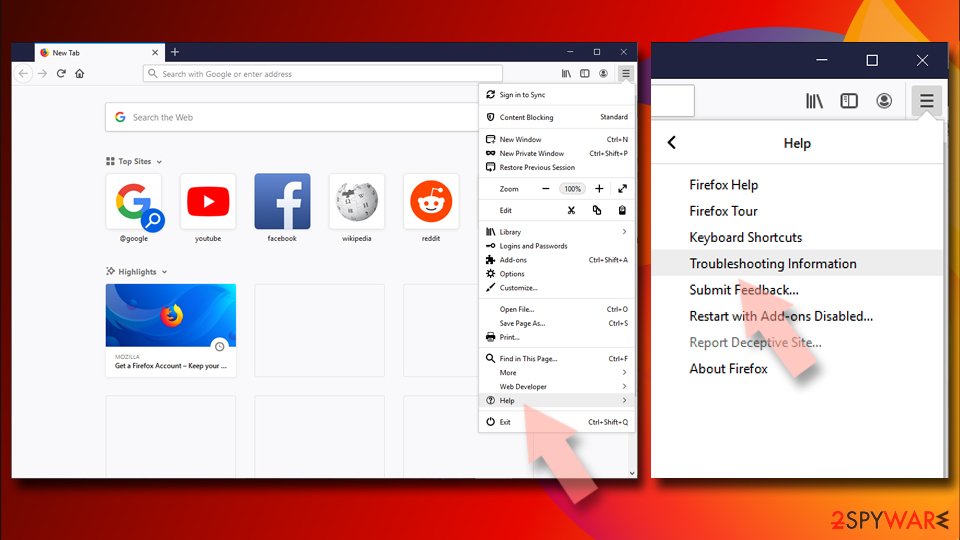
- Open Mozilla Firefox browser and click the Menu.
- Go to Help and then choose Troubleshooting Information.
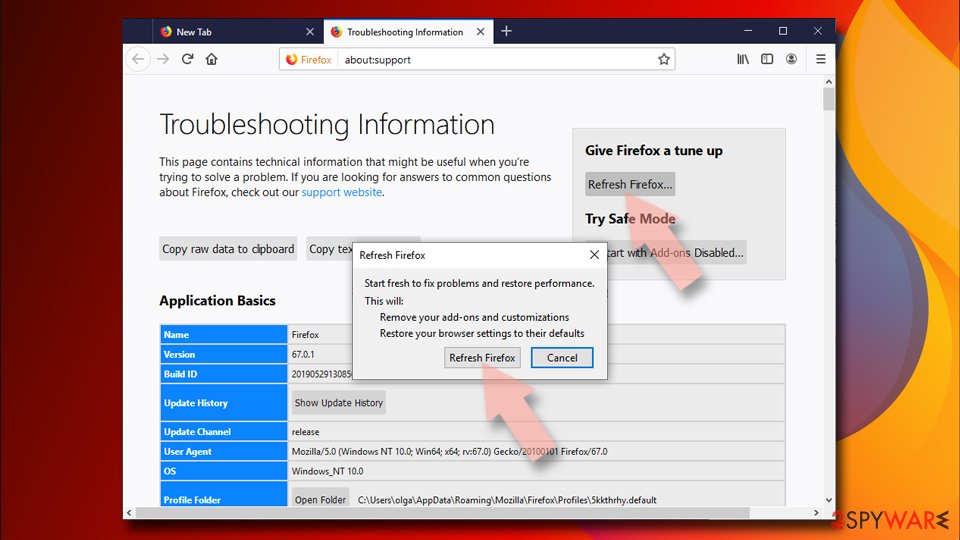
- Under Give Firefox a tune up section, click on Refresh Firefox...
- Once the pop-up shows up, confirm the action by pressing on Refresh Firefox.
Delete from Safari
You need to reset Safari by performing these steps:
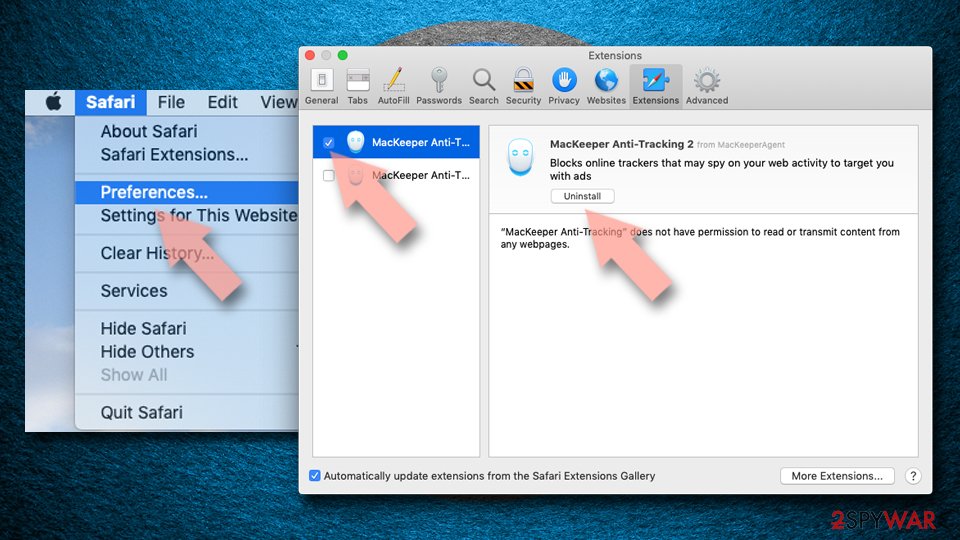
Remove dangerous extensions:
- Open Safari, click Safari in the menu at the top-left of the screen, and select Preferences.
- Go to the Extensions tab, look for any suspicious entries, and click Uninstall to remove them.
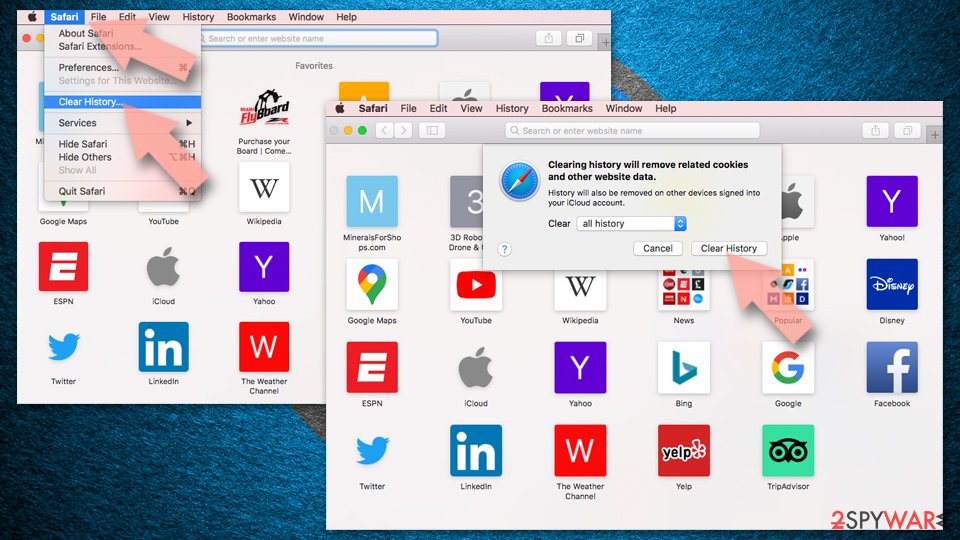
Clear history and website data:
- Click Safari in the menu and pick Clear History.
- Set Clear to all history and confirm with Clear History.
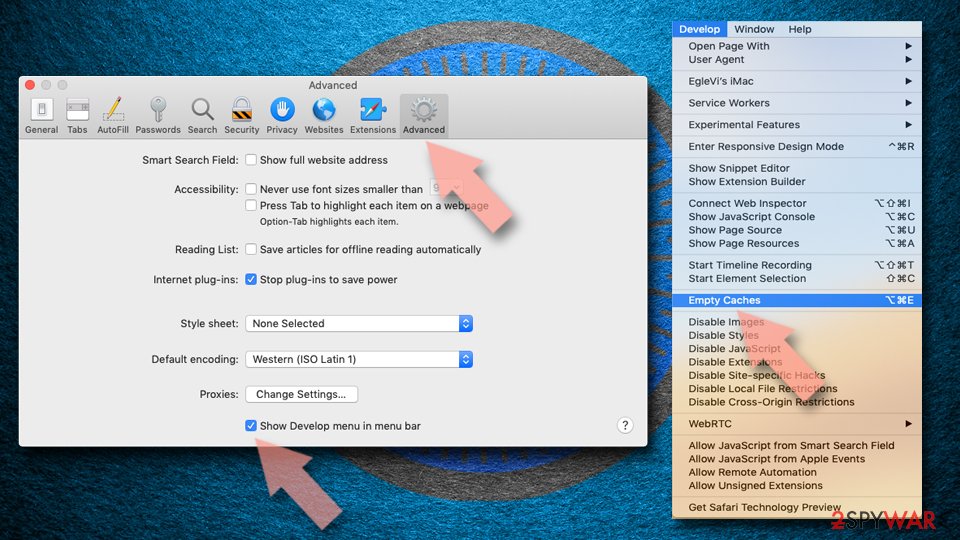
Reset Safari:
- Click Safari in the menu and select Preferences > Advanced.
- Enable Show Develop menu in menu bar.
- From the menu bar, click Develop and select Empty Caches.
Delete from macOS
To remove Shlayer Trojan virus from your Mac, follow these steps:
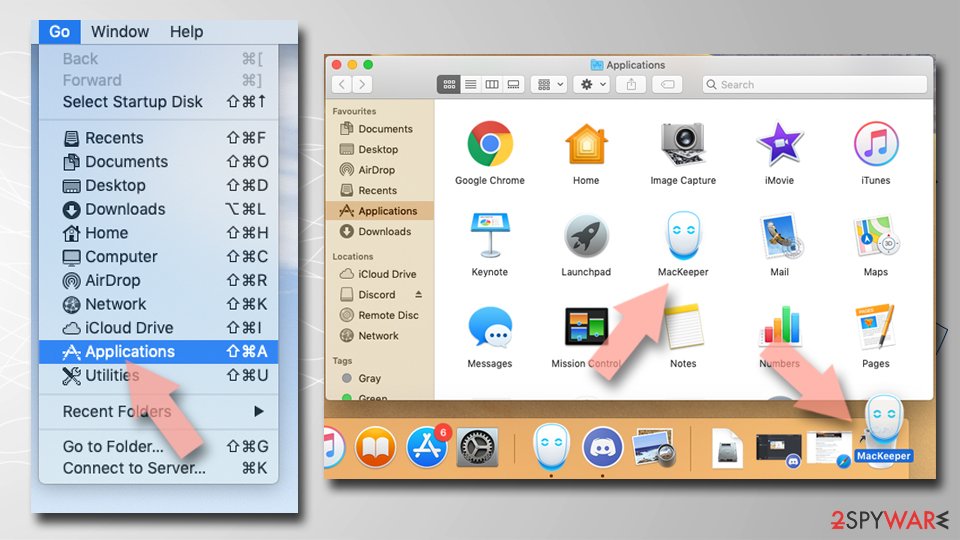
Remove the unwanted application:
- From the menu bar, select Go > Applications.
- In the Applications folder, look for any suspicious entries, then drag them to Trash (or right-click and pick Move to Trash).
Delete leftover files and folders:
- Select Go > Go to Folder.
- Enter /Library/Application Support and remove any suspicious folders related to the unwanted program.
- Repeat the same check in the /Library/LaunchAgents and /Library/LaunchDaemons folders, deleting any suspicious entries.
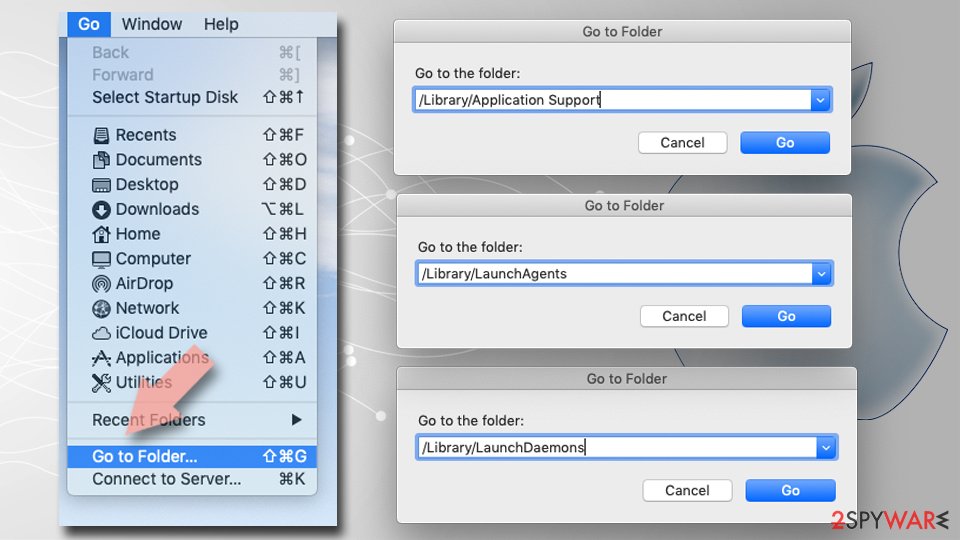
- Finally, empty the Trash to permanently remove the leftovers.
From our report of Feb 2019 · not reviewed since
Remove Shlayer Trojan virus with the help of these instructions
The first thing you have to do is to remove Shlayer Trojan virus and the applications that it installed.
If you are savvy enough, you can proceed simply go Application folder and look for apps mentioned above. However, be aware that OSX/Shlayer is designed to download and install unknown programs automatically.
Once the unwanted applications are removed, you will have to delete the malicious profile that Shlayer Trojan created. Please follow these steps:
- Go to System Preferences;
- Click on Profiles;
- Locate a suspicious profile;
- Remove it by clicking on the "-" button.
After removal: passwords, accounts and prevention
Secure your accounts after the clean-up
Assume that whatever was saved in the browsers on this PC while the PC showed shlayer Trojan virus in the list of installed apps has been copied:
- passwords
- cookies
- autofill data
Work from a clean device, or from this PC once the offline scan finds nothing.
Start with your main e-mail account, because it can reset everything else, then banking and payment, then social and gaming accounts. Change each password, sign out of all sessions and turn on two-step verification: Turn on two-step verification / secure a hacked account.
The full order, including crypto wallets and card replacement, is in securing your accounts after malware.
Stream videos without limitations, no matter where you are
There are multiple parties that could find out almost anything about you by checking your online activity.
While this is highly unlikely, advertisers and tech companies are constantly tracking you online. The first step to privacy should be a secure browser that focuses on tracker reduction to a minimum.
Even if you employ a secure browser, you will not be able to access websites that are restricted due to local government laws or other reasons. In other words, you may not be able to stream Disney+ or US-based Netflix in some countries. To bypass these restrictions, you can employ a powerful VPN, which provides dedicated servers for torrenting and streaming, not slowing you down in the process.
Data backups are important - recover your lost files
Ransomware is one of the biggest threats to personal data.
Once it is executed on a machine, it launches a sophisticated encryption algorithm that locks all your files, although it does not destroy them. The most common misconception is that anti-malware software can return files to their previous states. This is not true, however, and data remains locked after the malicious payload is deleted.
While regular data backups are the only secure method to recover your files after a ransomware attack, tools such as can also be effective and restore at least some of your lost data.
Questions about Shlayer Trojan virus
Can I safely uninstall Shlayer Trojan virus?
If you did not install Shlayer Trojan virus yourself and it is not part of your hardware or a program you rely on, yes. Uninstalling an unwanted program does not harm Windows.
Before you do, search the exact name and publisher to be sure it is not a driver tool, a printer utility or a game launcher with an odd name. Then remove it from Settings, Apps, Installed apps.
Ignore any offers or warnings in its uninstaller about losing protection or performance. Afterwards check Startup apps and your browsers for leftovers, and restart once to confirm that it does not reinstall itself.
How do I stop programs like Shlayer Trojan virus from being installed again?
Most unwanted programs arrive through installers, so the fix is in how you install software. Download programs from their official sites or the Microsoft Store, not from download portals or ads above search results. During setup, choose Custom or Advanced installation and untick every extra offer, including browsers, toolbars and optimizers.
Decline update prompts that appear inside other programs unless you know them. In Windows Security, turn on reputation-based protection and potentially unwanted app blocking. These steps would most likely have stopped Shlayer Trojan virus before it reached the app list.
I found AnyDesk or ScreenConnect that I did not install. Is that Shlayer Trojan virus?
Not necessarily Shlayer Trojan virus, but it is a warning sign. These are legitimate remote support tools, and criminals use them as ready-made backdoors, especially after tech support scams or fake invoice calls.
If you did not install it and no one you trust set it up, uninstall it, change passwords from a clean device and check your bank account. If someone connected to your PC through it, follow the steps for remote access trojans and consider a Windows reset. Installed apps sorted by date shows when it appeared.
How do I know if my PC has Shlayer Trojan virus?
Often you do not, which is the point of a trojan. Possible signs are an antivirus alert naming Shlayer Trojan virus or a generic trojan detection, unknown programs or scheduled tasks, processes with random names in Task Manager, browser extensions you did not add, security settings turned off, slower performance, or account alerts about logins from unknown places.
The reliable check is a full scan followed by Microsoft Defender's offline scan. If you recently ran a crack, a fake installer or a command a website told you to paste, scan even without symptoms.
Should I check my other computers too?
Yes, it takes little time and removes doubt. Shlayer Trojan virus itself usually stays on one PC, but the download that carried it may have been copied to other computers, shared drives may hold the same installer, and an attacker who had access could have tried saved passwords on other devices.
Run a full scan on every Windows PC in the home or office, check shared folders for the original download, and change Wi-Fi and router passwords if they were stored on the infected machine.
Should I report Shlayer Trojan virus?
Report it if you lost money, if accounts were taken over, if you are a business, or if the trojan came through a scam call. A police or national cybercrime report gives you a reference number for your bank and insurer and helps link cases.
You do not need to report a trojan that antivirus blocked before it ran. Before reporting, write down the dates, the detection name, file names and any messages or transactions linked to the attack; screenshots of antivirus alerts are useful evidence. The country list is in the report section above.
Which malware family is Shlayer Trojan virus?
That is not known yet. Shlayer Trojan virus has been reported by people who saw shlayer Trojan virus in the list of installed apps, but no sample has been analysed publicly, so security companies have not assigned it to a family. The name you see may be a file or program name chosen by the authors, not a family name.
This does not stop you from removing it: the startup points, the offline scan and the account steps are the same for most families of this type. If Microsoft Defender or another scanner gives the file a detection name, write it down; that name is the best clue to the family and is useful when you report the incident.
Do I need to reinstall Windows to get rid of Shlayer Trojan virus?
Usually not. A thorough clean-up is enough when the offline scan finds nothing afterwards and you do not see shlayer Trojan virus in the list of installed apps again. A reset is the safer choice if an attacker had remote control, if security tools were switched off, or if detections come back after every clean-up.
Windows 11 can reset itself without a USB stick under Settings > System > Recovery > Reset this PC. Copy documents and photos out first and scan the copies. A reset does not change passwords or undo stolen data, so the account steps still apply.
How dangerous is Shlayer Trojan virus?
Treat it as serious until proven otherwise. The visible sign is shlayer Trojan virus in the list of installed apps, and programs that behave this way often have more abilities than they show:
- copying passwords
- downloading other malware
- giving remote access
Its family is not known yet, so nobody can say which of these it uses. The good news is that the response is the same in every case and takes about an hour:
- cut the network
- remove the startup entry
- run an offline scan
- change passwords from a clean device
If someone had remote control, a full reset is safer.
Will Fortect remove Shlayer Trojan virus?
Fortect scans Windows for malware and unwanted programs and repairs the system files and settings they change, and its free scan shows what it finds on your PC before you decide anything.
For Shlayer Trojan virus, follow the plan above as well: the browser steps take back permissions and settings that no scanner treats as a threat, and uninstalling the program that brought it removes the source.
Run Microsoft Defender's full scan and, if anything was found, its offline scan as a second opinion. If the symptoms are gone after the plan and both scans are clean, there is nothing more to do.
Sources
- Carbonblack: New MacOS malware variant of Shlayer discovered (read October 7, 2026)
- Intego: New OSX/Shlayer Malware Variant Found Using a Dirty New Trick (read October 7, 2026)
- Kit Guru: Adobe Flash will be shut down in 2020 (read October 7, 2026)
- Adobe: Adobe Security Bulletins and Advisories (read October 7, 2026)
- FTC: How to recognize, remove and avoid malware (read October 7, 2026)