

Agpo ransomware is a malicious Windows program that might prevent access to all your files
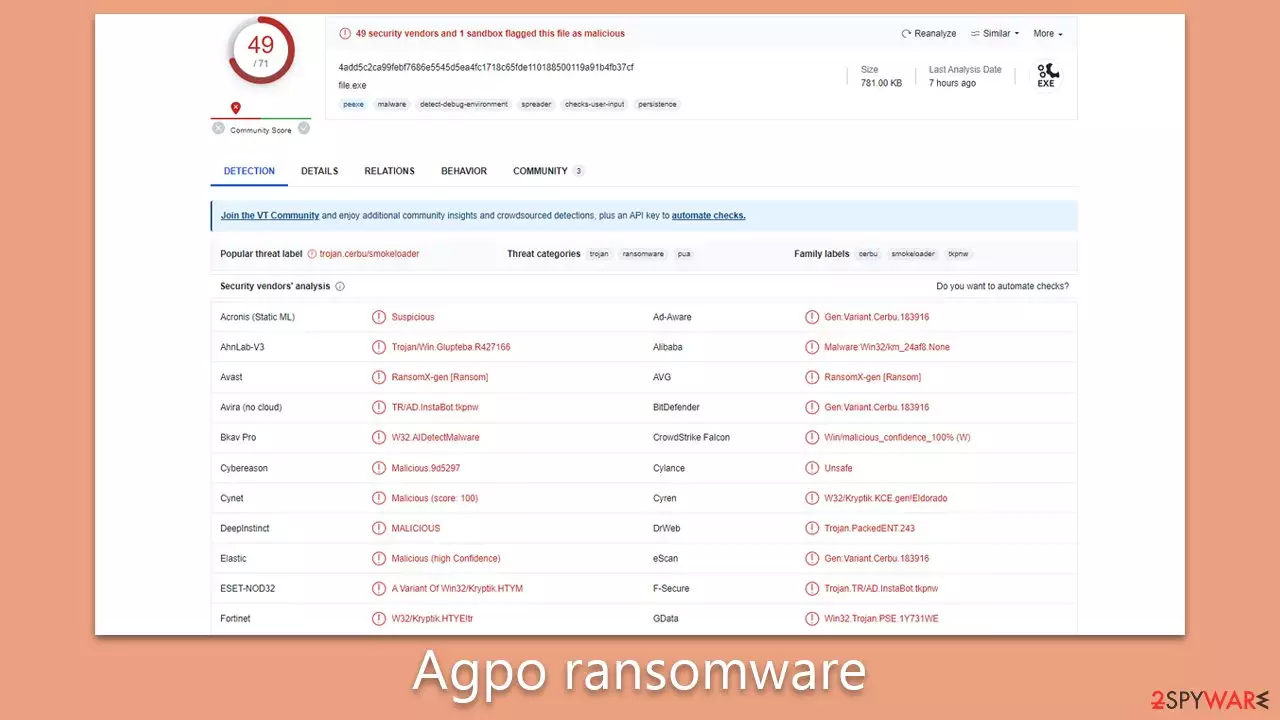
Agpo is a variant of the notorious Djvu ransomware family, infamous for its destructive capabilities. Similar to other versions of this strain, it infiltrates computer systems surreptitiously (usually through pirated software installers and software cracks), encrypting valuable files and demanding a ransom in exchange for their release.
Upon successful infiltration, Agpo ransomware embarks on an aggressive file encryption process, typically targeting documents, images, videos, and other critical data. This process employs a complex encryption algorithm RSA, rendering files inaccessible without a unique decryption key. Once the encryption is complete, all files are appended with “.agpo” extensions and a ransom note _readme.txt appears, demanding payment of $980/$490 in exchange for the decryption key.
Immediate action is necessary once the Agpo virus is detected. Users are advised to disconnect their system from the network and perform a thorough system scan using advanced security programs. Regular backups and strong security measures are the best defense against such ransomware attacks.
| Name | Agpo virus |
|---|---|
| Type | Ransomware, file-locking malware |
| File extension | Malware appends .agpo extension to all affected files |
| Family | Djvu |
| Ransom note | _readme.txt dropped at every location where encrypted files are located |
| Contact | datarestorehelp@airmail.cc and support@freshmail.top |
| File Recovery | There is no guaranteed way to recover locked files without backups. Other options include paying cybercriminals (not recommended, might also lose the paid money), using Emisoft's decryptor (works for a limited number of victims), or using third-party recovery software |
| Malware removal | As soon as the PC is removed from the network and the internet, perform a thorough system scan utilizing the SpyHunterCombo Cleaner security program |
| System fix | Once installed, malware poses a significant risk to system files, potentially leading to serious instability issues such as crashes and errors. Any resulting damage can be effectively remedied through the automatic repair features of FortectIntego PC repair |
Ransom note detailed analysis
The ransom note delivered by Agpo ransomware takes on an assertive tone, attempting to assure victims of their ability to recover their files, albeit at a significant cost. The ransom message reads as follows:
ATTENTION!
Don't worry, you can return all your files!
All your files like pictures, databases, documents and other important are encrypted with strongest encryption and unique key.
The only method of recovering files is to purchase decrypt tool and unique key for you.
This software will decrypt all your encrypted files.
What guarantees you have?
You can send one of your encrypted file from your PC and we decrypt it for free.
But we can decrypt only 1 file for free. File must not contain valuable information.
You can get and look video overview decrypt tool:
https://we.tl/t-3OsGArf4HD
Price of private key and decrypt software is $980.
Discount 50% available if you contact us first 72 hours, that's price for you is $490.
Please note that you'll never restore your data without payment.
Check your e-mail “Spam” or “Junk” folder if you don't get answer more than 6 hours.To get this software you need write on our e-mail:
support@freshmail.topReserve e-mail address to contact us:
datarestorehelp@airmail.ccYour personal ID:
This note aims to manipulate victims into a state of fear and urgency, pushing them to pay the ransom. It emphasizes that files have been encrypted with the “strongest encryption and unique key,” implying the supposed impossibility of retrieval without the said key. The aggressors offer a 'guarantee' of sorts by providing the option to decrypt one file for free as a show of their control over the situation.
A video link is provided, presumably showcasing the decryption tool in action, which serves to further assert their capability to restore the encrypted files. The ransom sum is stated to be $980, but a 50% discount is offered if contact is made within the first 72 hours, applying pressure on the victim to act hastily.
The note concludes with instructions on how to make contact and warns victims to check their email's Spam or Junk folder if they do not receive a response within six hours, suggesting an attempt to maintain communication and coerce payment. The inclusion of a 'reserve' email address indicates the perpetrators' anticipation of potential disruptions in their primary contact email. This level of calculated manipulation and high-pressure tactics underscores the severity and sophistication of the Agpo ransomware threat.

Dealing with the aftermath: malware removal
In the event of a ransomware infection, the initial reaction could be one of shock and fear, particularly as the malware often targets all user-related files. Such files, ranging from photos to documents, often hold precious information or irreplaceable memories. It is this emotional significance that the cybercriminals behind the ransomware exploit to their advantage. Nevertheless, we advise against succumbing to the demands of the Agpo ransomware operators and instead encourage the use of the alternative strategies detailed below.
The immediate priority should be the elimination of the ransomware from your system. While certain ransomware variants may auto-terminate post-encryption, there could be other malicious modules or additional payloads left behind. These components could continue to compromise your data, hence the importance of conducting a comprehensive system scan. Reliable anti-malware software, such as SpyHunterCombo Cleaner or MalwarebytesMalwarebytes, should be employed to ensure the complete removal of the ransomware and any residual malicious elements.
It's worth noting that some malware variants might obstruct the removal process by interfering with the security software. If such a situation arises, you can utilize Safe Mode and perform the system scan from there. The process for accessing Safe Mode will be elaborated at the end of this guide.
Additionally, to mitigate the risk of system crashes, errors, and other malware-induced complications, inspecting your system for potential damage is crucial. The most straightforward method is by scanning the system using a PC repair tool, such as FortectIntego. This approach is preferred over reinstallation of the Windows system, which can be a complex and lengthy process for some users.
Data recovery explained
A common misconception is that anti-malware software can also recover personal files affected by ransomware. However, this isn't the case. The primary function of anti-malware software is to guard against digital threats and identify malicious programs – it doesn't possess the capability to decrypt data encrypted by ransomware. That involves a completely different process. Regardless, maintaining an effective security software solution is indispensable for safeguarding your online presence.
Following the installation of ransomware, files are encrypted, and a unique ID, along with a distinct encryption key, is generated. The attackers receive this information, allowing them to access victims' data in combination with a decryption tool. However, this decryption key isn't given without a demanded payment, which is how these cybercriminals generate their income.
Instead of submitting to the ransom payment, we suggest you consider the alternative solutions provided below. Before you start, it's advisable to create a backup of the encrypted data, as there's a risk of further data corruption during the recovery process.
Once you've managed your files, consider running a scan using the FortectIntego PC repair software. This can help repair any system files damaged during the ransomware attack, helping prevent post-infection issues such as crashes and errors.
Remember also to recreate the “hosts” file. Certain ransomware variants, like the Assm virus, may interfere with your ability to visit specific websites. Lastly, arm yourself with knowledge about creating effective backups for future use. The most robust defense against ransomware is having readily available backups should an infection occur. Ensure to keep reputable anti-malware software active in the background, and always heed any warnings it provides.
Did this guide help?
Be the first to comment