

SoundCloud virus is spread using compromised user accounts and posting malicious links

This malware, known as the “SoundCloud virus,” has spread malicious programs by exploiting compromised user accounts. The compromised accounts are being used to promote links to malicious websites that host dangerous software. Hundreds of compromised SoundCloud accounts, all of which appear legitimate, have been discovered.
These accounts were most likely obtained by cybercriminals through credential-stealing malware or phishing[1] scams. An automated voice prompts listeners to click on a link provided in the description within the music tracks associated with these accounts. These shortened URLs direct unwary users to malicious download pages, triggering a chain of infections.
| NAME | SoundCloud virus |
| TYPE | Trojan, password-stealing virus, banking malware, spyware |
| SYMPTOMS | Trojans are designed to infiltrate the victim's computer quietly and remain silent, so no specific symptoms are visible on an infected machine. |
| DISTRIBUTION | Malicious links in track descriptions uploaded to compromised SoundCloud accounts, as well as social engineering. |
| DANGERS | Stolen passwords and banking information, identity theft, and the victim's computer being added to a botnet. |
| ELIMINATION | Use anti-malware solutions to scan your system and remove the threat effectively |
| FURTHER STEPS | Fix operating system damage and optimize the device with FortectIntego |
PrivateLoader – the malicious payload
When Windows users click the link, they are directed to download a password-protected archive containing the dangerous malware PrivateLoader. PrivateLoader is a type of malware known as a loader/backdoor[2] that is designed to facilitate further infections by downloading and installing additional malicious programs or components. Amadey, Fabookie, G-Cleaner, RedLine, SmokeLoader, and Vidar are examples of malware associated with PrivateLoader that act as data stealers and backdoors, jeopardizing system security.

MobiDash targets Android devices
While PrivateLoader primarily affects Windows users, the SoundCloud virus campaign also affects Android devices. MobiDash adware is currently the most serious threat to Android users. Adware is intended to generate revenue for its developers by displaying intrusive advertisements. It displays advertisements on websites and interfaces, potentially redirecting users to deceptive or dangerous websites. Advanced adware can collect sensitive information, subscribe users to premium-rate services, and perform other malicious activities in some cases.
Protecting against the SoundCloud virus
Falling victim to the SoundCloud virus or other high-risk malware can have serious consequences. These malware strains have the ability to infect multiple systems, degrade system performance, cause data loss, compromise privacy, cause significant financial losses, and even lead to identity theft.
It is critical to act quickly if you suspect an infection in order to limit the potential damage. Malware infection prevention necessitates a multi-layered approach. Here are some important safety tips:
- System scans and removal: If you suspect your device is infected, perform a complete system scan using reliable antivirus software such as SpyHunterCombo Cleaner or MalwarebytesMalwarebytes and remove all detected threats promptly.
- Be cautious of deceptive content: The internet is filled with deceptive and harmful material. Cybercriminals often abuse the names, graphics, and designs of legitimate products and services for malicious purposes. Exercise caution while engaging with suspicious or unfamiliar content, regardless of the platform or application.
- Recognize phishing and social engineering tactics: Malware associated with the SoundCloud virus is often distributed through phishing and social engineering tactics.[3] Remain vigilant when opening emails, messages, and attachments from unknown sources, and refrain from clicking on suspicious links.
- Download from official sources: Obtain software and content exclusively from official and verified sources to minimize the risk of malware infection. Avoid downloading from third-party websites or using illegal software activation tools.
- Keep software updated: Regularly update all installed software using legitimate functions and tools. Outdated software may contain vulnerabilities that cybercriminals can exploit.
Removal of the SoundCloud virus
It can be difficult to remove trojans and other types of malware. When an infection of this type enters a computer, it makes extensive changes to system files and settings in order to establish persistence, making it extremely difficult to detect. It is usually best to let antivirus or anti-malware software do this for you.
In some cases, however, malware may disable your anti-malware tools and disguise its processes as legitimate Windows tasks. If malware prevents you from using antivirus in normal mode, boot into Safe Mode and run a full system scan from there.
Windows 7 / Vista / XP
- Click Start > Shutdown > Restart > OK.
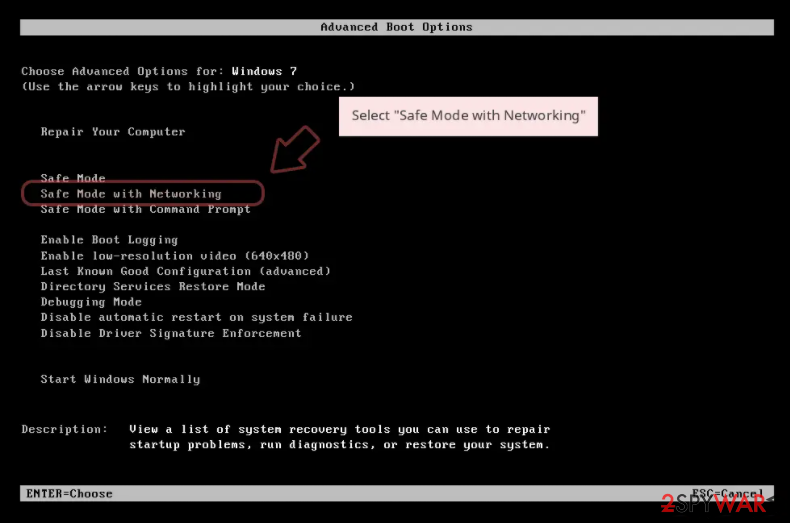
- When your computer becomes active, start pressing F8 button (if that does not work, try F2, F12, Del, etc. – it all depends on your motherboard model) multiple times until you see the Advanced Boot Options window.
- Select Safe Mode with Networking from the list.

Windows 10 / Windows 8
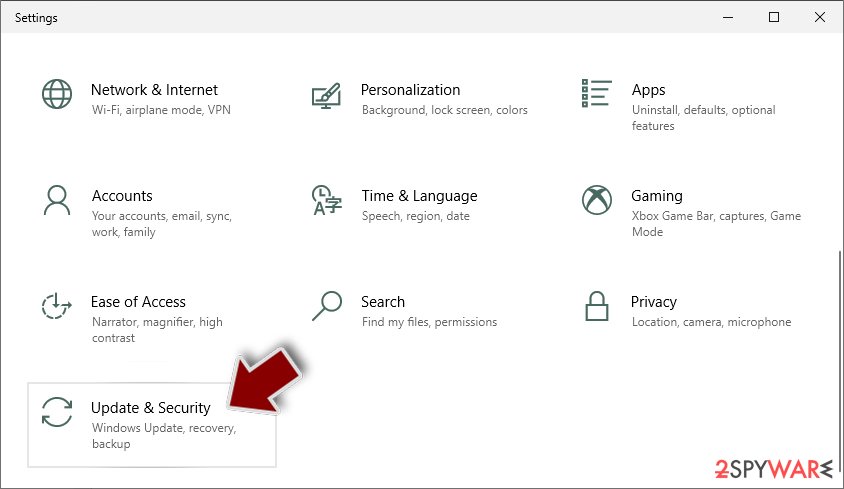
- Right-click on Start button and select Settings.
- Scroll down to pick Update & Security.
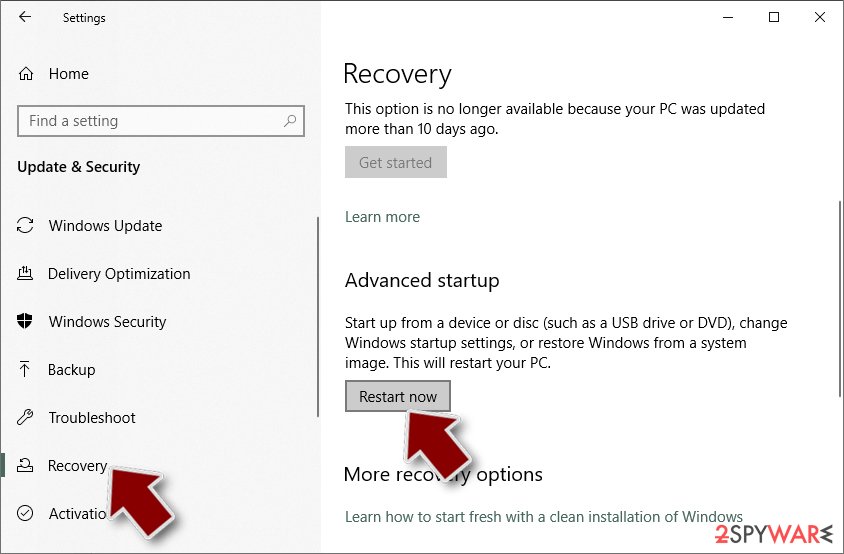
- On the left side of the window, pick Recovery.
- Now scroll down to find Advanced Startup section.
- Click Restart now.
- Select Troubleshoot.
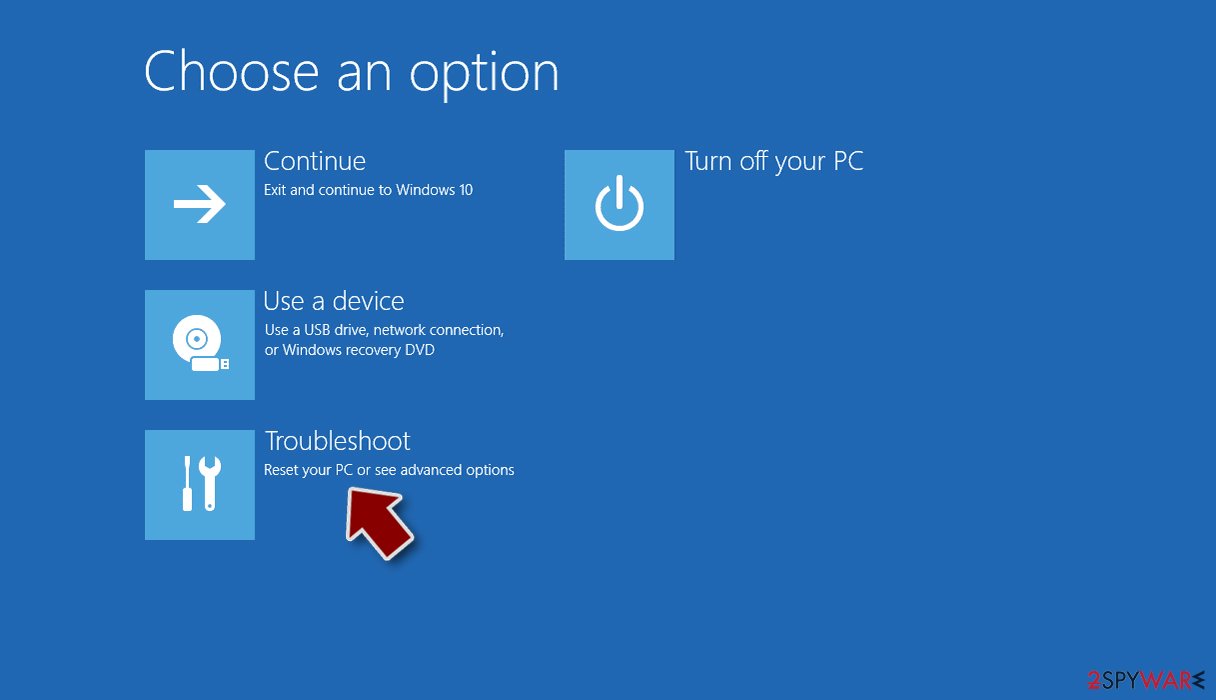
- Go to Advanced options.
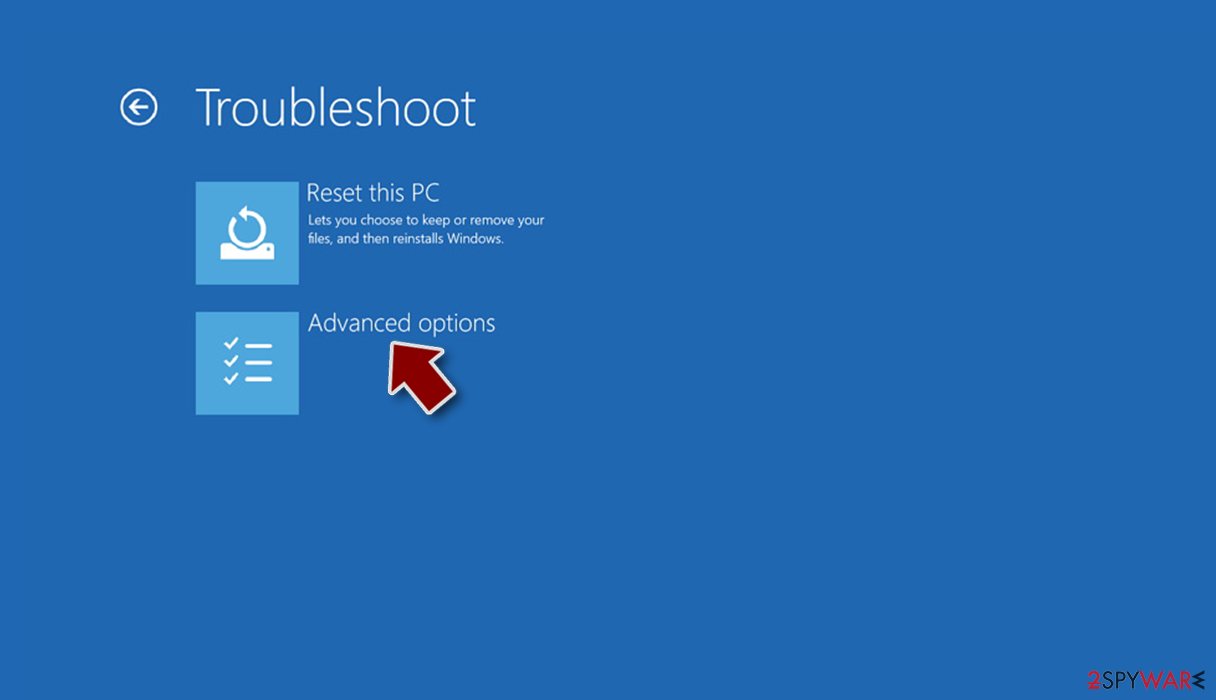
- Select Startup Settings.
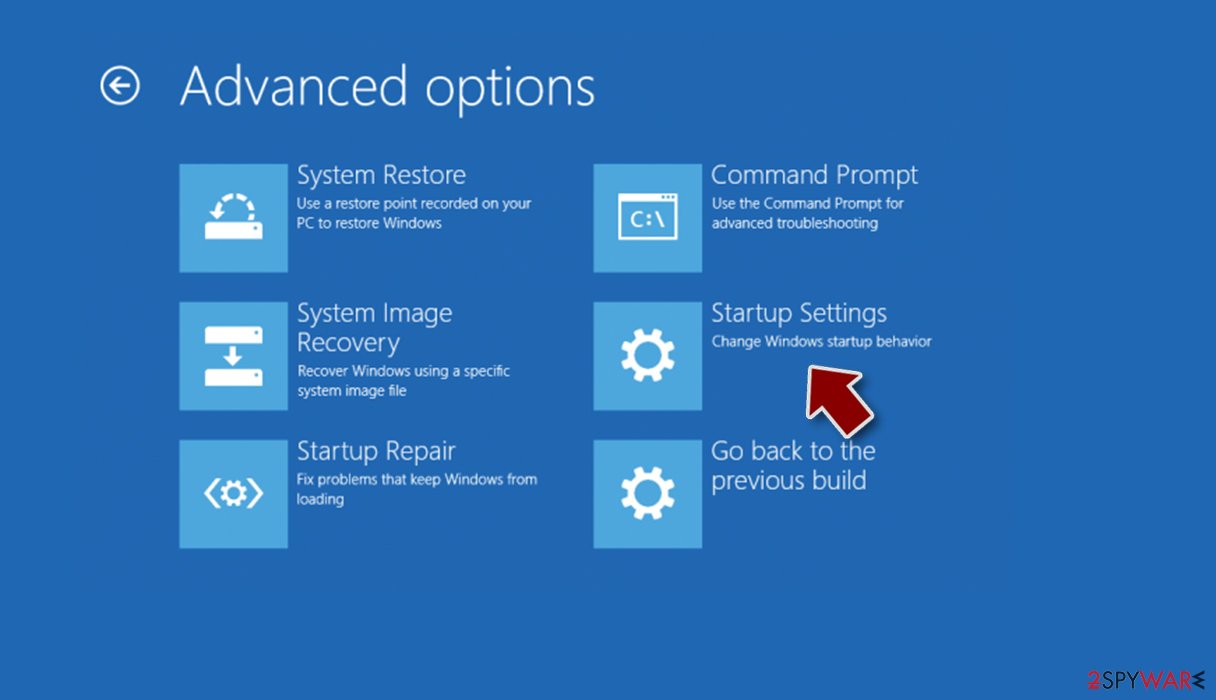
- Click Restart.
- Press 5 or click 5) Enable Safe Mode with Networking.
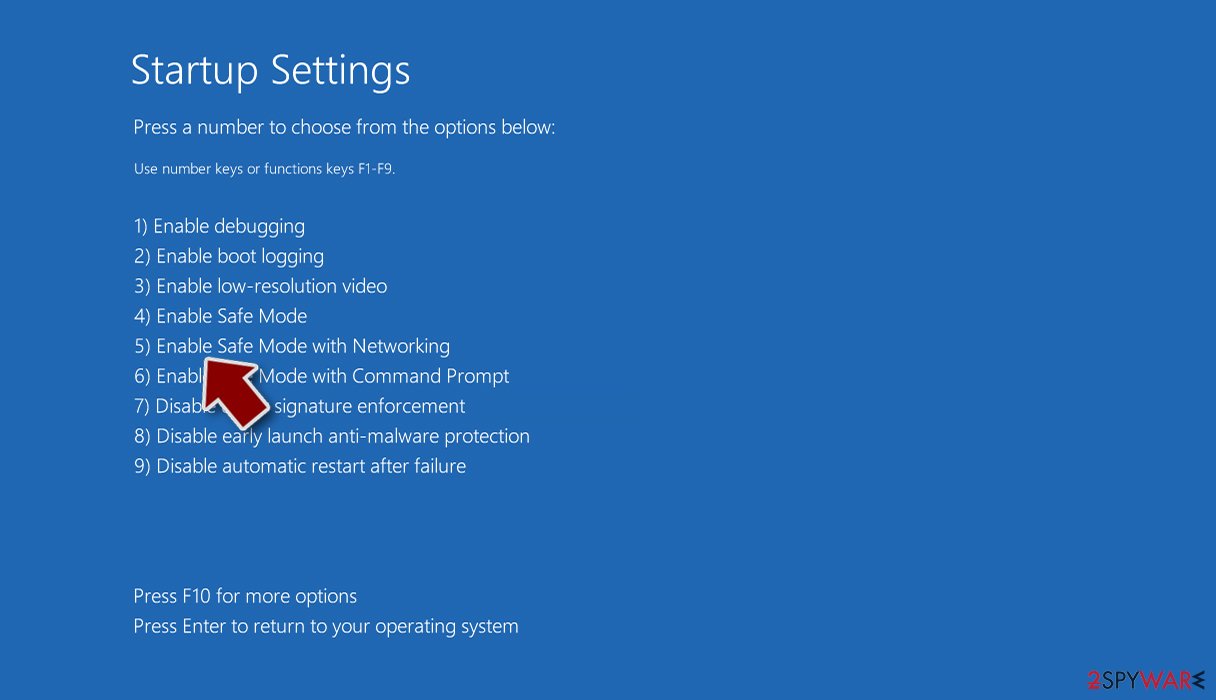


Once your device is in Safe Mode, you must run a reliable antivirus program to effectively remove malware. We strongly advise you to use professional security tools such as SpyHunterCombo Cleaner or MalwarebytesMalwarebytes. To ensure complete removal of malware and its associated malicious components, update your chosen security program with the most recent definitions and run a full system scan.
The antivirus software will detect any malicious files on your device during the scan, isolate them, and give you the option to remove them. Every person who spends even a few minutes online must have reliable anti-malware software installed. Cybercriminals are constantly coming up with new and inventive ways to spread their dangerous creations, making anti-malware tools your first line of defense.
Fix the damaged operating system
When a computer is infected with malware, it changes its operating system. An infection, for example, can corrupt or delete the Windows registry database, harm vital bootup and other sections, and so on. When malware corrupts a system file, antivirus software is powerless to repair it, leaving it in its current state. As a result, users may experience problems with performance, stability, and usability, necessitating a full Windows reinstallation.
As a result, we strongly recommend that you use a unique, patented FortectIntego repair technology. Thanks to the program's various engines, it can repair virus damage after infection. Furthermore, the application can repair a variety of Windows-related issues, such as Blue Screen errors, freezes, registry errors, damaged DLLs, and so on.
You won't have to worry about future computer problems, because most of them can be resolved quickly by running a full system scan at any time. Most importantly, you can avoid the time-consuming process of reinstalling Windows if something goes horribly wrong.
Did this guide help?
Be the first to comment