

Pzcqyq ransomware is a dangerous virus that uses encryption to lock users' personal files
Because of the possible rewards, ransomware attacks have grown in popularity among malicious actors in recent years. Criminals like these use encryption technology to make personal data, such as images, videos, and documents, unavailable and unreadable. This form of virus is very dangerous for individuals who do not have sufficient data backups and for major companies. Criminals exploit this vulnerability by blackmailing individuals and threatening to reveal the hacked information unless large ransom payments are made.
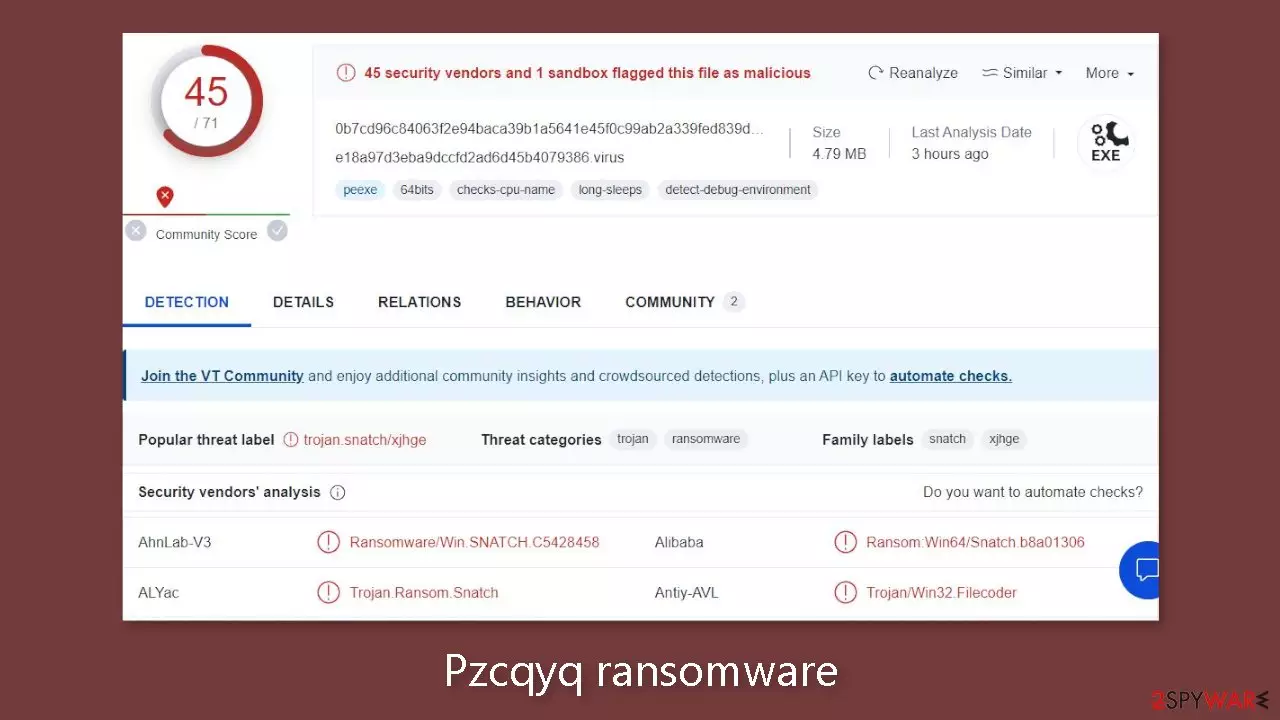
Cybersecurity specialists have discovered a new strain of ransomware known as Pzcqyq ransomware.[1] It is linked to the Snatch ransomware family, which is known for targeting high-profile targets. When this virus infects a victim's device, it immediately begins a complex encryption procedure that employs advanced algorithms. The malware adds the extension .pzcqyq to the files it infects. After encryption, a file named “picture.jpg” would be turned into “picture.jpg.pzcqyq.”
Furthermore, the icons associated with these encrypted files are changed to show blank pages, hiding their contents even while in preview mode. Any attempt to open these affected files results in a warning that Windows is unable to access them. Soon later, a ransom note named “HOW TO RESTORE YOUR PZCQYQ FILES.TXT” appears on the user's PC, indicating that the attackers have communicated with them. This note describes the problem, explains the encryption, and instructs the victim on how to continue to recover their files.
| NAME | Pzcqyq |
| TYPE | Ransomware, cryptovirus, data locking malware |
| MALWARE FAMILY | Snatch ransomware |
| FILE EXTENSION | .pzcqyq |
| RANSOM NOTE | HOW TO RESTORE YOUR PZCQYQ FILES.TXT |
| DISTRIBUTION | Infected email attachments, peer-to-peer file-sharing platforms, torrents, malicious ads |
| FILE RECOVERY | It is next to impossible to recover the files if you do not have backups or the decryption keys were not leaked; in some cases, recovery is successful with third-party software |
| ELIMINATION | Scan your machine with anti-malware software to eliminate the virus safely; this will not recover the locked files |
| SYSTEM FIX | You can avoid Windows reinstallation with FortectIntego maintenance tool, which can fix damaged files and system errors |
The ransom note
Pzcqyq ransomware drops a HOW TO RESTORE YOUR PZCQYQ FILES.TXT ransom note, which reads as follows:
THE ENTIRE NETWORK IS ENCRYPTED YOUR BUSINESS IS LOSING MONEY!
Dear Management! We inform you that your network has undergone a penetration test, during which we encrypted
your files and downloaded more than 100GB of your dataPersonal data
Marketing data
Confidential documents
Accounting
Copy of some mailboxesImportant! Do not try to decrypt the files yourself or using third-party utilities.
The only program that can decrypt them is our decryptor, which you can request from the contacts below.
Any other program will only damage files in such a way that it will be impossible to restore them.
Write to us directly, without resorting to intermediaries, they will deceive you.You can get all the necessary evidence, discuss with us possible solutions to this problem and request a decryptor
by using the contacts below.
Free decryption as a guarantee. Send us up 3 files for free decryption.
The total file size should be no more than 1 MB! (not in the archive).Please be advised that if we don't receive a response from you within 3 days, we reserve the right to publish files to the public.
Contact us:
goodwork2020@mailfence.com or 2020host2021@tutanota.com
The note provides explicit instructions for victims, asking them not to attempt to decode the files themselves or use any third-party tools, as doing so could permanently harm the encrypted files. The attackers, on the other hand, argue that their decryptor is the sole reliable solution. They underline that attempting to handle the matter through intermediaries or without their direct involvement will result in fraud.
As a guarantee of their decryption capabilities, the attackers offer to decode up to three files of the victim's choosing. However, this is a common approach used to gain trust and persuade victims to agree with their requests.
The note gives the victim 3 days to respond and comply with the assailants' demands. If the victim does not answer within this deadline, the attackers threaten to publicly reveal the stolen files, which might have serious consequences for the victim's reputation, privacy, and security.

Why victims of ransomware should not pay the ransom?
No guarantee of data return: Paying the ransom does not guarantee that the attackers will actually provide the decryption key[2] or fulfill their promises. There have been instances where victims paid the ransom but still did not regain access to their data.
Supporting criminal activity: Paying the ransom funds criminal activities and encourages perpetrators to continue their illegal actions against other individuals and organizations.
Lack of ethics: Ransomware attacks are illegal and unethical. By paying the ransom, victims inadvertently support a criminal enterprise, contributing to the growth of cybercrime.
Legal implications: Paying the ransom might involve dealing with legal and regulatory consequences, especially if the attackers are part of a sanctioned group or located in a jurisdiction that prohibits such payments.
Funding future attacks: Ransom payments often fund the development of more advanced and sophisticated ransomware attacks, perpetuating the cycle of cyber threats.
Strengthening cybersecurity: Instead of paying the ransom, victims should focus on enhancing their cybersecurity measures, conducting thorough investigations, and implementing better defenses to prevent future attacks.
The start of the elimination process
The most important step is to disconnect the hacked device from the local network. Individuals at home should be able to unhook the ethernet cable. This method may be more complicated in a business setting, and comprehensive instructions for corporate environments are provided near the end of this article.
It is critical not to hurry into data recovery operations at first, as this can result in irreparable data loss. There's also the possibility that attempted recovery will result in a second encryption of your stuff. The encryption process will continue until the malicious files that are causing it are removed. It is not recommended that you remove the harmful software on your own unless you have the necessary knowledge.
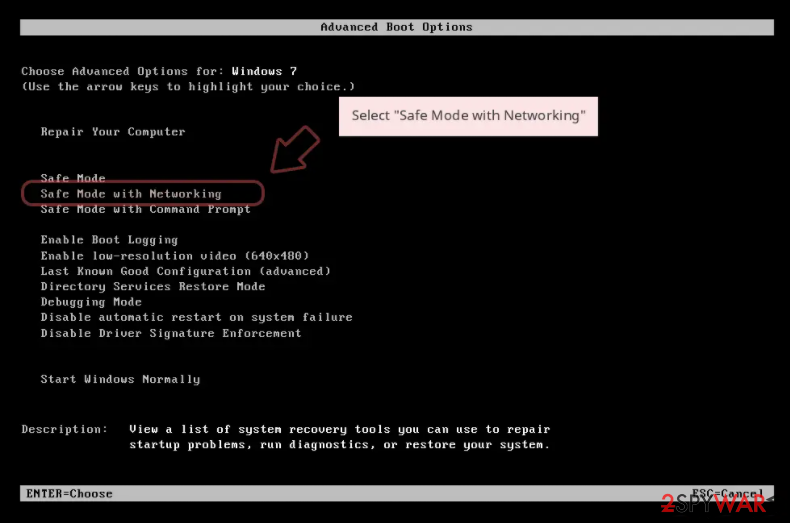
Use anti-malware tools like SpyHunterCombo Cleaner or MalwarebytesMalwarebytes to scan your system. This security software should find all the related files and entries and remove them automatically for you. In some cases, malware is not letting you use antivirus in normal mode, so you need to access Safe Mode and perform a full system scan from there:
Windows 7 / Vista / XP
- Click Start > Shutdown > Restart > OK.
- When your computer becomes active, start pressing F8 button (if that does not work, try F2, F12, Del, etc. – it all depends on your motherboard model) multiple times until you see the Advanced Boot Options window.
- Select Safe Mode with Networking from the list.

Windows 10 / Windows 8
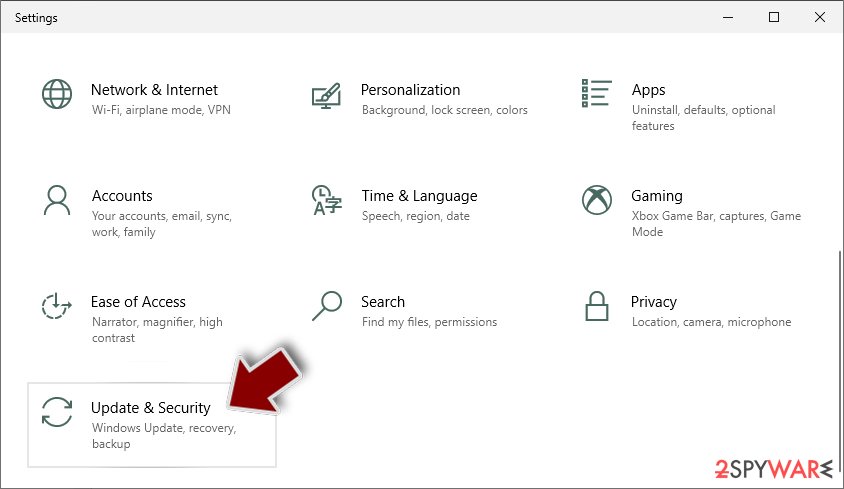
- Right-click on Start button and select Settings.
- Scroll down to pick Update & Security.
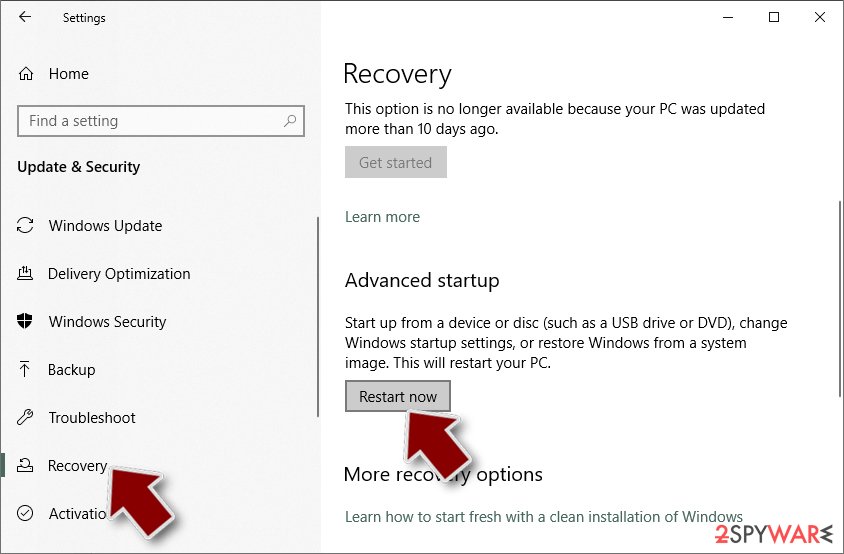
- On the left side of the window, pick Recovery.
- Now scroll down to find Advanced Startup section.
- Click Restart now.
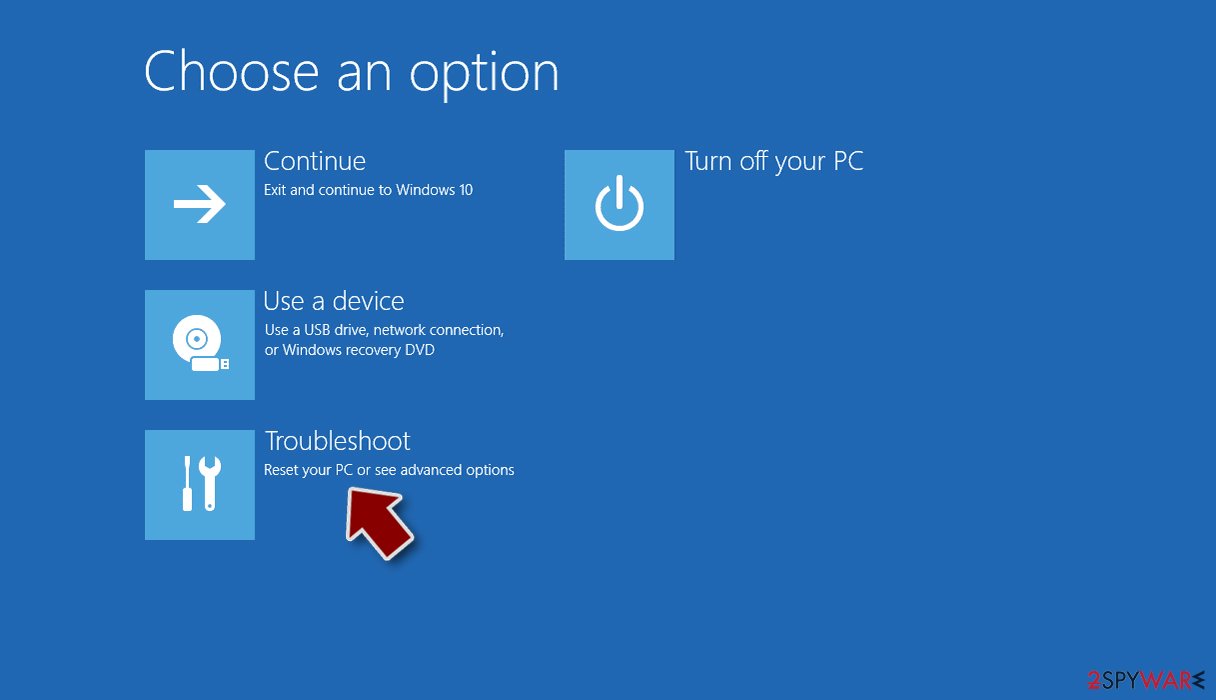
- Select Troubleshoot.
- Go to Advanced options.
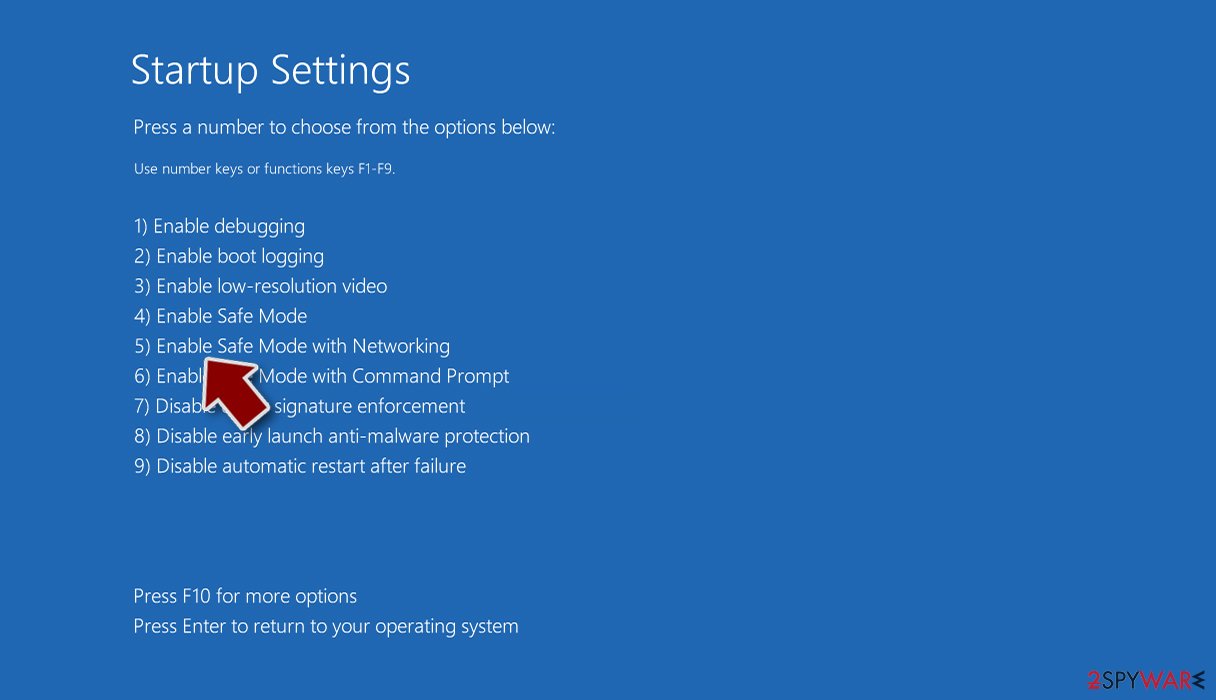
- Select Startup Settings.
- Click Restart.
- Press 5 or click 5) Enable Safe Mode with Networking.


Damaged operating system
Following a malware infection, a variety of difficulties affecting performance, stability, and usability should be expected. These issues can grow so serious that a full reinstallation of the Windows operating system is required. Malware infections frequently cause modifications to the Windows registry database, harm to important boot-up processes and other system parts, and destroy or corrupt DLL files, among other things. Notably, once a system file has been infected by malware, standard antivirus software is powerless to repair the damage done.
FortectIntego was created in order to overcome these difficulties. This method is intended to successfully address a large portion of the harm caused by infections of this type. Blue Screen[3] problems, system freezes, registry problems, broken DLLs, and other issues can render a computer completely useless. The necessity for a full Windows reinstallation could be avoided by utilizing the features of this maintenance application.
Try recovering your files with third-party software
Only the hackers have access to the decryption key, which has the capacity to open your files. As a result, if you failed to create backups, there is a strong probability that your files were irretrievably destroyed. While you can try to use data recovery tools, keep in mind that third-party applications may not always help with the decryption procedure.
Nonetheless, we recommend considering this approach as a potential avenue. Before embarking on this path, it's crucial to duplicate the corrupted files and relocate them to a USB flash drive or alternate storage medium. It's paramount to underscore that this action should only be pursued once you have definitively eliminated the Pzcqyq ransomware from your system.
Before you begin, several pointers are important while dealing with this situation:
- Since the encrypted data on your computer might permanently be damaged by security or data recovery software, you should first make backups of it – use a USB flash drive or another storage.
- Only attempt to recover your files using this method after you perform a scan with anti-malware software.
Install data recovery software
- Download Data Recovery Pro.
- Double-click the installer to launch it.
- Follow on-screen instructions to install the software.

- As soon as you press Finish, you can use the app.
- Select Everything or pick individual folders where you want the files to be recovered from.

- Press Next.
- At the bottom, enable Deep scan and pick which Disks you want to be scanned.

- Press Scan and wait till it is complete.
- You can now pick which folders/files to recover – don't forget you also have the option to search by the file name!
- Press Recover to retrieve your files.



Did this guide help?
Be the first to comment