

Endsupreme.com ads might lead you to dangerous places online
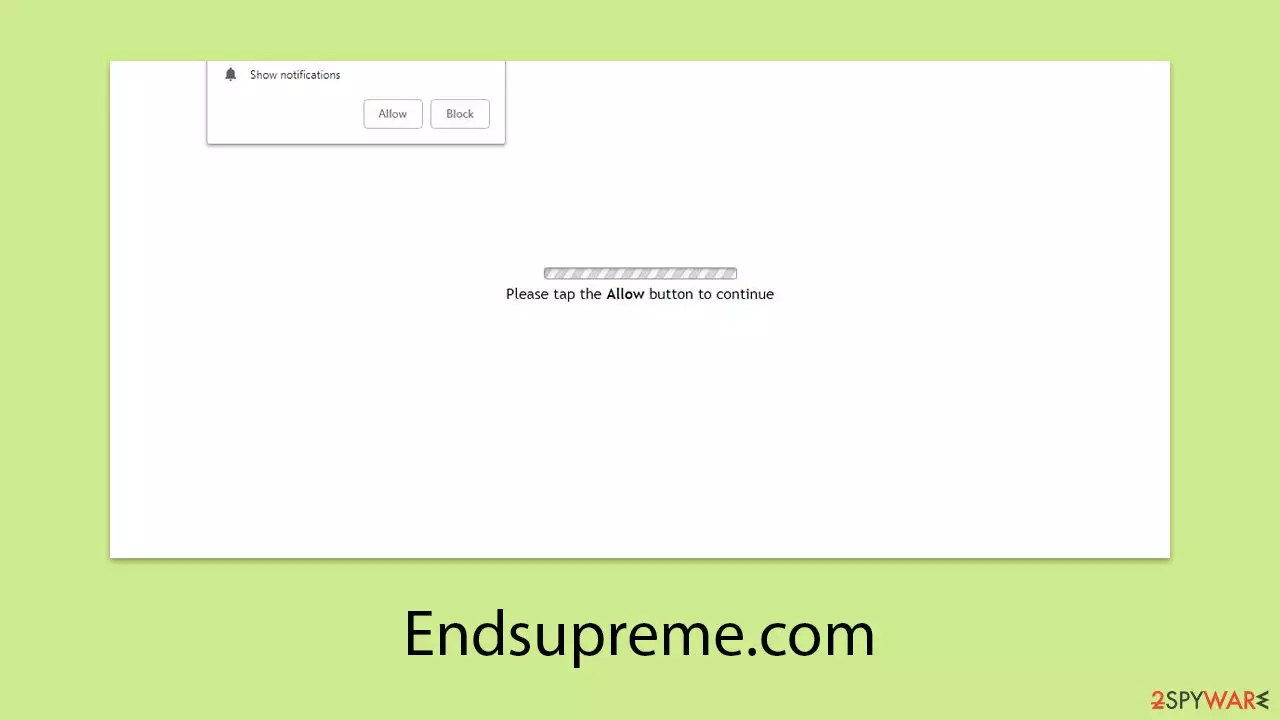
Endsupreme.com is a scam site cleverly designed to trick internet users through misleading tactics. Users often encounter this website without intentionally visiting it, finding themselves bombarded with unsolicited pop-ups. These pop-ups stem from previously authorized push notifications, forming part of a sophisticated scam strategy.
Typically, individuals stumble upon Endsupreme.com either by clicking on a dubious link from an untrustworthy source or as a result of redirects triggered by adware. Initially, users might not recognize the deceptive nature of the site, confusing it for a standard security check. It is crucial, therefore, to remain alert while surfing the web.
By pressing the “Allow” button for push notifications on the site, users inadvertently give Endsupreme.com the green light to send notifications whenever the browser is active. It's important to note, however, that users have at their disposal effective methods to stop and eliminate these annoying pop-ups, which will be discussed further.
| Name | Endsupreme.com |
| Type | Push notifications, pop-ups, ads, scam |
| Distribution | The website gains access to deliver any information as soon as the “Allow” button is pressed within the push notification prompt |
| Symptoms | Pop-ups that are shown include fake notifications and push scams. Links can also direct you to sites filled with malware |
| Risks | The advertisements displayed in push notifications could potentially contain deceptive content and direct you to harmful websites. Should you click on these, you run the risk of exposing your system to malware, revealing your personal details, or even losing funds |
| Removal | You can disable the push notifications from any website via browser settings. Scanning the system with SpyHunterCombo Cleaner can also ensure that it's clean and secure |
| Other checks | Delete web caches and other data from your browsers to protect your privacy and prevent information leaks – FortectIntego can quicken this process |
Scamming techniques used
Most internet users wouldn't knowingly clutter their online experience with sudden and intrusive ads. However, bad actors have crafted a deliberate scheme to trap the unwary into agreeing to these annoying push notifications. The entrapment typically starts with an unexpected redirect from another site, initiated by clicking on a tainted link or stumbling upon a malicious script. These surprise redirects serve as an effective precursor to phishing tactics, as people are more prone to mistakes when taken by surprise.
Once users find themselves on the Endsupreme.com page, they're met with messages that seem harmless and might even look familiar. They might see various prompts designed to mimic common online verification requests, such as:
- Click Allow to watch the video
- Press “Allow” bot verify, that you are not robot
- If you are 18+, click Allow
- Browser verification in progress – click the button “Allow” to access
- Click “Allow” to win a prize and get it in our shop!

These prompts are entirely misleading, designed solely to entice users into clicking the “Allow” button within the notification dialog. After users comply, there often follows a quiet period, which leads many to forget their earlier action. Eventually, however, users might start receiving a flood of ads from Endsupreme.com, featuring dubious content like fake malware alerts, quick-rich schemes, and similar dubious offers.
It's important to recognize that these deceitful prompts are not unique to Endsupreme.com. A wide array of websites uses remarkably similar tactics and language to deceive people into activating push notifications, including sites like Yourequiredatanalysis.info, Pcdsecuresupdates.live, among others.
Make some system checks
Understanding that the root of unwanted visits to dubious sites often lies in adware or similar invasive software is key. Adware developers frequently partner with dubious advertising networks, raising the likelihood of stumbling upon deceptive content online.
This adware can quietly integrate itself into systems, sneaking in with other software or through misleading installation methods, leaving users oblivious to its existence. The best strategy for identifying and removing such hidden threats is to use reputable anti-malware software, like SpyHunterCombo Cleaner or MalwarebytesMalwarebytes.
Before running a malware scan, it's crucial to update your anti-malware software with the latest definitions to ensure it can effectively combat the newest cyber threats.
After detecting malware, using a tool like FortectIntego to eliminate residual cookies and trackers from your browsers is recommended. This step enhances your online security and may help undo any harm the malware caused, helping to return your system to optimal condition following the removal of the malware. Repeated encounters with scam websites could indicate that your system has been infiltrated by adware or similar harmful software, highlighting the need for a thorough malware check.
Endsupreme.com ads removal
To thoroughly remove the irritating pop-up ads, venturing into your web browser's settings is vital. Although push notifications themselves are not intrinsically malicious, the links embedded within them may harbor malicious intent, particularly when they originate from questionable sources.
Due to the subtlety of these links, they can sometimes evade detection by standard anti-malware programs. This situation necessitates manual action, not only offering benefits but also becoming essential for their complete eradication.
Google Chrome
- Open the Google Chrome browser and go to Menu > Settings.
- Scroll down and click on Advanced.
- Locate the Privacy and security section and pick Site Settings > Notifications.
- Look at the Allow section and look for a suspicious URL.
- Click the three vertical dots next to it and pick Block. This should remove unwanted notifications from Google Chrome.


Google Chrome (Android)
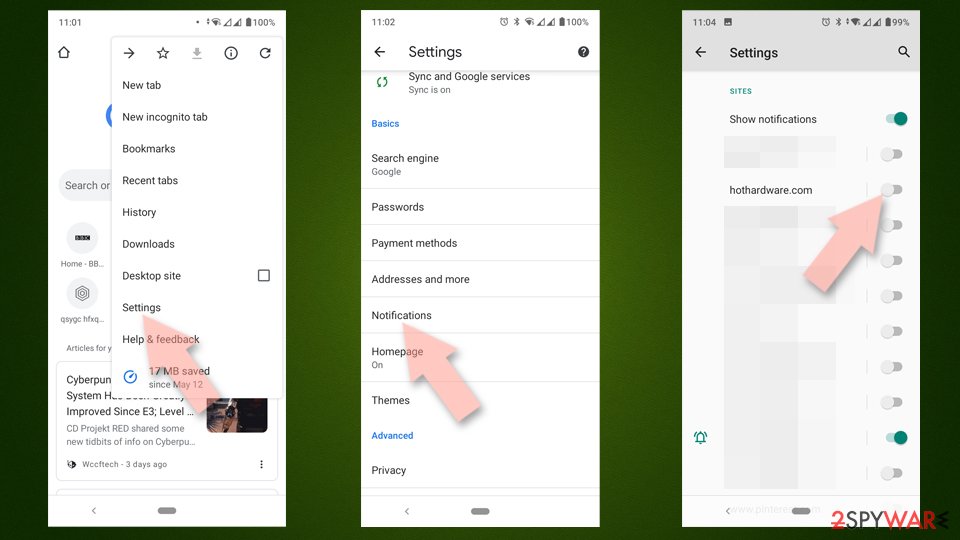
- Open Google Chrome and tap on Settings (three vertical dots).
- Select Notifications.
- Scroll down to the Sites section.
- Locate the unwanted URL and toggle the button to the left (Off position).

Mozilla Firefox
- Open Mozilla Firefox and go to Menu > Options.
- Click on Privacy & Security section.
- Under Permissions, you should be able to see Notifications. Click the Settings button next to it.
- In the Settings – Notification Permissions window, click on the drop-down menu by the URL in question.
- Select Block and then click on Save Changes. This should remove unwanted notifications from Mozilla Firefox.


Safari
- Click on Safari > Preferences…
- Go to the Websites tab and, under General, select Notifications.
- Select the web address in question, click the drop-down menu and select Deny.


MS Edge
- Open Microsoft Edge, and go to Settings.
- Select Site permissions.
- Go to Notifications on the right.
- Under Allow, you will find the unwanted entry.
- Click on More actions and select Block.


Internet Explorer
- Open Internet Explorer, and click on the Gear icon at the top-right of the window.
- Select Internet options and go to the Privacy tab.
- In the Pop-up Blocker section, click on Settings.
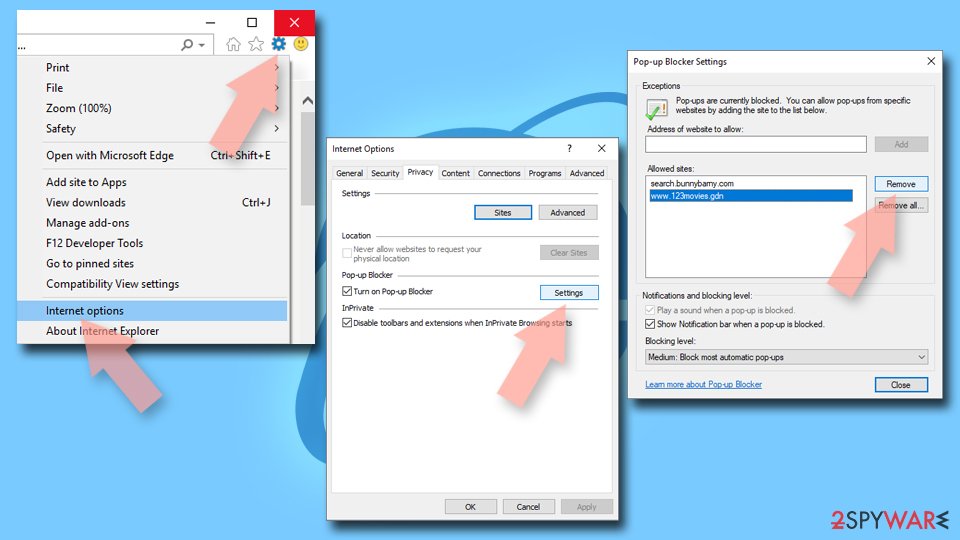
- Locate the web address in question under Allowed sites and pick Remove.

Did this guide help?
Be the first to comment