

Your personal files are encrypted virus – a ransom-demanding virus that is identical to CTB-Locker malware
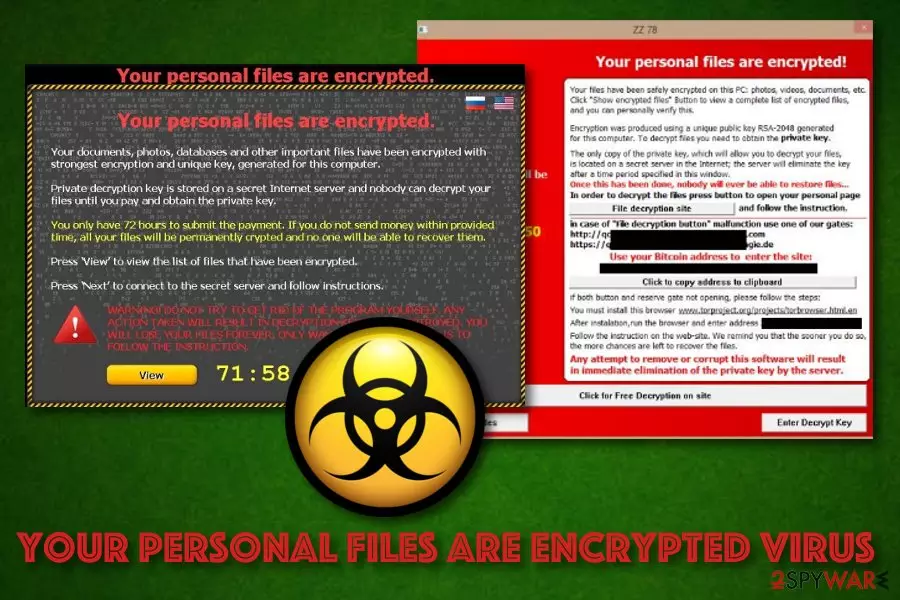
Your personal files are encrypted virus, also known as Your personal files are encrypted by CTB-Locker, is a ransom-demanding malware that locks photos, databases, and documents with the RSA-2048 algorithm,[1] adds the .ctbl appendix and requires a 3 BTC payment in exchange for data recovery. This ransomware is identical to CTB-Locker virus and targets a wide range of people, including users from the United States, Germany, France, and other countries. Your personal files are encrypted virus can appear on any type of Windows OS starting from the XP version and ending with the newest one. The malware brings DecryptAllFiles.txt, AllFilesAreLocked.bmp, and (multiple random letters).html ransom-demanding messages to the system and places a copy of each note to every folder that holds encrypted data.
| Name | Your personal files are encrypted virus |
|---|---|
| Type | Ransomware |
| Target | This malicious infection targets a big variety of countries worldwide, including the United States, France, Germany, and others |
| Identical to | CTB-Locker virus |
| Affected OS | This ransomware virus is able to infect various Windows computer systems such as Windows XP, Windows Vista, Windows 7, Windows 8, Windows 10 |
| Appendix | After the encryption process, the malware appends the .ctbl extension to each locked document, including photos, word documents, powerpoints, excel sheets, databases, etc. |
| Ransom note(s) | DecryptAllFiles.txt, AllFilesAreLocked.bmp, and (multiple random letters).html are the ransom-demanding messages that are provided by the ransomware virus |
| Elimination | Use only automatical software to complete the elimination process of the ransomware as manual step-by-step guidelines are not a solution here |
| Repairing | If the cyber threat has touched some system files of yours, you can try repairing them with FortectIntego |
Your personal files are encrypted by ctb-locker developers urge for an inadequate ransom price (3 Bitcoins) that has to be paid within 96 hours by transferring money to the given Bitcoin wallet address. Continuously, if the victims want to decrypt their files with the received decryption tool they have to enter a specific URL via the Tor web browser:
Your documents, photos, databases and other important files have been encrypted with strongest encryption and unique key, generated for this computer. Private decryption key is stored on a secret Internet server and nobody can decrypt your files until you pay and obtain the private key. If you see the main locker window, follow the instructions on the locker. Otherwise, it's seems that you or your antivirus deleted the locker program. Now you have the last chance to decrypt your files.
1. Type the address hxxp://torproject.org in your Internet browser.
It opens the Tor site.2. Press 'Download Tor', then press 'DOWNLOAD Tor Browser Bundle',
install and run it.3. Now you have Tor Browser. In the Tor Browser open the hxxp://zaxseiufetlkwpeu.onion
Note that this server is available via Tor Browser only.
Retry in 1 hour if site is not reachable.4. Copy and paste the following public key in the input form on server. Avoid missprints.
436VPT-XI445Z-X4CFSL-MPOT6U-PQL2TK-74RNAQ-XYCCWO-ADYDL6
27UGA3-4YIAVP-IF3TTK-YGXGAI-3FATAX-SFK2XJ-VMELOS-YQNMI7
Q456FO-OVG476-FXKES2-TIAVXZ-ME2RLY-OWBKKV-L7EWNS-KYSWLB
5. Follow the instructions on the server.
Your personal files are encrypted virus also provides the users with the possibility to decrypt to small files for free as giving evidence of the decryption tool's existence. However, we recommend declining any offers to pay the demanded ransom price as you might easily get scammed by the hackers at the end and be left with an empty bank account and no decryption software in your hand.
If Your personal files are encrypted virus enters your Windows computer, it can easily encrypt each of these files: 3fr, accdb, ai, arw, bay, cdr, cer, cr2, crt, crw, dbf, dcr, der, dng, doc, docm, docx, dwg, dxf, dxg, eps, erf, indd, jpe, jpg, kdc, mdb, mdf, mef, mrw, nef, nrw, odb, odm, odp, ods, odt, orf, p12, p7b, p7c, pdd, pef, pem, pfx, ppt, pptm, pptx, psd, pst, ptx, r3d, raf, raw, rtf, rw2, rwl, srf, srw, wb2, wpd, wps, xlk, xls, xlsb, xlsm, xlsx, etc.

Afterward, both encryption and decryption keys are stored by Your personal files are encrypted virus developers on remote servers that are in reach only for the hackers themselves. This way the crooks try to decrease the chances for users of locking their files independently. However, you can try performing data recovery by yourself but you need to remove Your personal files are encrypted virus before that.
Your personal files are encrypted virus removal should be performed by employing reliable antimalware software that would be capable to deal with threats like this. Also, if the malware has corrupted some system files of yours, you can try repairing them with a program such as FortectIntego. Afterward, continue with the file restoring task. Even though no official decryption tool has been released yet, travel to the end of this article and take a look at all methods possible.
Your personal files are encrypted virus might be dangerous not only because of the encryption process that it performs but also because of the risk of additional malware infiltration. Ransomware infections are capable of bringing other cyber threats such as Trojan viruses, worms, cryptocurrency miners, and other dangerous malware to the system that can cause severe and unrepairable system damage.
In addition, Your personal files are encrypted virus might alter various entries in the Windows Registry or create malicious tasks and drop them in the Task Manager section. Keep in mind that each malicious component needs to be removed, otherwise, the dangerous infection might return easily.

Ransomware payload can get delivered in many ways
Experts from LosVirus.es[2] claim that ransomware developers think of various techniques on how to distribute the malicious payload. The most popular spreading locations of malware are:
- Software cracks. When malware camouflages as a program downloading link in unsecured networks such as The Pirate Bay, eMule, and similar p2p sites.[3]
- Email spam. Bad actors pretend to be from reliable organizations or companies and deliver malicious payload by presenting the clipped attachment as some type of “order shipment” information.
- Vulnerable RDP. Criminals target RDP configuration that holds weak security, for example, if it contains an easy-guessable password or no security code at all. The TCP port 3389 is known to be commonly targeted by hackers.
- Malicious updates. Sometimes crooks provide fake JavaScript or Adobe Flash Player updates as a way to infect users unknowingly. You might be flooded with urges to upgrade some of your software while browsing on unsafe networks.
The best way to protect yourself from possible ransomware attacks is to always pay attention while completing browsing and computing actions. First of all, make sure that all of your accounts and servers are secured with strong and reliable passwords. Continuously, always investigate your received emails (the sender, the content) and do not open any questionable-looking attachments without scanning them with antimalware software.
Furthermore, keep a fair distance from third-party downloading sources that produce cracked software. Do not click on any secondary downloading links or advertising content that is met on third-party websites. If you are ever provided with a dubious update, you should check the official developer's website and look for newly released upgrades. Last but not least, employ long-term antivirus protection that will announce about suspicious and malicious occurrences.
Remove “Your personal files are encrypted” virus
In order to remove Your personal files are encrypted virus that is providing you with inadequate ransom demands, you should use reputable antivirus software only as manual instructions are not the once you should rely on in this case. However, you can definitely use the below-provided guidelines on how to boot your computer system in Safe Mode with Networking or activate System restore to diminish malicious processes.
When you are ready for the Your personal files are encrypted virus removal process, you can also perform a full system checkup with a tool such as SpyHunterCombo Cleaner or MalwarebytesMalwarebytes. Once you remove malicious files, check the system for virus damage as well. To repair altered system components, use FortectIntego. Once your computer is clean, go back to the part about ransomware prevention and memorize all avoiding steps once again.
Besides, do not forget to think about the file backup process in order not to get caught by malware such as Your personal files are encrypted ransomware the next time. You can use USB external hard drives, CDs, DVDs, Google Drive, Dropbox, Flickr, and other solutions. It is also recommended to make sure that all your open shares are available only for the necessary user groups or authenticated users.
Did this guide help?
Be the first to comment