

ENCRYPTED (Alpha) ransomware – malicious program that asks for 1.5 Bitcoin for file recovery
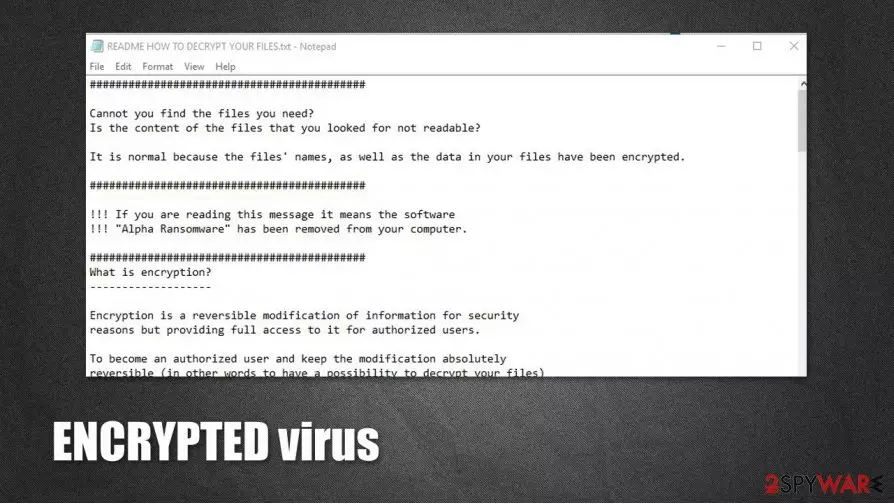
ENCRYPTED virus, a.k.a. Alpha ransomware is a destructive computer virus that is designed for money extortion. As soon as it gains access to the PC, it locks all pictures, videos, music, documents, databases, and other files with AES + RSA ciphers, appending .encrypted extension in the process.
ENCRYPTED files virus also drops a ransom note README HOW TO DECRYPT YOUR FILES.TXT, which explains to victims what happened to their files and that they need “Alpha Decryptor” software to be able to access data on the PC once again. As evident, the attackers do not want to provide the decryption tool for free and are asking for 1.5 bitcoin in exchange for it. Security experts recommend staying away from ENCRYPTED virus authors and using alternative methods to recover files – we provide the instructions below.
| Name | Encrypted ransomware virus |
| Type | File locking malware, ransomware |
| Family | Alpha ransomware |
| Extension | .ENCRYPTED |
| Ransom note | README HOW TO DECRYPT YOUR FILES.TXT and README HOW TO DECRYPT YOUR FILES.HTML |
| Ransom size | 1.5 bitcoin |
| Removal | Ransomware should be removed with powerful anti-malware software, such as SpyHunterCombo Cleaner |
| System fix | To remediate Windows system after ransomware infection, use FortectIntego |
Ransomware is a notorious type of computer virus, and nowadays, it is the most widespread computer infection. Cybercriminals have discovered that many computer users do not know how to protect computers from ransomware, so they keep creating new variants of this malware almost every day.
ENCRYPTED ransomware arrives into the victim’s email as an email attachment, which looks like a safe file, for example, invoice, phone bill, speeding ticket, and so forth. When the computer user downloads and opens such a file, ENCRYPTED malware enters the computer system and starts the hideous data encryption process.
It is nearly impossible to stop this virus once it enters the computer because it drops an autorun file titled “Microsoft,” which starts encrypting files immediately after rebooting your computer. ENCRYPTED malware uses the AES-256 encryption algorithm to lock the victim’s data and also appends .encrypted extension to filenames.
An interesting fact about this ransomware is that it only encrypts particular files times in My Pictures, Cookies, and Desktop, but does not affect any other data stored in SystemDrive folders. However, it encrypts absolutely all records in other computer locations.
After it finishes encrypting the victim’s files, it creates numerous Read Me (How Decrypt) !!!!.txt files and drops them in each folder that includes at least one encrypted file. This text file contains information written by cybercriminals. Crooks ironically state that they apologize for the inconveniences and that they have encrypted the victim’s files.

They also explain what the victim needs to do in order to recover these files. Just like any other ransomware virus, it asks to pay a ransom in exchange for a decryption key. Surprisingly, it does not ask to use the Tor browser or pay the ransom in Bitcoins – it dictates to spend 400$ on iTunes gift cards and send codes to a particular email address.
Such a request is more than strange because legal authorities can easily track crooks down as soon as they use these codes, which means that frauds related to this malware are not very apprehensive. However, you shouldn’t pay the ransom because computer security experts have already created a program that can decrypt files locked by Alpha ransomware.
However, before using the ENCRYPTED decryption tool, you have to remove ENCRYPTED malware from your computer. If you are an unskilled computer user, we do not recommend dealing with this virus on your own. The easiest and safest way to eliminate this ransomware is to use MalwarebytesMalwarebytes, SpyHunterCombo Cleaner, or another malware removal tool. Experts also recommend to employ FortectIntego after the virus is eliminated, as it will help to recover from the infection quicker.
What methods do cyber criminals use to spread ENCRYPTED virus?
Ransomware spreads using Trojan horse strategy. People who develop such malicious programs conceal their executive files under safe-looking file names and even modify file icons so that they would like .PDF or .TXT files. The most common way to spread ransomware is to attach such malicious executive files to deceptive emails and send them to thousands of computer users.
Blackmailers usually tend to send such letters to employees of large enterprises, seeking to infect the whole computer network, but individual computer users can receive such emails, too. It is quite simple to avoid downloading ransomware that was sent to you via email – just do not open suspicious email attachments or links sent to you by unknown senders. However, it is still very hard to avoid ransomware because cyber criminals tend to place malicious hyperlinks on various Internet sites.
Unfortunately, even one click on a corrupted button or link online can immediately download malware to your computer. Therefore, we recommend you to secure your PC with a proper computer security software that can ensure real-time protection from malware.

How to remove ENCRYPTED virus and restore your files?
You do not have to pay up to get your files back because a decryption tool for Alpha ransomware has already been discovered, plus, you can get it for free. Before you attempt to use this ENCRYPTED decryption tool, make sure you eliminate ENCRYPTED ransomware and all files related to it from your computer.
You can remove this virus manually by following the ENCRYPTED removal instructions provided below this post, but we strongly recommend you to use an automatic ransomware removal tool, such as SpyHunterCombo Cleaner or MalwarebytesMalwarebytes. After that, you should fix Windows system files that might have been damaged with a repair utility FortectIntego.
Did this guide help?
4 comments
Georgina
Thanks so much - I have decrypted my files and removed the virus!!!!
Mondeo
me too! I have recovered my files! Thanks, 2-spyware!
Julia
My mom downloaded this threat into her computer, thanks God her files can be decrypted!
Sibella18
Malware again? Why no one can stop these people who create these viruses?