

New ransomware has been discovered: JuicyLemon virus
A new computer threat has been detected, and it belongs to ransomware category. It is called JuicyLemon, and it is yet another ridiculous virus name. It is not a surprise for us because it seems that cyber criminals tend to have fun creating silly sounding ransomware names. Examples include RedShitline, PacMan, JigSaw, CryptoHitman and so on. JuicyLemon is a newly discovered ransomware, but speaking of its functionality, it seems that there is nothing new or unusual about it. JuicyLemon ransomware acts like the majority of ransom-demanding computer threats – it encrypts files and urges the victim to pay a ransom. This virus runs the malicious executable file immediately when it enters the computer system, and starts a data encryption process right away. This malware variant appends file extensions to corrupted files, which seem to be .id-[9 random digits]_.
Once it corrupts victim’s data, it leaves a ransom note, which is called Read me now !.txt. The message in this file says that victim’s files were encrypted, and it is impossible to decrypt them without cyber criminals help, which is not a free service. The message states that the victim must pay a certain amount of money to recover the encrypted data. The price of the ransom is not revealed in the note, but there are two e-mail addresses left (support@juicylemon(.)biz and provectus@protonmail(.)com) to contact the cyber criminals. The victim can also get in touch with crooks via BitMessage address. The fact that authors of this virus do not ask for a certain amount of money possibly means that they are ready to negotiate. However, some victims reported that crooks demand 1000€ in exchange for information how to decrypt data.
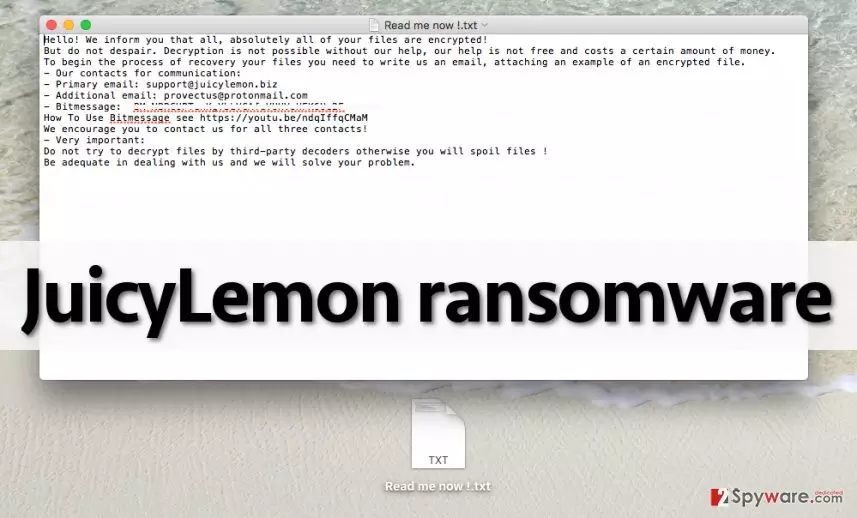
If your computer has been infected with this virus, we strongly recommend you not to pay the ransom because most likely cyber criminals are not going to help you to recover your files. They seek to collect as many ransoms as possible and become rich, and we doubt that they would waste their time helping each user to decrypt the data. It seems that cyber criminals only put efforts into convincing the user to pay. Therefore, we recommend you to remove JuicyLemon (use a good anti-malware software like FortectIntego for that ) and then try to recover your files from a backup. You can find more detailed JuicyLemon removal instructions on the second page.
How did this threat get inside your computer?
This virus does not spread in any special way – its authors use traditional virus distribution methods. They either send it to victims via email or insert malicious codes into shady Internet sites. In some cases, frauds bundle viruses with other programs, usually fake software updates (Java, or Adobe Acrobat, so make sure you download these updates ONLY from verified and secure websites if you do not want to end up installing viruses!). Bear in mind that if you do not have a computer security software, your PC is vulnerable to Trojans, which are capable of silently downloading malware into your computer.
If you want to keep your PC safe and sound, first and foremost thing you should do to protect it from malware attacks is to install a good anti-malware software. Also, be suspicious of emails that come from unknown senders. Be very careful and do not click on any links placed in the message, and do not open files attached to such emails. We also recommend you to avoid visiting questionable Internet websites that are filled with aggressive and pushy ads, because even one click on an infected clickable content can download and execute a malicious program.
How to remove JuicyLemon virus?
Do not try to eliminate this malware from your computer manually, because it is a very hard task to do. If you have never had experience in removing computer threats, we recommend you to use an automatic malware removal program and eliminate JuicyLemon ransomware with it. Please take in mind that attempting to remove this virus manually can do more harm than good because you can accidentally delete important system files thinking that they are part of the virus. Therefore, we suggest you to follow JuicyLemon removal instructions down below to deactivate the virus and install the automatic malware removal tool.
Did this guide help?
4 comments
Andre55
This virus is on my computer and it prevents me from installing antivirus! Help!
pacific
Have you tried to start your computer in a safe mode first?
Ore01
Well, another ransomware. Are authors of it dumb or something? why would someone want to name virus as Juicy Lemon?
Nicol
i was infected and i dont care about name yes authors of this ransomware are dumb thats for sure, i cannot get my files back although i have removed the virus!!! i have no idea what should i do it seems that it is impossible to recover them....