

Information about Russian EDA2 ransomware
EDA2 ransomware targets Russian-speaking computer users, just like Enigma ransomware did. When Russian EDA2 virus infiltrates into a computer, it checks what is the default language set on the computer. If it is not Russian, the virus uninstalls itself automatically. If the default language is set to Russian, the threat starts encrypting files stored in it. It searches for files with the extensions listed below, and then it encrypts them using AES-256 encryption algorithm.
.djvu, .djv, .rb, .epub, .html, .htm,. asp, .aspx, .php, .phtml, .xls, .xlsx, .xlsm, .csv, .ods, .asm, .c, .h, .cpp, .cxx, .h, hpp, .pas, .dpr, .bas, .bbc, .ml, .pl, .pm, .php3, .py, .java, .js, .cs, .resx, .rb, .rbw, .sd7, pdf, .psd, .txt, .rtf, .odt, .doc, .docx, .docm
After it encrypts the file, it adds .locked file extension to it. When it corrupts all data, the virus replaces desktop wallpaper with a frightening message that claims all data on the computer system has been blocked. It says that the victim can find information on how to recover files in README.html file, which can be found on computer’s desktop. Surprisingly, it seems that authors of this ransomware aren’t greedy – they ask to send them 0.1 BTC (approximately 59 USD) in exchange for a decryption key, which is required to decrypt corrupted files. The ransom price is considerably small, considering that other ransomware threats usually demand 300-700 USD.
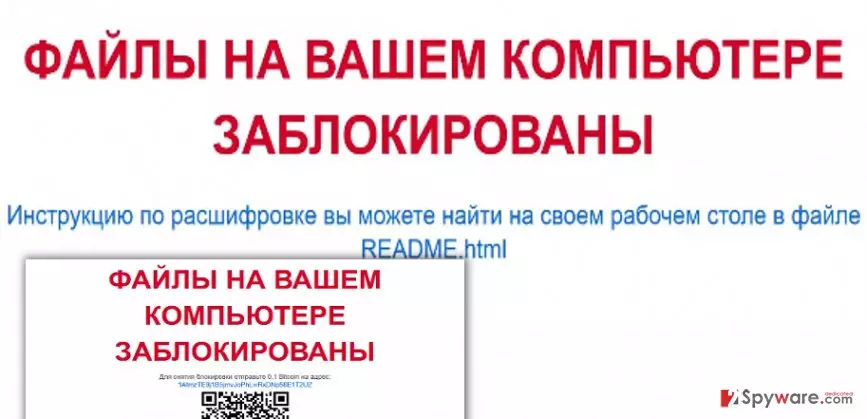
We understand that it is your choice whether to pay up or not, but we would like to encourage you NOT to support cybercriminals, even if the ransom price is small. There is no guarantee that frauds will give you the decryption key even if you pay. Therefore, we suggest you to remove Russian EDA2 virus right away and protect your computer from future virus attacks with an anti-malware software like FortectIntego. If you have a backup, you can recover at least part of your files, but make sure that you need to implement a successful Russian EDA2 removal first, since this virus can encrypt data stored on removable drives, too.
How did it enter your computer system?
You can get infected with this virus after opening a malicious email attachment or by agreeing to install a bogus software update. Frauds usually send deceptive emails claiming that they are delivering some very important documents, for instance, invoice, speeding tickets, CVs, and so on. If the victim opens such email, the malware executes itself and drops infectious files into the computer system. The same can happen after downloading and installing a bogus software update. It was noticed that crooks tend to insert malicious executive files into fake Java or Adobe Acrobat updates, so you should think twice before downloading them from unknown web sources. What is more, if your computer is unprotected (if you do not have a security software), there is a possibility that a Trojan horse has slithered into the system unnoticed and silently downloaded Russian EDA2 malware.
How to remove Russian EDA2 ransomware from the computer?
If you have become a victim of Russian EDA2 virus, do not rush to pay the ransom. We recommend you to think whether it is worth paying up. Consider the possibility of losing your money along with your files, because cyber criminals might not be willing to reveal decryption key to you.
If you decide not to pay, please read Russian EDA2 removal instructions provided down below and learn how to delete malware from your computer system. We do not advise you to deal with this virus by yourself, as trying to remove its components manually can do more harm than good. If you are not experienced in computing, you risk deleting important files and corrupting the computer system. Therefore, 2-spyware researchers say that when it comes to virus removal, using an automatic virus removal software is the best option.
Did this guide help?
3 comments
William
I had a hard drive with copies of my data - it saved my life.
Tom21
I am not Russian nor I speak this language but my mother does, and she sets Russian language on the computer sometimes. Guess what, she managed to download this virus. She thought it is a document or something. Ridiculous! Now all our files are useless..
John
thats a small ransom. still not gonna pay. screw cyber criminals!