

EduCrypt ransomware’s mission is to educate computer users
Today we are going to describe a unique variant of ransomware, which is called EduCrypt virus. If your files have been encrypted by EduCrypt, do not worry – the aim of this crypto-ransomware is not to demand a ransom and earn money, but to frighten computer users a little bit and teach them a lesson. The ransomware is a simplified version of Hidden Tear virus (an open-source crypto-ransomware). It does not communicate with a C&C server to encrypt files.
EduCrypt can encrypt data stored in Desktop, Documents, Downloads, Pictures, Videos, and Music folders. Unlike other ransomware threats, it does not scan the entire computer system. Once it encrypts a file, it adds .isis extension to it. Then it leaves a short note in README.txt file, saying, “well hello there, seems you have a virus!” Then authors of this threat provide a link where the user can download a decryption tool, which is unlikely to be trustworthy. Do not forget that cybercriminals might have added additional infectious components to this decryption tool, so by fixing one problem, it can cause another one. Therefore, you should not use it and rely on one that was created by trustworthy computer experts. You can download it here. The ransom note says that the user does not have to download random decryption programs from the Internet because the virus had hidden a .txt file with a decryption code in it. According to the ransom note, the user has to find it in the computer system. We will simplify this task for you by saying that this file is called DecryptPassword.txt and it can be found in Documents folder. What is more, it turns out that this virus encrypts each computer the same way and the same decryption key works on each infected computer. The EduCrypt decryption key is:
HDJ7D-HF54D-8DN7D
Although this virus is not disastrous and you can easily recover your files after it attacks the computer, it does not mean that other ransomware variants are as innocent and harmless as this one. If you have never heard about Locky, CryptXXX, CryptoLocker and other well-known ransomware variants, you should definitely read some more information about them (click on virus names to learn more). Typically, when such virus encrypts files, there is no way back – you can pay the ransom and expect to get a decryption tool from criminals, which is unlikely to happen. It goes without saying that you should never pay frauds not only because they can deceive you, but also because if you paid, you would support them financially. The first thing that you should do if your PC has been infected with a virus is to uninstall it. To remove EduCrypt and other malicious threats, use an anti-spyware program like FortectIntego.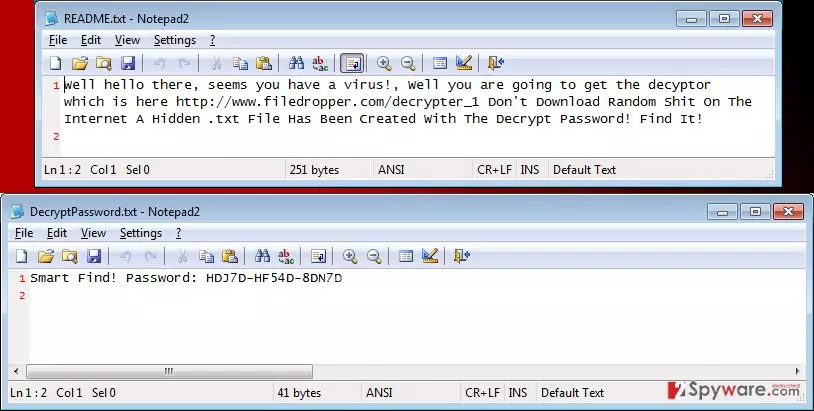
How does EduCrypt spread?
EduCrypt can be installed on the computer system after opening an infectious email or a website. Since ransomware spreads using Trojan horse method, you have to be aware of the fact that you can accidentally download it while thinking that it is a safe file. To avoid installing such harmful programs, you have to stay clear of questionable file sharing networks and suspicious emails. If you have received an email from an unknown sender and if the email has several files attached to it – do not open them! These attachments can be malicious, although you might not be able to realize it immediately.
How to remove EduCrypt?
EduCrypt virus can be deleted with a help of FortectIntego or with another reliable anti-malware program. To remove it automatically, install such program and check the computer system by running a full-system scan. If your anti-malware program cannot detect EduCrypt, you should update it and then try to do it again. If it still cannot find this threat, you should consider obtaining a more powerful anti-malware application.
Did this guide help?
4 comments
ronny
EducationalCrypt, huh? I wouldnt like to get such lesson... because that would make me freak out...
Abigaille
Interesting. I wonder who created this virus.
maddie
You guys cannot imagine how scared I am when I saw all these .isis file extensions.... Literally got a heart attack
Hadid
ISIS File extensions, hmmm, what is that supposed to mean?