

CryptoLocker – an infamous ransomware virus that was stopped by the Operation Tovar
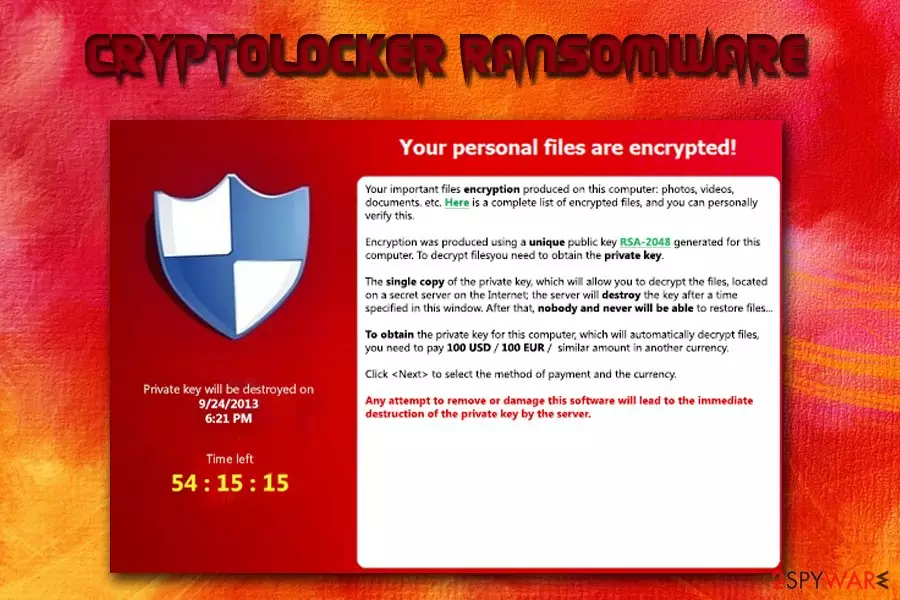
CryptoLocker is ransomware that encodes files and asks for victims to pay up in the given time. This is a file locking virus that was active from September 2013.[1] It attacks Windows machines via Gameover Zeus botnet[2] and encrypts files using RSA & AES ciphers. As soon as data is encoded, hackers ask for $100 to $300 ransom payment in order to retrieve the decryptor for the unusable files.
The ransom note is displayed in a “CryptoLocker” program which also explains that victims only have 72 hours to recover their files. If the ransom is not paid using MoneyPak or Bitcoin transfer during that time, the key is destroyed and access to data is lost permanently.
| SUMMARY | |
| Name | CryptoLocker |
| Type | Ransomware |
| First spotted | September 5th, 2013 |
| Taken down | June 2nd, 2014 |
| Taken down by | Operation Tovar, organized by the FBI and Interpol |
| Encryption algorithm | RSA & AES |
| Ransom demanded | $100-$300 |
| Ransom payment rate | 1.3% which equals to $3 million in profit |
| Decryption | Original version decryptable (as well as few others) |
| Elimination | Download and install FortectIntego, SpyHunterCombo Cleaner or MalwarebytesMalwarebytes. Do not attempt manual removal |
CryptoLocker virus was discontinued on June 2nd, 2014, when Operation Tovar[3] took down the Gameover Zeus botnet. The security firm gained access to the database used by hackers to store all decryption keys.
This allowed users to retrieve their data without paying the ransom. Since then, many other versions of the virus emerged, but they are not related to the original one. If you get a message that your files are encrypted by CryptoLocker, it is most likely other ransomware, such as TorrentLocker.
The main goal of Cryptolocker is to infiltrate your computer without your knowledge. For that, malware relies on seemingly harmless email messages. These messages typically contain malicious attachments which carry the payload of the ransomware. Once the victim is tricked into opening it, the virus infiltrates the target PC system, encrypts victim's files and displays a ransom note which is displayed below.

No matter that it belongs to the same category as FBI virus, Police Central e-crime Unit virus or Department of Justice virus, this virus tries to convince its victims that they have to pay a ransom by encrypting their personal files. CryptoLocker[4] is the file-encrypting ransomware, so it uses RSA public-key cryptography to lock the following file types on victim's PC:
3fr, accdb, ai, arw, bay, cdr, cer, cr2, crt, crw, dbf, dcr, der, dng, doc, docm, docx, dwg, dxf, dxg, eps, erf, indd, jpe, jpg, kdc, mdb, mdf, mef, mrw, nef, nrw, odb, odm, odp, ods, odt, orf, p12, p7b, p7c, pdd, pef, pem, pfx, ppt, pptm, pptx, psd, pst, ptx, r3d, raf, raw, rtf, rw2, rwl, srf, srw, wb2, wpd, wps, xlk, xls, xlsb, xlsm, xlsx.
As you can see, this list is full of widely used files names, such as doc, xls and similar. To restore them, Cryptolocker ransomware asks you to pay a ransom via Moneypak, Ukash, cashU, or Bitcoin. Typically, this threat asks from $100 to $300, but the price can be increased any time soon.
According to the warning message, which is typically displayed by this threat, people have only a certain amount of time to pay a ransom and recover the connection to their files. Cryptolocker leaves the so-called ransom note, which showcases such information:
Your personal files are encrypted!
Your important files encryption produced on this computer: photos, videos, documents, etc. Here is a complete list of encrypted files, and you can personally verify this.
Encryption was produced using a unique public key RSA-2048 generated for this computer. To decrypt files you need to obtain the private key.
The single copy of the private key, which will allow you to decrypt the files, located on a secret server on the Internet; the server will destroy the key after a time specified in this window. After that, nobody and never will be able to restore files…
To obtain the private key for this computer, which will automatically decrypt files, you need to pay [specified amount of money in EUR or USD] similar amount in another currency.
Click To select the method of payment and the currency.
Any attempt to remove or damage this software will lead to the immediate destruction of the private key by server.
Fortunately, Cryptolocker cannot harm those who have been backing up their data and making extra copies of their files. If you have copies of your photos, business documents, and other files, you don't need to pay a ransom. You just need to remove this ransomware from your computer and prevent additional damage.

For Cryptolocker removal, we highly recommend using FortectIntego, which has been showing great results when eliminating files of this virus. For restoring your files, we kindly ask you to read data recovery options provided below the article.
However, it seems that frauds have decided to ease the rules for victims who choose to pay the ransom but simply cannot gather the fixed amount of money within the specified amount of time. Typically, when the anti-virus software deletes the ransomware, the victim can no longer pay the ransom.
Therefore, the latest versions of CryptoLocker have a new feature to change the desktop's wallpaper when the anti-virus detects the threat and display a message on the screen informing the victim where to download the ransomware again in case he or she still wants to buy the decryption software.
Although we highly recommend not paying the ransom, we understand that some companies might not be able to survive without personal data that has been stored on the compromised computers, so in such cases, paying the ransom might be the only chance to evolve the business. Again, we remind you that we do not recommend paying up. Keep in mind that you can never be sure whether criminals provide working decryption tools!
Cyber criminals use rely on malicious spam emails to spread ransomware
CryptoLocker is considered as one of the most efficiently distributed crypto-ransomware viruses and, speaking of its distribution, we have to say that authors of this virus combine several different techniques to spread the virus.[5] It has been noticed that they use both old and new distribution techniques, failing to comply with any moral norms.
According to experts, Cryptolocker virus is spread using officially-looking emails, fake pop-ups, and similar techniques. Earlier, ransomware has been distributed via hideous email letters that contained malicious attachments, malware-laden ads, which advertise programs or updates that actually contain the virus executive file, or exploit kits, which allowed crooks to infect victims' PCs by exploiting their computers' vulnerabilities.
Beware that this threat can infiltrate your computer thru fake pop-up that claims that you need to update your Java, Flash Player or similar program, so make sure you install these programs from their verified developers' sites, not from some suspicious third-party sites.
On September 2016, several new ransomware distribution techniques have been spotted. The first one is based on malicious emails posing as letters from electricity supplier VERBUND. This company is not related to these scammers in any way – they just use a reputable company's name to convince users to click on malicious links or open infectious email attachments containing CryptoLocker ransomware.
The message subject is Detailaufstellung zu Rechnung Nr. [numbers]. If you have received such letter, delete it immediately without clicking on links included in the message or opening attachments it contains!
The second ransomware distribution method that has been discovered is a filthy and hideous way to trick the user and force him or her to open the malicious file containing the virus. Scammers pose as employees of healthcare companies and send deceptive emails that can cause a heart attack on the victim. They deliver a bogus blood test report, stating that the victim might be suffering from cancer due to the lack of white blood cells.

The message asks to print out the blood test results that are in an attached document and bring these to the family doctor ASAP. Such news can make anyone panic, and forced to open the attached document without even thinking that this is just a bait. When the miserable victim opens the attachment, the ransomware takes control over the system and encrypts all victim's files without any remorse. As you can see, cyber criminals can go very low because all they care about is money.
12 Versions of Cryptolocker ransomware virus still active in 2021
Crypt0L0cker virus
Crypt0L0cker virus is one of the file-encrypting viruses that is capable of infiltrating computers thru fake Java updates or thru infected email attachments. After encrypting victim's files, this virus adds .encrypted or .enc file extension to each of them and starts showing a warning message asking the victim to pay the ransom.
This virus was first spotted in 2015. However, several years later it is still actively infecting computer users. Crypt0l0cker 2017 version demands 2.2 Bitcoin for giving a user a chance to decrypt encrypted files. Please, do NOT pay the ransom and use a guide below to fix your computer. You can always recover your files from backup for free.
CryptoLocker-v3
CryptoLocker-v3. When infected with this ransomware (you can download it after clicking on the fake popup that says that you need to update your Java or Flash Player), you can expect that it will block the most of your files.
For encrypting the files, this threat uses RSA-2048 (a unique public key) and asks 1 BTC ransom which was equal to $350 USD in 2015. Making this payment is the same as supporting the scammers and their future crimes, so you should never do that. This malware uses .crypted file extension which is added to every file it encrypts.
Cryptographic Locker
Cryptographic Locker is very similar to CryptoLocker ransomware. It lets its victim know what files it encrypted by adding .clf file extension to every file it encrypts. All these files are saved in %Temp%\CryptoLockerFileList.txt. Right after appearing on the Internet, this ransomware was asking 0.2 BTC ransom in exchange for the decryption key which is needed for recovering files.
During its active distribution, the amount of ransom was equal to $100. However, as well all know, the price of bitcoins keeps changing. If you happen to get infected with this malware, please, do NOT pay the fine because there is no guarantee that this will help you to recover the connection to your files. Instead of doing that, you should use a guide below.
PCLock ransomware
PCLock ransomware is another ransomware that tries to scare its victims by encrypting their files. This procedure is typically initiated with the help of XOR encryption. Fortunately, it is not as aggressive as the original CryptoLocker version, so you should be capable of eliminating it by removing its main file WinCL.exe and other files with the help of security software.
Please, do NOT pay 1 bitcoin ransom which is required to be paid in the ransom note called last_chance.txt for unblocking encrypted files. After you remove PCLock from your computer, you can use the decryption tool invented by security experts for unblocking encrypted files.

CryptoTorLocker2015
CryptoTorLocker2015 is capable of infecting Windows OS and Android OS. Once it does that, it uses XOR encryption for blocking victim's files. If your system is filled with precious photos or business documents, you can lose them. Infected files are typically marked by .CryptoTorLocker2015 file extension. You should also find the ransom note called as HOW TO DECRYPT FILES.txt on your desktop.
Fortunately, Android users need only to uninstall the affected application, which was used for downloading CryptoTorLocker virus to their computers, to remove this virus from their devices. Windows OS users are recommended using reputable anti-virus or anti-spyware software for CryptoTorLocker2015 removal.
Crypt0 ransomware
Crypt0 ransomware was discovered in September 2016. This ransomware variant also attempts to use a part of CryptoLocker's name to seem scarier than it is. This version appends ._crypt0 suffix after the original file name, while other viruses add the extension after the original file extension.
This ransomware leaves HELP_DECRYPT.TXT ransom note, which informs the victim about the attack and asks to use contactfndimaf@gmail.com for data decryption instructions. The virus is a foolish copy of CryptoLocker and can be decrypted using this free Crypt0 decryption tool.
Il tuo computer e stato infettato da Cryptolocker! ransomware
Il tuo computer e stato infettato da Cryptolocker! ransomware virus is yet another version of CryptoLocker which is aimed at Italian-speaking computer users. This version of ransomware asks for a smaller ransom than other viruses – it requires “only” 130 eur from its victims. However, that does not mean that victims should pay the ransom.
Just like its predecessor, this ransomware changes file extensions (it uses .locked file extension) and gives its victim a specified amount of time to pay up. Currently, malware researchers keep silent as there is no free decryption tool available; however, such tool might show up in the future.
CryptoLocker 5.1 ransomware virus
CryptoLocker 5.1 ransomware virus was released in 2016. Since its first appearance, it has been working on infecting Italian users. Alternatively, it has been alternatively known as Il tuo computer e stato infettato da Cryptolocker! threat. Though it attempts to disguise under the name of notorious cyber menace, IT experts still suspect that it is not so powerful as the original version.
Speaking of the current virus, it appends .locked file extension and demands 250€ in exchange for the decryption key. The transaction is expected to be made within 48 hours. Brush aside any thoughts to transfer the money and concentrate on the elimination.
Cryptolocker3 ransomware virus
Cryptolocker3 ransomware virus is an imposter-type malware which can also be called as lock screen ransomware [6]. Such viruses do not actually encrypt the computer files but prevent their victims from accessing them and using the regular computer functions. However, after several months of functionality, Cryptolocker3 entered another sub-section in which malware acts like the original ransomware virus[7].
This parasite uses XOR encryption algorithm and appends .cryptolocker file extension. There is currently no safe decryption tool for the locked files, but we can assure you that the experts are working on it actively and you can expect your files to be decrypted in the future. In the meanwhile, you need to remove this parasite from your computer without any delay.
MNS Cryptolocker
MNS Cryptolocker is yet another ransomware virus which uses Cryptolocker's name. While there is no evidence that it is related to the notorious cyber infection, it does not mean that this malware is less harmful. Once it encrypts victim's personal files, ransomware drops its ransom note asking the victim to send 0.2 BTC ($180 USD) via Tor or other anonymous networks.
Virus does not append new extensions to the target files, so you become aware of the infection only when you try to open one of them. Unfortunately, this malware can eliminate shadow volume copies of the target files with the special command known as vssadmin DELETE SHADOWS /all /quiet. Because of this feature, victims find ShadowExplorer useless. The most interesting fact is that MNS Cryptolocker can delete itself from the system.
CryptoLockerEU ransomware virus
CryptoLockerEU ransomware virus was detected in January 2017. It appears to be a modified copy. The virus calls itself CryptoLockerEU 2016 rusia, which gives an idea that it was developed in 2016 by Russian hackers. During the data encryption procedure, the virus encodes files using a RSA-2048 algorithm and gives each file a new extension .send 0.3 BTC crypt.
The name of the ransom note is supposed to look like that: РАСШИФРОВАТЬ ФАЙЛЫ.txt. However, due to an error in virus' source code, it appears as ĐŔŃŘČÔĐÎ ŔŇÜ ÔŔÉËŰ.txt. Currently, files cannot be decrypted. Victims should use backups or wait for free decryption programs that malware researchers might release soon.
CryptON
Cryptolocker Portuguese ransomware or CryptON is the latest variant of CryptoLocker-related ransomware. Some believe that it may be released by the same group of hackers because it uses a similar source code and displays typical nature of CyptoLocker on the infected computer.
The most interesting fact is that this virus is aimed at Portuguese-speaking users since the ransom note and the ransom payment interface are presented in this language. In particular, the ransom note used by this malware is called COMO_ABRIR_ARQUIVOS.txt which essentially means “how to access your files” in English. Likewise, the encrypted files are renamed in the following manner: [file_name].id-[victim’s ID]_steaveiwalker@india.com_.
To retrieve access to the files, the victims are demanded to pay 1 BTC. By no means should you pay the hackers! Instead, remove CryptON CryptoLocker and try to recover your files using our recommended data recovery options.

Suggestions on how to keep your files safe from crypto-virus
If you want to stay safe, you should never trust misleading ads that pretend to be helpful because the only thing what they do is spread viruses and useless programs. Also, make sure you delete spam and double check every email that was sent to you by unknown senders. Besides, don't forget to disable hidden extensions (if you are using Windows OS)[8] and, to avoid the loss of your files, you should think about their protection.
The first thing that you should do is to download a reputable anti-spyware on your computer. We recommend using FortectIntego. In addition, make sure you perform backups as frequently as possible because this could help you to recover your encrypted files.
Finally, you should use such solutions as Google Drive, Dropbox, Flickr, etc. when trying to protect your extremely important files. However, keep in mind that this powerful virus might be able to access these online storage places via your Internet connection and encrypt these files, too.
Therefore, it is recommended storing data backups on removable storage devices such as hard drives or USBs. Unfortunately, if you are infected with this ransomware right now, you should know that there is no official Cryptolocker decrypt tool yet. Nevertheless, you can check the guide given on the second page of this post and recover your files with some special tools. Don't forget to remove ransomware before recovering your files because it may disable them again!
Delete ransomware with professional malware removal program
Please, do NOT pay a fine because this doesn't guarantee that you will receive a key required for files' decryption. In order to remove CryptoLocker virus from the system, you need to scan your computer with FortectIntego or SpyHunterCombo Cleaner.
If your anti-spyware or anti-malware tool does not start because the ransomware is blocking it, you need to follow special tips that we prepared to help you with this procedure. CryptoLocker removal instructions are provided at the end of this post. You can also find informative data recovery instructions down below.
Victims of Cryptolocker ransomware can use a free online tool created by FireEye and Fox-IT to decrypt files compromised by this malware – decryptcryptolocker.com
Frequently Asked Questions related to Cryptolocker in 2021
Question: My PC has been infected by Cryptolocker ransomware. The infection has also affected my sd memory card in which I've stored important picture. I'm reading now a notification saying that I have a certain amount of time to pay the ransom, but there is no specific period indicated. Does anybody know how long files remain available to recover after they are affected by ransomware?
Answer. We feel responsible for answering your question ASAP to warn all people in advance. Paying the money for the decryption key is a huge mistake which can result in money and data loss. So, please, don't risk that much.
The first thing that you have to do after receiving a ransomware notification is to run a full system scan with a reputable anti-spyware (the list of them is given below) and remove Cryptolocker virus ASAP. After that, check whether your files still cannot be accessed. In this case, install data recovery tool (e.g. Photorec, R-Studio) or use file backups.
Question: I've been hit by Cryptolocker virus twice! I suppose I was dealing with different versions. Nevertheless, could you please tell me how could I prevent this in the future? It's painful to pay $500 to these bastards. However, I had to do so since nothing else has helped. Please, advise.
Answer. It's a pity to hear that you have been attacked by ransomware twice. We assume that the reason for a repeated attack might be inappropriate Cryptolocker removal. Anyway, now you are asking how to protect your computer from this threat. Honestly, there is no hundred percent reliable method that would give you zero chances of getting infected with any ransomware.
Nevertheless, there are several tips that we can give for you. 1. Stay away from illegal websites. 2. Do not open suspicious emails, especially those containing attachments. 3. Do not click on software update prompts that pop up on your screen out of nowhere. 4. Do not visit websites filled with adult content. 5. Finally, keep a reliable anti-spyware installed on your computer and update it regularly.
Question: I've just been browsing through the websites I regularly visit, and suddenly a pop-up window locked my screen stating that data stored on my computer has been encrypted and that I have to pay the ransom. Is this a joke or I have to pay $500 for getting rid of Cryptolocker?
Answer. Unfortunately, if the message that you've indicated has been brought by Cryptolocker ransomware, then it seems that your computer has been affected with ransomware. Probably you have already checked personal files stored on your computer and discovered that they are blocked. Nevertheless, you should NOT pay the ransom to get decryption code that is needed for unblocking locked files.
Although some users claim that they have been provided with a decryption key after sending the money, no one can guarantee that you will be the lucky one. Thus, instead of spending your money on nothing, install a reliable anti-malware (you can select one from the list below), delete Cryptolockerand try to recover data using data recovery tool.
Question: Please help! My files were locked by Cryptolocker virus last night, and I continuously receive a notification that contains instructions how to make the payment. I feel helpless as I cannot afford to pay such a big sum of money although pictures stored on my PC are worth millions for me. Can anyone help?!
Answer. Cryptolocker ransomware is a nasty infection. its developers only seek to earn easy money and frequently manage to do so. For you, as well as for the other victims of this ransomware, we want to highlight that paying the ransom will not solve the problem. There is no guarantee that your data will be restored.
Beyond that, making the payment will not help to remove ransomware. In order to fix your computer and restore data stored in it, you are recommended to install a powerful anti-malware and run a full system scan with it. Finally, you should either use file backups or data recovery software for getting your data back.
Question: Cryptolocker has stolen my data. However, some of the .doc, .pdf. and .jpg files were very important for me. Is there are a way to decrypt at least some pieces of data? Maybe there's a way to fix this issue manually?
Answer. Unfortunately, there is no way to get rid of Cryptolocker manually. There are only two ways to get decrypt data – either use backups or use a reliable file decryption tool, such as Photorec or R-Studio. Besides, in order to remove this threat once and for all, update or install a reliable anti-spyware and run a full system scan with it.
Did this guide help?
17 comments
Pissed Off
Virus creators should be systematically exterminated.
seth co
my girlfriend got cryptolocker 3 days after she got her first windows box, she decided to give up her mac for it... big mistake.
got really angry but then decided just to give them the ransom
getting some bitcoin to remove this thing can be hell.
coinbase takes 5 days, bigmama says they take debit and makes u signup and then says it doesnt
not gonna wire money to solvenia sorry. spent hours racking my brains and going thru sketchy websites.
found a reddit thrad about http://getcoincafe.com called em up, had .5 bitcoin in like 5 minutes.
they sent it asap right after i put some cash into their bank of america account, was right down the street so it worked out.
these guys anser the phone and are fast. if anyone has had luck with other bitcoin exchanges or moneypak let us know!
stick to mac!
Optix
Or just dont be a moron. Viruses are the easiest thing to avoid. You literally just have to not be an idiot.
Snoopy
Easy to avoid, huh? Are you that naive? I am a systems admin, and as most are easy to avoid, they all are not avoided. Even if you have the best anti-virus and running concurrently with the best anti-malware, not everything can be stopped until the damage is done.
So Screwed
Tried doing a System Restore through the Command Prompt. Went as far back as I was allowed. System Restore was successful but when I tried to open my files, they were still encrypted. This is not good. Now looking at buying bit coins, 7 of them..@ 425 us dollars as of today.
Javatyger
Just got this stupid virus. They can go to hell if Ill ever pay them $500 to get it back. No file I have is worth that amount.
lrypto cocker
ruining peoples businesses and lives if they dont have backups i cant stress enough people need at least a weekly backup.
Jo
Its not difficult to avoid all kinds of viruses if you know how they are transmuted. 99% of all viruses today are transmuted with emails.
I have two rules:
- Never open email from unknown sender
- Never open email from unknown sender
Have a nice day!
Julius
This thing infects mac users as well if they are dumb enough to open the stupid file.
Infected
Did paying up get your files back or did they just take your money too? Never had a virus in 25years - somehow got this. Any other info on converting payment to them. Do they have a time limit?
Idiot Hunter
Well done for paying money and thus enabling them to continue. Faith in humanity is lost.
FROMDAYS OF OLD
I ll tell u all, I suppose to be this pc dude from way back in the day almost 50 years Hell I worked for uncle sam an never been hacked or infected in my life... UNTIL NOW sO YOU ALL GO FIGURE THIS OUT i CAN DOWNLOAD ALL I WANT BUT i CAN NOT ACCESS NOTHING.. I have my files backed up but the only way I could of gotten to them is thru window explorer which they blocked me from
EndUser
Seriously, dont pay and fund the criminals. There is no guarantee that they will give you the key anyway. Make sure you always have recent backup of your data. Option is to also use shadow copies (previous versions) to see if you can recover them there if not too late.
If running in a business, it is best not to have mapped network drives or your server files will be encrypted. Also, it is best to keep all important files on a server with automatic daily backup. Even small network files servers (NAS) are so much more affordable and protect your files.
System restore does not affect data files, only recovers system files in case it is unable to boot.
Gina
Switch to Linux!
Aster
Hi All - Firstly im hit but have backup. Screen is completely blacked out not even start bar, windows button disabled. downloaded malwarebytes free and going to try just get the laptop back. Did receive said ransom note and links to a page requesting $500 or $1000 after 3 days.
only been on worksites for research (music) all day today, havent added any updates at all .... so yea they still manage to get you hmmm
anyways will add if this works ...
Aster
The almighty knowledge you hold makes me weep and I shall crawl before you.
leo warner
CryptoLocker Virus (Files Encrypted Ransomware) is seen as a horrible Trojan which is truly dreadful for the Windows clients. It is competent to track your Internet action and keep records all important data, for example, program history points of interest, correct treats, and other program related learning which can use for promoting and publicizing reason. Trojan.Cryptolocker.AA can hurt or destroy Windows expert boot record and additionally change web program essential landing page settings in spite of the fact that it could supplant desktop foundation picture to new picture. It would divert program landing page alongside web search tool outcomes to meddling website page.