

The way Simple_Encoder ransomware virus works:
Have you received a message on your computer screen, stating that “All your system is encrypted”? If so, there is a great chance that your computer has been attacked by Simple_Encoder virus (also known as Tilde ransomware), which is a powerful malware variant that uses AES encryption algorithm to render victim’s files useless. It is nearly impossible to notice that the computer has been infected with this virus immediately, since it works in the background and encrypts files in deeper system folders, finishing with data that is located in most used folders and Desktop. After encrypting a file, it also adds .~ file extension to it, so for example, a file that is named example.jpg becomes example.jpg.~. Once the damage has been done, Simple_Encoder ransomware scares the victim by launching a message on the computer screen, which includes information about the encryption, price of the ransom that needs to be paid, victim’s ID number and the email address to contact cybercriminals – one1uno243@yandex(.)ru. The virus saves same messages into Desktop and Templates folders under _RECOVER_INSTRUCTIONS.ini name. The virus also changes the desktop image with the img.bmp file, which is stored in TEMP\Simple_Encoder folder.
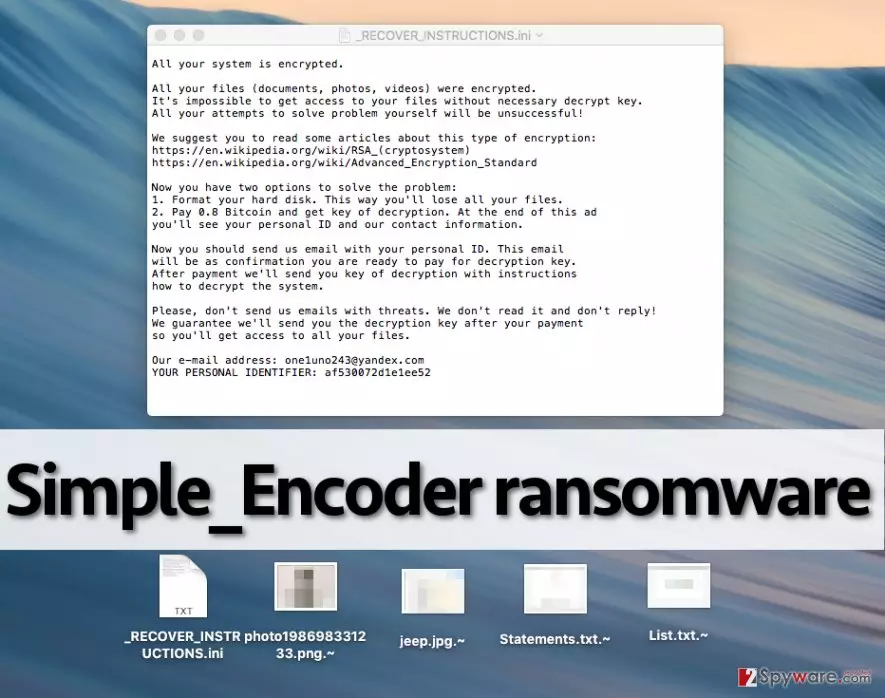
You should know that ransomware is a very powerful virus, and if you haven’t heard about such viruses before, you should read more about such ransomware variants like Locky, CryptoWall, or CryptXXX virus. The bad thing about these viruses is that without having a decryption key, you cannot decrypt your files anyhow. That is why the developers of such viruses suggest buying it, aka paying the ransom. One1uno243@yandex.ru virus asks to pay 0.8 Bitcoin, which is roughly 523 USD dollars. Now, if you have become a victim of this ransomware, we suggest you to remove Simple_Encoder instead of paying the ransom. Our experience in ransomware research shows that computer security experts often than before succeed to discover working and free decryption tools for particular ransomware viruses. Besides, you should forget the idea of paying the ransom also because if you paid, you would fund cyber criminals and their filthy ransomware projects that they might be developing. To remove Simple_Encoder virus, use an anti-malware software, such as FortectIntego. To recover your files, we suggest waiting. You can also restore all your data in case you have a backup drive. Make sure you remove the ransomware before plugging the drive into your computer!
Distribution of Simple_Encoder virus:
Typically, ransomware viruses are distributed via malicious email campaigns. Frauds typically create safe-looking email accounts, which resemble official email accounts of well-known companies. This strategy helps to deceive inattentive computer users and trick them into opening malicious email attachments quicker. As you have guessed, these malicious emails contain attachments, and they are presented as relevant documents, such as invoices, speeding tickets, bills, CVs, and similar files.
Malware also spreads via so-called drive-by downloads, which means that you can download malicious code into your computer and make it vulnerable to cyber attacks just by visiting an insecure web page. Therefore, we suggest you to protect your computer system with a powerful anti-malware in advance and most importantly, keep all your software up-to-date.
How to safely remove Simple_Encoder malware from the compromised computer?
Dealing with Simple_Encoder ransomware is not funny at all, as this virus cannot be deleted as easily as typical computer programs. The developers of this PC threat have designed it to be tricky to uninstall and made sure that it roots deeply into the compromised computer. Therefore, there is no manual Simple_Encoder removal option this time, and we have provided a guide on how to start your computer in a Safe Mode in order to make it possible to start an anti-malware application:
Did this guide help?
5 comments
Steff
I have checked my computer, and discovered that I have an anti-malware software. Ill update it. I dont want to become a victim of ransomware...
cherry9
i cant get my files back, what do i do, help please, someone
Gille
There is hardly something you can do... Probably these researchers are right-you need to wait until someone cracks this virus and creates a decryption tool. You shouldnt pay the ransom... at least I wouldnt do so.
Balenciaga
what do cyber criminals think??? they think they will steal my files and I will willingly pay up for them!!! oh hell no. Id rather be without my files, I wont pay a penny to them.
Simmons
Removed the virus, but cannot open my files. Sad