

MMLocker ransomware virus. How does it act?
MMLocker virus is a malicious Trojan horse that meets characteristics of ransomware virus. It combines two encryption algorithms – RSA and AES to encrypt victim’s files and protect them from being decrypted. It can corrupt files that are stored not only on the computer system, but also on external drives (plugged-in hard disks, USB sticks, CDs, DVDs, and so on). Encrypted data becomes inaccessible, which means that user loses access to his/hers precious files, including family photos, documents, videos, music, and other types of data. MM Locker malware appends .locked file extension to corrupted files without removing the original file extension. This virus can be easily mistaken with Raa virus or Uyari ransomware because they also add this file extension to locked data. The virus, just like other ransomware-type threats changes desktop wallpaper with a threatening message and urges the victim to open a ransom note, which is created and stored on the desktop. The ransom note by MMLocker is called READ_IT.TXT and starts with such words:
Uh oh. It looks like your data has been the victim of the encryption thief. Your files have been encrypted with AES.
The indicated virus aggressively commands the victim to pay 200$ in Bitcoins (approximately 0.501049 BTC). The cyber criminal also tells the victim that the ransom payment must be made within 72 hours; otherwise, he/she deletes the decryption key.
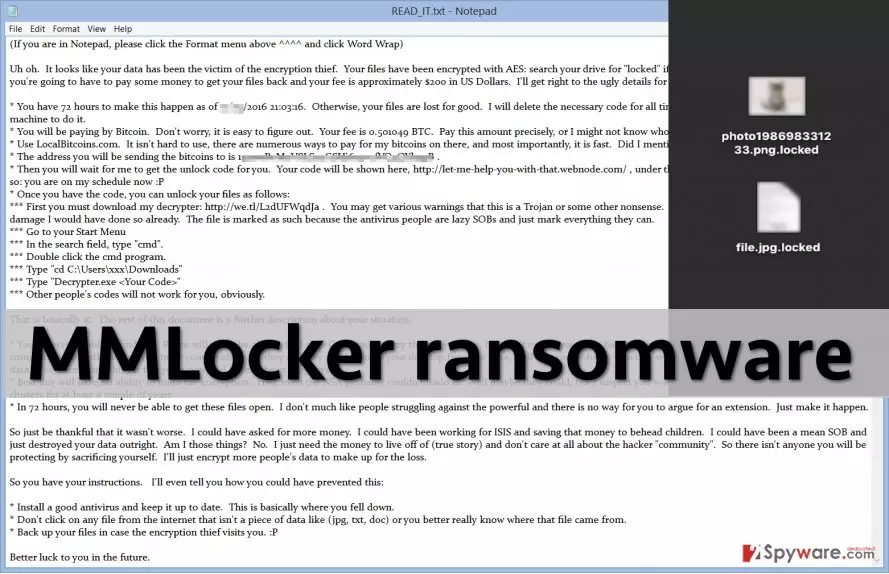
What is also interesting is that the crook gets personal in the message, and leaves a message convincing the victim to pay up as soon as possible. According to the message, the criminal has been running “ransomware” business for five years in a row and that nobody could find him/her yet. He/she tells that the situation “could have been worse” and that the ransom price could have been higher. At the end of the message, the cyber criminal even leaves a short guide telling the victim how to protect the PC from ransomware attacks. This is an exceptional piece of ransomware, and it leaves quite a long note for the victim. Unfortunately, the cyber criminal is right – data cannot be recovered, and you do need stronger computer protection. We would like to encourage you not to fulfill this cybercriminal’s wishes and not to pay the ransom. Instead, remove MMLocker ransomware using malware removal program like FortectIntego. Files can be decrypted using backups, but if you do not have them, you should learn how to create and save them. We also want to say that sometimes IT experts manage to create free decryptors for victims of ransomware. However, before any attempt to decrypt the .locked data, MMLocker removal should be completed first.
How does this virus spread?
MMLocker crypto-ransomware is distributed via spam emails, fake software updates, and malvertising. To put it simply, you can infect your PC with this Trojan after opening a file from unknown source. Such infectious file can look entirely safe; for example, the virus can be injected into Word or JS file, and the idea that such files can be malicious would probably never come to your mind. Sadly, cybercriminals educate themselves, too, and find new ways to spread malware. To protect your computer, avoid opening suspicious email attachment or links because these can immediately inject malware into the system.
How to remove MMLocker?
MMLocker virus is a severe computer infection, and it should be taken seriously. If you are not an advanced computer user, we do NOT recommend you to play around with this threat and try to delete it manually. It is not that simple! This sophisticated malware consists of various components and executive file, which are hidden deeply in the computer system. Luckily, these can be successfully discovered quickly with a help of malware detection software. Use one of the following tools to carry out MMLocker removal, and in case the virus attempts to stop you from doing so, follow steps that are provided below.
Did this guide help?
3 comments
Joel
Could not decrypt my data.... sad.
Renee
MMlocker just infected my computer and I cant stop it, it is decrypting my files now! i have shut it down, waiting for a technician to show up, hope he can fix the problem and save some files...
henriet
It is not possible to decrypt files unless you have the decryption key.