

The latest information about Siddhiup2@india.com ransomware virus
If you seek to keep your computer safe and sound, Siddhiup2@india.com virus is something that you definitely do not want to install on your PC system. This hazardous computer program takes files hostage, leaves a ransom note and demands a ransom for the decryption service. According to our research, this virus belongs to XTBL ransomware family and is closely related to CrySiS and Shade ransomware. It spreads like a Trojan horse, which means that victims can unintentionally download and execute it while thinking that it is a safe file. Once executed, Siddhiup2@india.com virus creates and saves Sidhhi.exe file, deletes Volume Shadow copies, assigns itself to Startup programs and performs other malicious activities. Take note that this virus can automatically restart your computer.
When this virus runs its main file responsible for the encryption process, there is almost no way the victim can notice that it has started. Sadly, the only symptom that indicates something is happening is that the computer performs slower than it usually does. The virus is programmed to detect and encrypt particular files (the malicious program is designed to find certain file extensions). Files are encrypted using AES encryption algorithm, and certain file extensions added to them. Just like other XTBL viruses, it adds a file extension that contains victim’s ID number, email to contact the cyber criminal, and .xtbl extension. For example, a file that is named image.jpg gets renamed into image.jpg.id-[7 random symbols].Siddhiup2@india.com.xtbl. If your files were renamed and if you cannot open them, you must remove Siddhiup2@india.com virus immediately. Automatic Siddhiup2@india.com removal method requires a good malware removal software, so if you don’t have one, we recommend installing FortectIntego or SpyHunterCombo Cleaner software. Please, do not pay the ransom – try this Siddhiup2@india.com decryption tool instead. Before you run this tool, make sure you entirely get rid of the virus first.
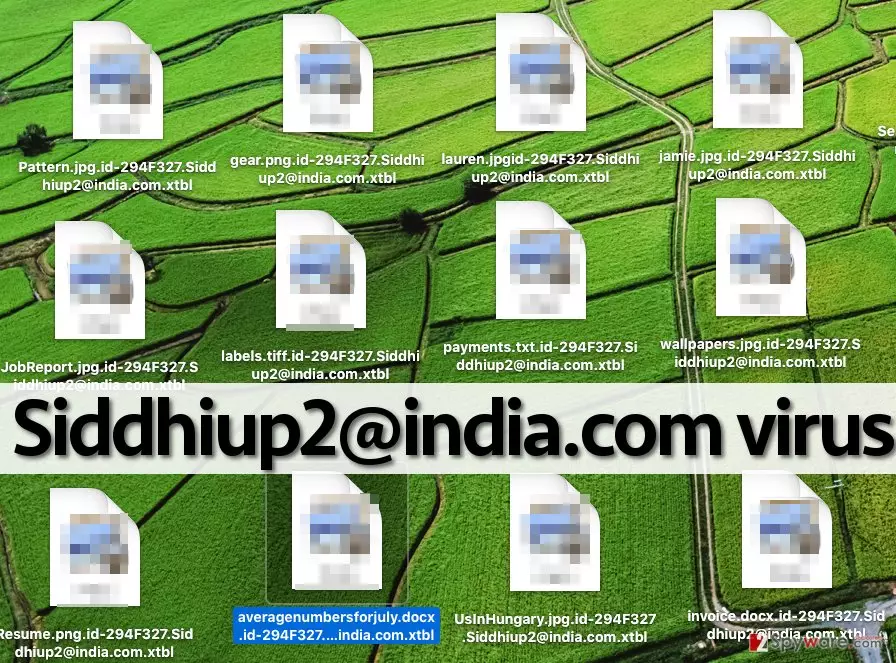
How is this virus distributed?
The indicated crypto-ransomware infection is spread over the web together with other malicious files, with the help of exploit kits and via email as well. It is vital to keep your computer protected with a decent anti-malware program and also take precautions to protect your data from being encrypted. The number 1 tip for those who want to keep their files secured is to create data backups and store them on external devices. In the case of ransomware infection, such backups come in handy. We do not recommend using online storage clouds, because some ransomware viruses are capable of infecting them, too. Next, users who wish to prevent ransomware attacks should stay away from suspicious links, ads, websites and email letters. One innocent click on a link, ad, or email attachment can severely impact your computer system and open a path for malware to get inside your computer system.
Siddhiup2@india.com removal methods
If you have been infected with Siddhiup2@india.com virus, first of all, decide whether you are willing to pay the ransom. We believe that you do not; besides, it is strongly advisable not to do so. You can never know if crooks provide a working decryption tool – it can be a useless executive file containing more malicious components. Besides, a decryption tool is available, so do not waste your money or your time trying to get help from authors of this malicious virus. Below, you can find directions on how to decrypt your files and remove Siddhiup2@india.com malware from the system.
Did this guide help?
Be the first to comment