

“Validate copy of your Microsoft Windows” error – what should be your next move after this pop-up appears?
If you have unexpectedly encountered a request to “Validate copy of your Microsoft Windows,” chances are, your computer is infected with “Validate copy of your Microsoft Windows” malware, which is better known as Fake Windows Activation virus. This virus proliferates due to Trojan horse technique used for its distribution and manages to infect many computers this way. Once installed, this malicious program launches a fake screen stating that user’s Windows copy did not pass genuine validation/appears to be pirated/or cannot be activated for some other feigned reason. Such virus ALWAYS displays a “Toll-free” technical support number asking the victim to dial it for help. In this case, the virus can display this or a similar line in the message:
Contact Support US/CA Toll-Free 1-800-931-9159
However, people behind phony 1-800-931-9159 tech support line are scammers who seek to take advantage of miserable users who do not know how real Windows Activation screens look. Scammers that pose as “certified Microsoft technicians” typically just pull the wool over victim’s eyes and tell tales that computer has some problems that can be fixed only with particular paid software. However, scammers might also ask you to provide personal information, for example, credit card details, for some bizarre reason, for instance, “to verify your identity.” In some cases, scammers ask to provide them remote access to the computer so that they can fix the computer. Do not react to such trickeries and stay cautious. If you ever call a vague tech support number and the person on another end of call asks you to buy a particular software, provide your bank card details or even give him/her remote access to your PC, hang up. For “Validate copy of your Microsoft Windows” removal, we recommend using the FortectIntego software. You must remove “Validate copy of your Microsoft Windows” without any hesitations because the program displaying this screen to you can be more dangerous than it seems at first sight.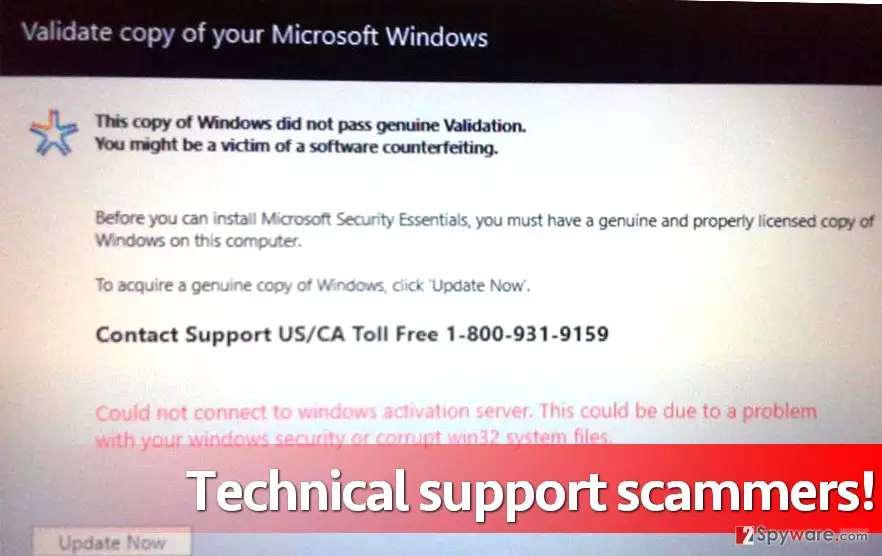
How such malware gets into the system?
You can unknowingly install “Validate copy of your Microsoft Windows” malware when installing another deceptive program using Default or Standard setup settings. Please, do not rely on these settings and better opt for Custom or Advanced option. Either one or another option gives the opportunity to see additional downloads bundled with your selected software and allows you to opt-out unwanted ones. Alternatively, you might install this malware after opening a malicious email attachment, visiting a deceptive website and downloading some files from it, or by performing other reckless activities online without following safe-browsing practices.
How to uninstall “Validate copy of your Microsoft Windows” malware?
If you wish to remove “Validate copy of your Microsoft Windows” virus, you should follow instructions given below. Boot your computer into Safe Mode first and then update your antivirus to update its database and make it capable of identifying this threat. If you do not have an anti-malware tool, you can install FortectIntego or another trustworthy program. You can also find some other recommended programs below the article. Let it scan your computer system, do not interrupt it, and it will automatically complete “Validate copy of your Microsoft Windows” removal.
Did this guide help?
3 comments
Jady
God damn, scammers are crafty. I have attempted to call them and waste their time, but their line was busy. Guess these scammers work extra hours trying to deceive more and more people!
Daniel
Filthy scammers! How dare they use such techniques to deceive miserable users. I hope you get caught one day. Tech support scammers have no morals...
brexton
Removed this with my anti-malware.