

The menace of Hades Locker ransomware spreads at an alarming rate
The curious case of Hades Locker virus shows that authors of Wildfire ransomware decided to fight the bad fortune back and make a adamant ransomware. In the past, malware researchers managed to put this virus under control after taking down its Command and Control servers. However, HadesLocker ransomware is a brand new software released by same people behind WildFire, and it seems that this time crooks managed to develop the program carefully – this time, it might not be possible to decrypt Hades Locker. Once installed, this malicious software loads ip-api.com/xml site, which determines where the victim is from, including information such as country code, region name, city, zip code, internet provider, IP address and even coordinates of the place where the compromised computer is! Next, it sends this information to C&C server. The server then responds to the filthy virus and delivers a unique AES encryption key, which will be used to lock all victim’s files. During the encryption, HadesLocker malware adds specific file extensions that consist of .~HL and first five symbols of the encryption password. It must be noted that the program is set to target a wide range of file types, so once it finds a file with a particular file extension that is included in its target list, it encrypts it. The virus is set to encrypt these file types:
.apk, .bmp, .cdr, .cer, .chm, conf, .dat, .db, .dbf, .djvu, .dbx, .docm, ,doc, .epub, .docx .fb2, .flv, .gif, .gz, .iso .ibooks,.jpeg, .jpg, .key, .mdb .md2, .mdf, .mht, .mobi, .mp3, .mp4, .mhtm, .mkv, .mov, .mpg .mpeg, .pict, .pdf, .pps, .pkg, .png, .ppt .pptx, .ppsx, .rtf, .scr, .swf, .sav, .psd, .rar, .tiff, .tif, .tbl, .torrent, .txt, .wmv, .xls, .xlsx, .xps, .xml, .ckp, zip, .java, .py, .asm, .c, .cpp, .cs, .js, .php, .dacpac, .rbw, .rb, .mrg, .sql, .sqlite3, .sqlite, .sqlitedb, .psd, .psp, .pdb, .dxf, .dwg, .drw, .casb, .ccp, .cal, .cmx, .css, .csv, .cr2, .3gp, .7z, .avi., .dcx, .db3, .vsd.
Of course, the virus bypasses some folders to keep the computer running, and these directories are:
- Recycle bin;
- Windows;
- Program Files;
- Program files (x86);
- System Volume Information.
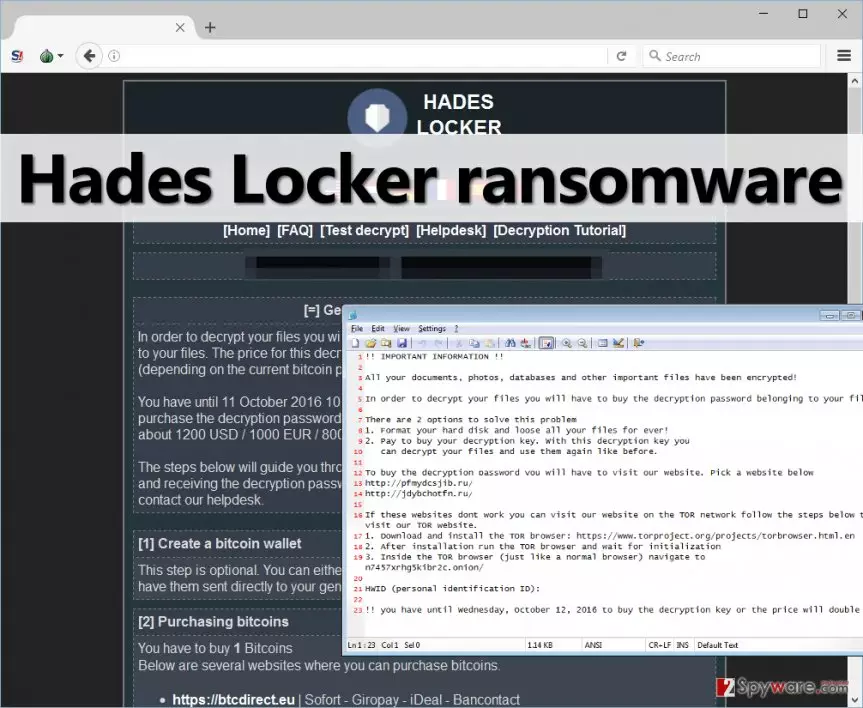
The virus then drops a ransom note into every place on the computer where it has encrypted at least some files. The ransom note traditionally arrives in three different formats, and surprisingly, the text these ransom notes is the same that Locky virus displays.
- README_RECOVER_FILES_[victim’s ID].html;
- README_RECOVER_FILES_[victim’s ID].png;
- README_RECOVER_FILES_[victim’s ID].txt.
The note either opens in Notepad, media viewer or web browser, depending on the file format. These notes hold the same information as any other ransomware virus provides – instructions on how to decrypt encrypted data. The victim is asked to download Tor browser, access a particular page via it, and pay the ransom to get the decryption key. Hade Locker wants either 600 USD, 500 EUR or 400 GBP, and according to cyber criminals, this sum of money in Bitcoin currency (around 1 BTC) should be transferred to provided Bitcoin address. What is more, Hades Locker payment site provides several additional pages, including FAQ, Test Decrypt, Decryption Tutorial, and Helpdesk. Here is what we learned about these pages:
- While typical ransomware projects allow the victim to test the decryption tool, it was impossible to upload any files to the Test Decryption page, which gives us a suspicion that there might be no decryption tool at all.
- The Help Desk page allows to enter and submit a message to ransomware authors.
- The Decryption Tutorial section provides a short tutorial with pictures explaining how to decrypt files with Hades Locker decrypter.
- The FAQ page provides answers to popular questions that victims ask. What is interesting is that criminals explain why victims should rely on them and pay the ransom – according to them, if they didn’t provide a working decryption tool, the word would spread fast and nobody would pay ransoms then.
If your files have been encrypted by Hades Locker ransomware, please look for any backups you have and recover your data from them – we do not recommend you to pay the ransom. Before you take any measures regarding data decryption, please remove Hades Locker virus first using FortectIntego, SpyHunterCombo Cleaner or another strong anti-malware tool. You must finish Hades Locker removal before decrypting your files!
The circle of ransomware victims broadens every day
HadesLocker reportedly spreads via Kelihos botnet, which earlier has been used to spread Wildfire ransomware. This botnet has also been used to spread CryptFile2 and JokeFromMars ransomware, which makes us think that these viruses are closely related. There are more ways how such malicious files infiltrate into victim’s computer system, so we encourage computer users to take mandatory security measures such as:
- Do not open suspicious emails sent by unknown individuals – ransomware mostly proliferates via spam email campaigns. Such infectious email letters are supplemented with hideous email attachments or links included in the message, which, once opened, drops the ransomware payload on the system.
- Avoid clicking on suspicious ads that aggressively show up on your screen whenever you browse the Internet. We highly recommend you to avoid clicking on ads that originate from adult-content websites, gambling or gaming sites.
- Never agree to install any type of program or its update from sites that have nothing in common with the developer of that software. Such bogus downloads are typically filled with malicious executive files.
- Install anti-malware software that can protect you from high-risk Internet sites and block malicious downloads.
What is the best way to remove Hades Locker virus?
Ransomware viruses, just like HadesLocker virus tend to be stubborn and refuse to go away; besides, they do not provide uninstallers, so it takes much longer to remove them from the system. However, with an updated anti-malware tool, you can remove Hades Locker virus and its files quite quickly. To launch the anti-malware software or to download it from the Internet, you will need to start your PC in Safe Mode with Networking. For that, please follow these Hades Locker removal guidelines:
Did this guide help?
4 comments
Lara
Got my PC blocked by this nasty virus this morning. all files gone..
bmx
Locker locked my files. how nice is that. I freaking need them!!! so wheres the decryption tool tho
awolnation
oh lord. no way to get data back?
jeff
HADES LOCKER, I HATE YOU. BUT I AINT GONNA PAY THE RANSOM!