

What do we know about Kostya ransomware?
Kostya virus (also known as K0stia) is a Russian-named ransomware which hails from the same family as previously-released viruses Petya and Mischa. Though the real relationship between Kostya and the these viruses is not yet defined, we cannot turn down the possibility that this virus is yet another nasty work of the Russian hackers. It is interesting, though, that this Kostya is country-oriented and infects computers located in the Czech Republic. Its victims are asked to pay a ransom of 300 CZK which is equal to $12, so we must admit that this is one of the cheapest ransomware-type viruses.
However, no matter how much does it ask from its victims, it works like any other ransomware. According to PC experts, K0stia relies on AES-256 encryption key that it uses for encrypting its victims’ files. As soon as it enters the system, it starts scanning computer’s hard disk and other locations for popular file extensions, such as .pdf, .jpg, .png, .mov, .avi, .pptx, .bmp, .doc, .docx and tens more. Good news is, that the virus only infects the C: drive, while D: partition usually remains untouched. Nevertheless, if you keep the most of your important documents on the C: drive, the consequences of this ransomware attack may be disastrous. It is especially important to remove Kostya virus from the infected device as soon as possible, because, otherwise, you may lose your files forever. Remember that it is no less essential to use reputable antivirus software for the ransomware removal. We suggest trying out FortectIntego.
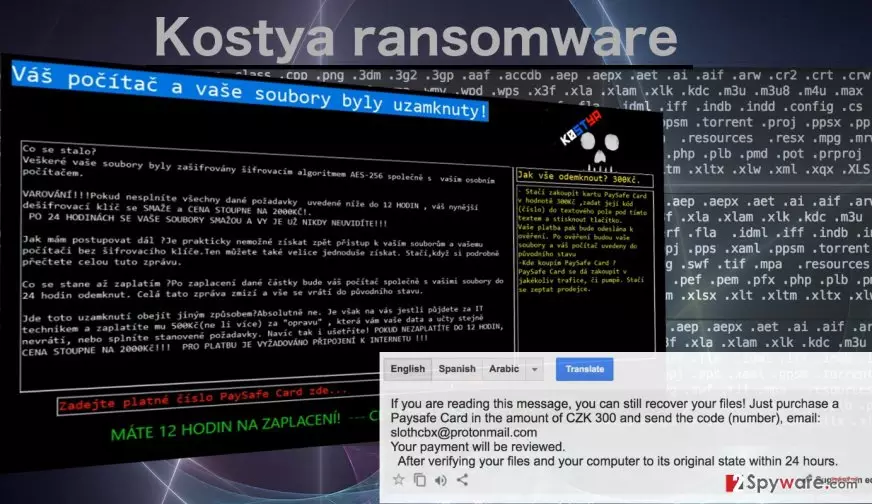
It might seem quite unusual that the criminals behind this virus only ask for 300 CZK (around 12 USD) for the decryption of the infected files. The sum is ridiculously low compared to what other ransomware developers typically demand. Nonetheless, this does not mean that after you pay this money, you files will be returned. It is most likely that such strategy is only a way to get the victims involved and collect more money. Besides, the extortionists threaten to increase the ransom to 2000 CZK (around 80 USD) if the victim fails to comply with the initial requirements. Finally, within 24 hours after the attack, you may lose access to your personal data completely if you fail to transfer the 300 dollars-worth PaySafeCard to the hackers. The payment can be made via the web or sent directly to the hackers’ email slothcbx@protonmail.com. If you want to check a ransom message which is displayed by K0stia ransomware, you can read it here:
Co se stalo?
Veškeré vaše soubory byly zašifrovány šifrovacím algoritmem AES-256 společně s vaším osobním počítačem.
VAROVÁNÍ!!!Pokud nesplníte všechny dané požadavky uvedené níže do 12 HODIN , váš nynější dešifrovací klíč se SMAŽE a CENA STOUPNE NA 2000KČ!.
PO 24 HODINÁCH SE VAŠE SOUBORY SMAŽOU A VY JE UŽ NIKDY NEUVIDÍTE!!!
[…]
Jak vše odemknout? 300Kč.
– Stačí zakoupit kartu PaySafe Card v hodnotě 300Kč ,zadat její kód(číslo) do textového pole pod tímto textem a stisknout tlačítko.
Vaše platba pak bude odeslána k ověření. Po ověření budou vaše soubory a váš počítač uvedeny do původního stavu
-Kde koupím PaySafe Card ?
PaySafe Card se dá zakoupit v jakékoliv trafice, či pumpě. Stačí se zeptat prodejce.
If the virus is curbed before the time runs out, you may still have the ability to save your files. Though there is currently no way of decrypting the documents to which this virus has already pinned its unique .k0stya extension, there still might be a chance to recover these files using Windows Previous Versions feature or data recovery utilities such as Data Recovery Pro or Shadow Explorer. All of these methods are described in more detail below the article. But before you start anything, make sure you take care of the Kostya removal first.
What do I need to know to avoid ransomware?
The most common way Kostya ransomware gets on the computers is with the help of malicious spam campaigns. We should note that since this virus is oriented to the Czech users, the infected emails will most likely be written in the Czech language too. Though we have no information about the content of these emails, what we know for sure is that they will include attachments carrying the malicious script. Kostya virus may try to deceive the users by adopting the form of a regular PDF, Word or EXE document. After such files are opened, the virus may start the encryption.
How can I remove K0stia?
Hoping for an easy Kostya virus removal would be quite an underestimation of this malicious cyber threat. Many things can go wrong in the process. For instance, manually eliminating the infection is strongly inadvisable because you may lose your files or damage your computer without even having had the chance to fix it. Less risky is the automatic Kostya removal. The antivirus utilities that need to be employed for this purpose can remove the virus quite easily. Nevertheless, if the virus is malicious enough to block the system scan, you may not be able to remove Kostya that simply. Luckily, we have a quick fix for this issue. Antivirus unblocking instructions can be found below.
Did this guide help?
Be the first to comment