

What makes DummyEncrypter an exceptional ransomware?
DummyEncrypter virus has several names – DummyEncryptor or DummyLocker virus, and it is an example of a ransomware-type computer program. According to malware researchers, this malicious program is a mixture of a screenlocker and crypto-ransomware. The executable file of this virus looks like a regular CCleaner installer, but instead of installing the well-known computer optimization software, it delivers ransomware payload. Luckily, it is an educational ransomware, which does not affect personal files. It has been developed to warn computer users and show them how easily ransomware can infiltrate a computer system. Following a successful infiltration, DummyEncrypter ransomware opens a window providing information about the ransomware attack and announces that files are encrypted with the AES-246 cipher. The whole ransom note is written in a horribly broken English, and instructions on how to decrypt data are hardly understandable. DummyLocker virus commands to “access the software provider and follow the introductions.” It is not clear what software provider the user needs to access and why criminals suggest following introductions and not instructions in order to get DummyUnlocker.
The indicated ransom note has two buttons at the bottom – one of them says “I can’t understand what you are saying,” and flashes additional message once the victim hovers the mouse over it – “Just grab someone who knows computer and let that person help you.” Another button says “I know, close this dialog.” The ransomware adds .dCrypt file extension to user’s personal files, but hardly touches them on a structural level. The victim might be surprisingly shocked and feel an enormous relief after clicking on any .dCrypt file hastily – the file will be opened without any issues. If you have been attacked by this virus, understand that your PC is vulnerable to malware and you should take actions to protect it. Otherwise, the next ransomware attack can destroy your files for good. We recommend you to remove DummyEncrypter malware as soon as possible – you can use FortectIntego or SpyHunterCombo Cleaner software for that. 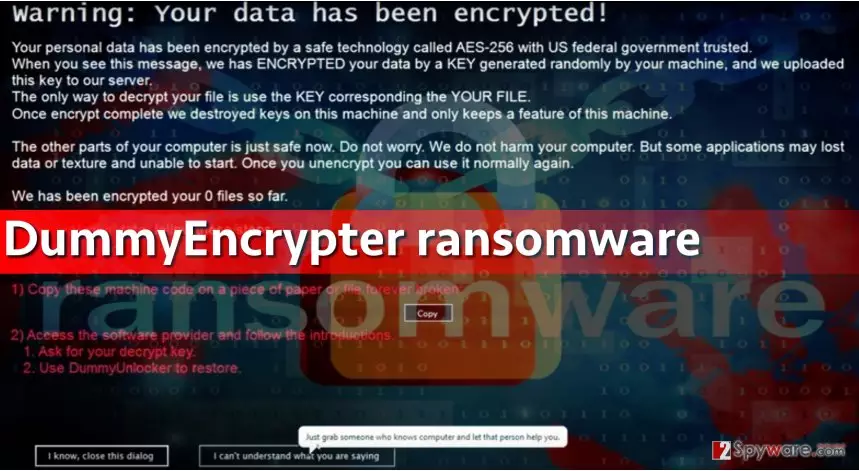
Actions to take to protect the PC from ransomware attacks
DummyLocker is generally delivered to victims via email-based distribution method. Malicious spam campaigns provide deceptive messages that are supposedly sent by banks, health organizations, or other reputable institutions. Such letters kindly invite the victim to open attached files and view their contents. However, before doing so, one should think twice. The main thing computer users should think about before opening email attachments is whether they are familiar with the sender of the email. If the answer is negative, users should bypass such emails.
Additionally, ransomware spreads in a bundle with fake software updates, so please be careful! Bear in mind that phony websites frequently advertise fake Java or Flash Player updates that are filled with malicious components. If you need these programs or if you want to update them, rely only on their official websites.
To learn more about other ransomware distribution techniques, please read this article – Preventing Locky virus: 5 tips for taking control.
Get rid of Dummy Locker virus quickly
If your computer has been touched by this fake ransomware, you should, without a doubt, remove DummyEncrypter virus as soon as possible. To do this, we recommend using anti-malware software like FortectIntego. This program can clean your PC from spyware/malware entirely. Although in this case, you might not need to boot your PC in a Safe Mode with Networking, we have added them just in case. And remember – ransomware cannot be ignored. In this case, it hasn’t encrypted your files because it was meant to warn you about ransomware menace. There are hundreds of destructive viruses that encrypt data with strong ciphers and ask for huge ransoms, for instance, Locky virus, Cerber virus, or Zepto.
Did this guide help?
3 comments
Cleo
No matter if its educational or not, ransomware is nasty.
Lize
I got so scared omg. But i can open my files, thats good...
savage
DummyEncrypter didnt touch my files, too. I am definitely gonna backup my files now!