

Russian Gingerbread ransomware asks you to help the criminal pay the home rent, encrypts files at the same time
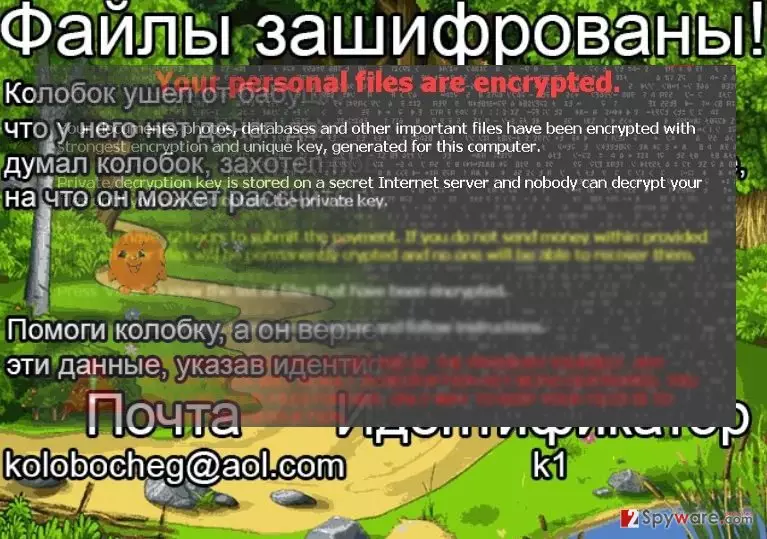
Gingerbread virus distinguishes itself from other ransomware examples because it provides quite a unique ransom note. Instead of threatening the victim to delete or publish personal files or destroy the decryption key if the victim recants paying the ransom, it tells a tale about gingerbread that went away from its grandparents and could not pay the home rent. According to the ransom note, Gingerbread has decided to ask computer users for help but encrypt their files to encourage them to “donate” money. Though hackers tend to use amusing titles for their ransomware projects, it is unwise to underestimate them. Although this virus is not as sophisticated as Locky ransomware, it still can cause a lot of trouble for its victims. Nonetheless, there is no need to panic and rush to comply with crooks’ demands. First, you need to remove Gingerbread completely from the device. Only after removing the virus you can concentrate on data decryption. More explicit information about Gingerbread removal peculiarities and file recovery is provided below the article. Keep in mind that it is very hard to eliminate viruses like this one manually, so we recommend you to use the FortectIntego software.
While Cerber’s successive versions, 4.1.0, 4.1.1, and 4.1.5, and Locky keep terrorizing the virtual community, there are multiple minor cyber threats. @aol.com themed viruses had occupied the cyber stage for a while a few months ago, but it seems that their developers are back in business. This ransomware was named “gingerbread” after famous Russian cartoon character. This time the swindlers present even an entire story for their victims:
Gingerbread went away from grandma and grandpa and found out that he doesn’t have money even to pay for his home rent! He thought long, wanted to hang himself – but couldn’t. And after all he can rely on something – your help!
Help Gingerbread, and he will give back your files to you! Write down the information for identification on the email below:E-mail – kolobocheg@aol.com
Identifier – {ID}
For more information – filesencoded.com
Despite such childish story, the essence remains the same – pay the ransom in exchange for the files. However, such act may turn out into to be futile as the crooks are not obliged to return any data. It purely depends on their sense of conscience. It is likely that when you contact the crooks via the given email address, you may only get mocked even more or receive no response at all. As for the operation, the ransomware employs AES and RSA algorithm to encode the data. As Gingerbread malware belongs to the notorious group of viruses, it is likely to append .xtbl extension to all the files. Unfortunately, the data encrypted with this technology still presents a challenge for IT experts. However, do not waste time and remove the virus from the device.
Methods of dissemination
It is likely that you facilitated Gingerbread hijack when you were carelessly opening spam messages. This ransomware may as well hide in a fake tax report or an exploit kit. Concerning the former, the crooks make up persuasive deception drawing the users into their trap. Therefore, virus researchers and cyber law enforcement institutions warn users not to open any suspicious emails even if they pretend to be the emails sent from the very FBI! The hackers do not know the right measure where to stop and have no morals so you can expect anything from them. In addition, it is essential to improve your security to ward off exploit kits which might be carrying Gingerbread ransomware. They are fraudulent files which deliver the ransomware payload in the disguise of a smaller file. What is more, they may also escape the detection of security applications. Updating the tools daily might be vital. Finally, avoid clicking on intriguing web ads that promise you brilliant business or weightloss plans. Such ads can point you to deceptive websites that contain malicious files, and can trick you into installing or opening a destructive file that starts malicious processes right away.
Delete Gingerbread ransomware virus from the compromised PC
This category of threats keeps causing serious damage and huge financial losses worldwide. What is more, this malware is still quite complicated, so we recommend you to remove Gingerbread virus from the device completely with the help of a proper security tool, for example, FortectIntego or MalwarebytesMalwarebytes. These programs will deal with the virus completely without leaving any malicious files. In addition, you may check the guidelines for access recovery if you are having Gingerbread removal problems. Lastly, some of the below-recommended tools may help you retrieve your files until virus researchers publish the decrypter.
Did this guide help?
3 comments
tristytrust
Of course, its funny if you are not a victim yourself/...
XPliz
I wonder, what ransomware is about to appear.
Phosphorus4
Damnn it, can;t find the decrypter!