

What is known about Suppteam03@india.com ransomware?
Suppteam03@india.com virus is also known as Sysras ransomware because the main virus’ file that wreaks havoc on the computer system is called sysras.exe. The virus is designed to look like Cryptolocker. Once installed, it encrypts all files and leaves several Your files are locked !.txt files on the desktop. The virus displays a lock screen that looks identical to CryptoLocker’s, and also copies this virus’ technique and changes the desktop picture with an image containing information how to recover the sysras.exe file in case user’s antivirus deletes it. According to the information provided in this picture, data recovery is impossible without that program. This ransomware-type infection urges the victim to pay the ransom as soon as possible; otherwise, it gets destructed. The victim can recover Sysras virus from antivirus quarantine or contact scammers via Suppteam03@india.com or Suppteam03@yandex.ru and ask them to provide the malicious file.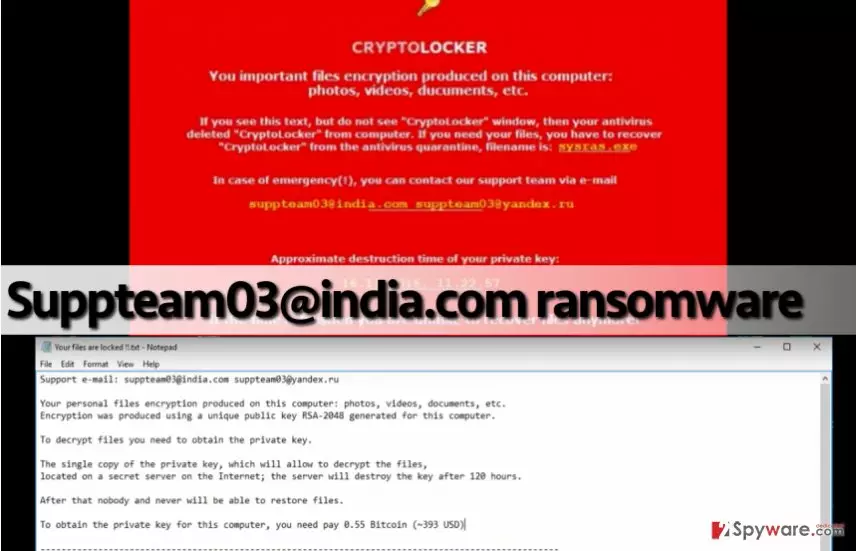
The text file left on the desktop provides more information. It informs the victim that all personal files have been encrypted and in order to decrypt them, the victim needs to obtain the private key. This key can be purchased within 120 hours from the infection date for 0.55 Bitcoin (virtual currency), which equals to $412. However, other sources state that virus required for a different amount of money, which means that criminals might ask for a random sum of money ranging approximately from 0.5 BTC to 1.5 BTC. If your PC has been infected with Suppteam03@india.com ransomware, we highly recommend you to protect the system by running anti-malware software. It will remove Suppteam03@india.com virus and all files associated with it for good and leave your PC nice an clean. However, anti-malware tools cannot decrypt files, so for that, we suggest using data decryption software such as Data Recovery Pro or Recuva. These tools might not help you to recover all files, but you can recover all of them in case you have a data backup. Before you plug data storage device into your computer, make sure that Suppteam03@india.com removal is complete.
How this ransomware variant spreads?
This virus is mainly delivered via malicious email spam, so be careful when opening letters in your Inbox! Sometimes criminals pretend to be representatives of well-known companies but do not rely on their words. We suggest you look at sender’s email address and try to understand whether it seems dependable or not. You must know that official employees of giant companies do not send out letters to clients from email accounts such as bellasmiths916262@protonmail.ru or specialoffer_2736@india.com. Therefore, you should never trust such emails and remove them from your Inbox ASAP. Such emails commonly deliver malicious attachments that victims only need to open to install ransomware on the system.
How can you remove Suppteam03 virus?
If this virus attacks a computer, it can seem that there is no way out. However, there are some data recovery techniques that can help you to recover lost data, so you should try them out. Please do not pay the ransom if you do not want to lose your money among your files. By paying the ransom, you only rely on criminals’ promise, and obviously, it has no value. Therefore, we recommend you to remove Suppteam03@india.com virus without a doubt – the sooner, the better. For Suppteam03@india.com removal, start your device in a Safe Mode with Networking first.
Did this guide help?
4 comments
Kevin
Thats not Cryptolocker, but still not decryptable?
ansi6a
I cannot believe my files are gone. I have no money to pay the ransom. Not sure if Id do that If i had the money, tho...
Vibez
Thanks God I have a backup...
Sandra101
Stupid virus. I need my files back!