

New Locked-In ransomware approach: what has changed?
Malware researchers are on the hunt for new ransomware variants, and today we’d like to present new Locked-In virus variant. Traits of this ransomware project were discovered in the past and used to append .novalid file extensions to encrypted data[1]. This time, the virus has another name and is known as Locked-in ransomware or RemindMe ransomware virus. The virus uses AES-256 encryption[2], which is hard to crack, however, there are some flaws in this virus’ code that actually can help malware analysts discover a method to decrypt victims’ files for free. Therefore, if you’ve become a victim of this virus, do not rush to take your credit card and pay the ransom these frauds demand, because shortly it might be possible to recover lost data for free.
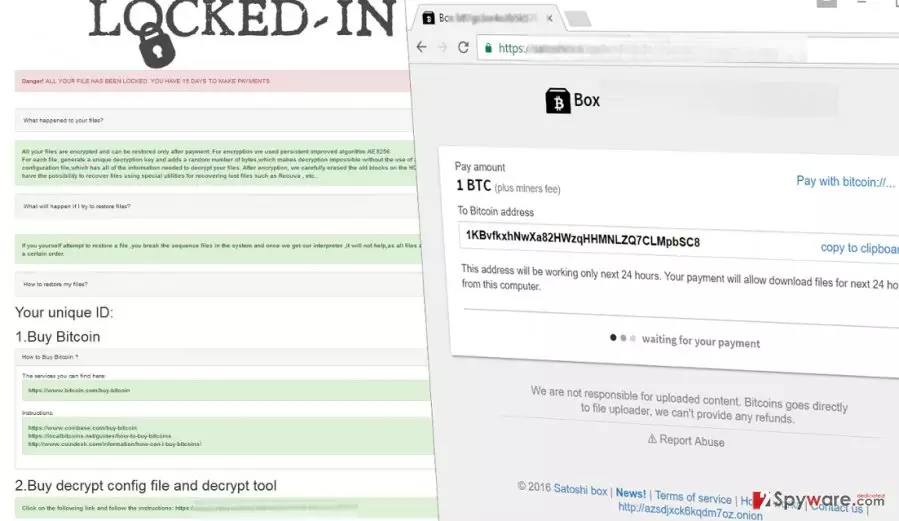
Differently than the .novalid virus, the new Locked-In ransomware leaves a ransom note titled RESTORE_CORUPTED_FILES.HTML, which looks quite similar to the one that previous virus’ version used to drop on victims’ desktops. The virus explains that files have been encrypted and that the only way to revert them to their initial condition is to pay a ransom and obtain a decryption key+software. According to the payment page we’ve got to access from the malware example we’ve tested, crooks want 1 Bitcoin as a ransom. Again, you should not pay the ransom as long as malware analysts mention that free decryption might be possible. This happens when ransomware authors are amateur programmers who, luckily, can’t do malicious activities properly. So now you should be thinking about Locked-In removal. You can get rid of this virus with the help of anti-malware tools like FortectIntego or SpyHunterCombo Cleaner, or antivirus if you have one. Please do not try to remove Locked-In malware manually as it is a highly complicated procedure that shouldn’t be carried out by inexperienced PC users. To learn how to properly delete the infection, see instructions presented under the article.
How did my PC get contaminated with this malicious virus?
Ransomware uses very similar distribution techniques as the vast majority of malevolent computer programs[3]. It obfuscates itself as a safe-looking file and spreads via email, malware-laden ads, and sometimes via exploit kits. Of course, the most efficient technique to defend your computer from malware attacks is to set up a proper anti-malware protection. On top of that, you should follow your common sense when opening links, emails, email attachments, and any other files on the Internet as they can look secure, but be harmful in reality. You do not want that to happen, so keep all your software up-to-date, install a proper anti-malware solution, and avoid suspicious material online[4].
Can I remove Locked-In virus manually?
We highly recommend you not to try this unless you are an experienced IT expert or programmer. It is hard to remove Locked-In virus as it is a sophisticated and hideous computer program, which spreads malicious files on the system in various folders and also modifies Registry Keys[5]. The wrong configuration of Windows Registry or elimination of the wrong files can lead to problems such as system instability and so on. Therefore, we suggest you automatic Locked-In removal option, which is precisely described down below.
Did this guide help?
4 comments
tuesday
Thank you for removal instructions, lets just all hope the decryptor will be released soon.
Qwerty123
Its so annoying that I dont have a backup. I was thinking about creating one about a week ago, boom, its too late. files are encrypted.
jolmz
I hate ransomware!!!
proof21
Thanks for explaining the situation... Damn criminals... encrypting files to make a living...