

What is known about the mysterious ihurricane@sigaint.org ransomware?
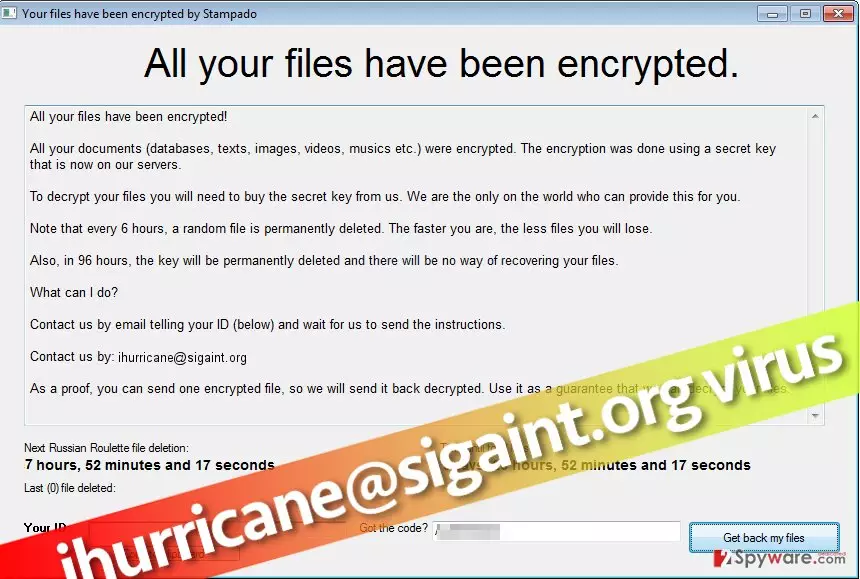
There is a great chance of getting infected with ihurricane@sigaint.org virus because this ransomware-type[1] infection is actively promoted via dark web pages and suggested as a money-extortion tool for cyber criminals. Reportedly, the tool is available on the dark web forums[2] for only $39 USD. In other words, it is likely that the same virus is going to be distributed by a group of hackers at once. ihurricane@sigaint.org ransomware is known to be technically similar to Stampado ransomware, so changes are high that you will be able to recover your files in case they will be encrypted by ihurricane@sigaint.org ransomware because malware analysts managed to create a Stampado decryption tool shortly after this virus’ emergence.
Upon arrival to the target computer system, this crypto-Trojan starts scanning the system and encrypting target files on its way. Unfortunately, the virus secures each record with a mixture of RSA and AES ciphers[3], making them completely inaccessible and useless. The reason why this malicious software does it is that it simply wants to steal user’s rights to his personal files that definitely mean a lot to him. Such loss causes frustration and nervousness and forces the victim desperately look for a way out. That is why the virus crafts up and saves a decryption note on the desktop, leaving instructions on how to pay the ransom. According to the ransom note, paying the ransom is the only way to get the decryption key and software that can revert files to their initial state. However, we want to warn you and tell you that there were cases when ransomware authors simply disappeared after receiving the ransom, failing to fulfil their promises[4]. If you do not want to be scammed by ransomware developers and lose your money the way you lost your files, just do not pay the ransom and remove ihurricane@sigaint.org virus from the system. FortectIntego and SpyHunterCombo Cleaner are the programs that can help you with ihurricane@sigaint.org removal. Remember – you shouldn’t be trying to delete files you believe belong to the ransomware because you can be wrong. Deleting wrong files clearly results in system instability, slowdowns, and similar problems.
Details about distribution of ihurricane@sigaint.org malware
Research shows that the hearth of ihurricane@sigaint.org ransomware distribution was a compromised website – jmhare[.]com, which was used to disseminate the malicious software. The reason why we are talking about the past is that this infectious website was suspended recently and it is no longer possible to enter it. According to information we have received, the virus was distributed with a help of a malware dropper. Reportedly, the virus was distributed as an obfuscated file titled as AVG_5Years_Antivirus_Activated_2017. This file clearly looks fake – it promises 5 years of free AVG antivirus use. Once activated, this file installs the malware dropper[5], which then connects to a remote server and gets the virus’ executable from there. As you can see, it is a perfect example that pirated software is very dangerous and often used as bait to trick inexperienced computer users into installing malware on their computers. Other ransomware examples are mostly distributed via email, so we suggest you stay away from shady-looking email letters that reach your Inbox. Remember that scammers pretend to be employees of well-known companies such as Amazon, Paypal, or even healthcare organizations. We suggest you inspect sender’s email address before even looking at the email message or files attached to it.
Getting rid of ihurricane@sigaint.org malware
If you have unwillingly installed ihurricane@sigaint.org virus on your computer system and your files are encrypted now, the first task that you should take care of is ihurricane@sigaint.org removal. Once you remove ihurricane@sigaint.org ransomware, you can begin the data recovery procedure. Clearly, the easiest, fastest, and safest way to recover lost data is to import saved data copies from a backup. If you do not have a backup, it will be harder to recover lost files. We suggest you take a look at data recovery solutions described below.
Did this guide help?
2 comments
sergio
horrible malware.
Jeffrey
I know! It has infected my computer and i cannot get rid of it!