

“Seu windows foi sequestrado” virus: another well-devised scam
“Seu windows foi sequestrado” virus has been spotted in the wild quite recently. The Portuguese users are the main target as the message of the malware is presented in the respective language. It is none other than a tech support scam[1]. The crooks managed to create a virus which locks a computer screen. Less experienced users might fall for this trick as the malware resembles the official Windows notification. However, a second look reveals mistakes which give out it is a scam. Every tech support scam contains a phone number or email address. The cyber villains want the victims to contact them and pay for computer “repair” services. If you happen to fall into the list of victims, do not panic but instead remove Seu windows foi sequestrado. In this case, FortectIntego will be of help to terminate the infection.
The world of viruses is vivid and ever-evolving. Crooks manifest their mastery and creativity by finding most unexpected forms of deception[2]. Most popular of them are Windows-related scams. In previous years, crooks did not try hard to craft a scam identical to the notifications of this operating system. Now racketeers have achieved such level that the virtual community might need to strain their eyes to notice the crucial flaw in counterfeited message[3]. Some tech support scams such as Admin user is disabled even locks out a Window user of his account. In this case, the Portuguese hackers intended to fool victims with a Windows error message. The content of the message exerts pressure on victims by deceiving them that their device has been heavily infected with malware. As for the solution to cease Seu windows foi sequestrado screenlocker, the message suggests contacting a tech support specialist. In addition, an email address –nardimayer@mail2tor.com – is provided.
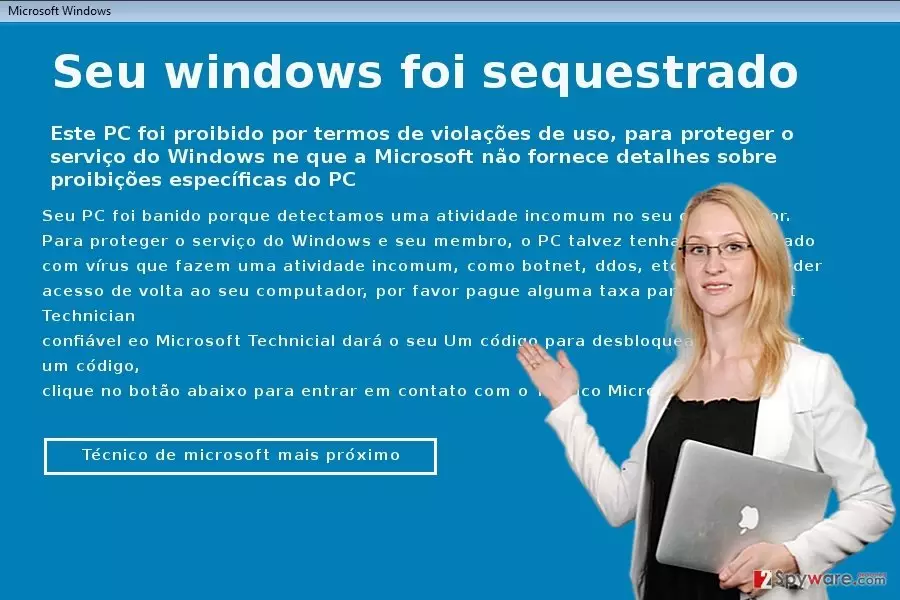
In the case of a real Windows notification, it does not disclose any email address nor phone numbers. What is more, the name of the email suggests that the crook has been using Tor to disguise his identity. Tor network is popularly used not only by political activists and users, who prefer staying anonymous online, but by cyber villains of various ilk. One of the most irritating feature of this scam is that it locks the computer screen. However, you can unlock it with the following set of numbers: 3458966021784633. Thanks to the virus researchers, this code has been acquired, and users did not need to contact the penetrator nor buy the unlock key. Once you type the mentioned key, another window emerges mocks the victim and provides instructions how to remove the virus. According to these instructions, you have to enter into Safe mode. Once you navigate to Program Files on your local disk, locate the folder named Bitcoin_BOT_2.2. Later on, you have to enter Registry Editor. Click windows+R, Type “regedit”. Then, find the folder HKEY_CURRENT_USER\Software\Microsoft\Windows\CurrentVersion\Policies\System and delete it. Besides these instructions, it would be better to eliminate all remaining elements with an anti-malware security application, such as FortectIntego or MalwarebytesMalwarebytes.
How does this message spread?
There are too many speculations how this threat penetrates into operating systems. The dominating method remains to be via corrupted websites. At this rate, it is not difficult to encounter such web page even if you restrain from visiting shady and insecure entertainment domains. There are dozens of web pages which contain adware elements alarming you about an infected device. More elaborate threats might be delivered with the help of exploit kits. Various additional system boosting applications might contribute to the infiltration as well. If a program has unexepectedly high rating, do not rush to download it. In order to prevent similar infections[4], install and update reliable anti-spyware applications. The combination of an anti-virus and malware elimination program will decrease the risk of encountering Seu windows foi sequestrado hijack again.
Eliminating the malware
This tech support scam is classified as malware, so you need to take extra measures to confront it. After you unlock the screen, use the program to remove Seu windows foi sequestrado virus. Do not forget to update the software for it to eliminate the threat. If you encounter any problems completing Seu windows foi sequestrado removal, feel free to use the below instructions. They are also applicable when dealing with the file-encrypting threat. Lastly, you might also terminate any related tasks in Task Manager. On the final note, do not give in to the pressure and comply with penetrators’ demands[5]. Carefully review the notification for any hints about the origin of this message. If it urges you to take immediate action, do not do any reckless actions, it is likely to be a scam!
Did this guide help?
2 comments
noMorooow
The scam is just too fake...
LucyLk42
I wonder, what percent of the virtual population actually falls for such scam.