

Pabluk Locker ransomware: a threat that does not encrypt files but instead locks your screen
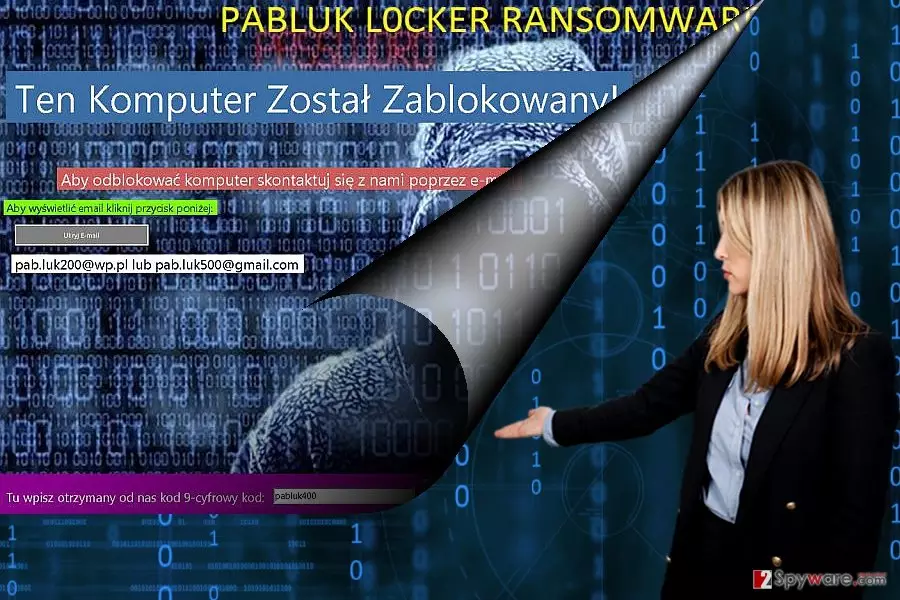
Pabluk L0cker virus operates as a file-encrypting computer infection. The most interesting aspect of it is that it targets Polish-speaking users. Interestingly, that a “Polish” crypto-malware is not an exception in the cyber world. A while ago, the virus Polski ransomware made its appearance.
The modest ransom note suggests that the malware is the creation of a still inexperienced cyber gearhead. Unlike other ransomware roaming on the market[1], the threat behaves more like a screen-locking threat. Upon the turn of the new year, the media fussed about new kinds of cyber malware. However, most unrealistic ideas[2] come true.[3]
| Name | Pabluk Locker ransomware |
| Type | Screenlocker |
| Peculiarities | Fails to encrypt user files, although still compromises Windows in other ways, e.g., locks desktop and disables vital OS features – including the Task Manager |
| Contact | pab.luk200@wp.pl and pab.luk500@gmail.com |
| Removal | Perform a full system scan with anti-malware |
| System fix | After virus removal, we recommend remediating the operating system with FortectIntego repair software |
Even though this malware may not seem quite exquisite at first glance, you should not underestimate it. The threat does not encode files. Unfortunately, the locked computer is no less a frustrating issue. If your computer has been victimized by this virtual infection as well, proceed to Pabluk Locker removal. In this case, let SpyHunterCombo Cleaner or MalwarebytesMalwarebytes, help you.
Since the ransomware market is filled with file-encrypting threats which employ sophisticated data encryption methods, the age for screen locker crypto-malware has seemed to come to an end. However, recently appearing screenlocker viruses deny such assumptions.[4]
Such threats are a no less troublesome issue since users still struggle to deal with them. There is no need to use encryption algorithms if the threat can fully paralyzing the device. In that case, you will be able neither to access your files nor launch any programs. These infections are less elaborate, they may also contain more vulnerabilities.
Speaking of malware, it presents scarce instructions on how to recover the data. However, it is capable of messing with the registry files. Specifically, it alters the following entry:
- HKEY_CURRENT_USER\ControlPanel\Desktop
- HKEY_LOCAL_MACHINE\SOFTWARE\Microsoft\Windows\CurrentVersion\Authentication\LogonUI\.
By contacting the cyber villains via pab.luk200@wp.pl and pab.luk500@gmail.com. The usage of email addresses increases the risk of getting caught. Another weakness of screen locker viruses is that they provide hints to a password.
Thanks to virus researcher Jiri Kropac, the unlocking password for this ransomware has been found – pabluk400. Nonetheless, the technical specifications should not ward you away from the idea of removing malware from the PC.
When does the malware invade PCs
If you wonder how the malware managed to access your PC, there are many theories about its distribution. Usually, ransomware threats are spread as corrupted attachments to emails. In order to persuade the victims to open the attachment, crooks usually disguise it under the name of a fake invoice or delivery message.
Alternatively, exploit kits and other hacking tools are gaining popularity among cyber villains. Likewise, the virus has been wandering in the virtual world under the disguise of a trojan. Different anti-virus programs may detect under varying titles:
- Artemis!C3C843CD0F88,
- MSIL/FakeSupport.AS!tr,
- Ransom.LockScreen,
- Trojan.GenericKD.4354144,
- or Win32/Trojan.Multi.daf.
Likewise, you need to arm up not only with cautiousness and awareness but with proper virus-fighting utilities as well[5].
Getting rid of Pabluk L0cker Screenlocker
When it comes to the file-encrypting virus, you should not take them too lightly. In some cases, even time becomes a crucial matter. Thus, it would be better to rely on the automatic ransomware removal method. However, since the virus locks your computer screen, you might encounter system errors and simply get frustrated.
If you cannot remove Pabluk Locker virus, you will need to enter into Safe mode and then launch the malware elimination tool for complete elimination. The instructions are provided in the below-given guide. On the final note, do not forget to update system apps daily and perform regular backups.
Did this guide help?
3 comments
NoVirusR
New players in town, huh?
LLLlawlet
Lets hope it will not return again.
Jean4.4
Luckily, I got extra copies of my files. Took some time until full removal.