

“Mafia Malware Indonesia” released a new malware – L0CK3R74H4T ransomware virus
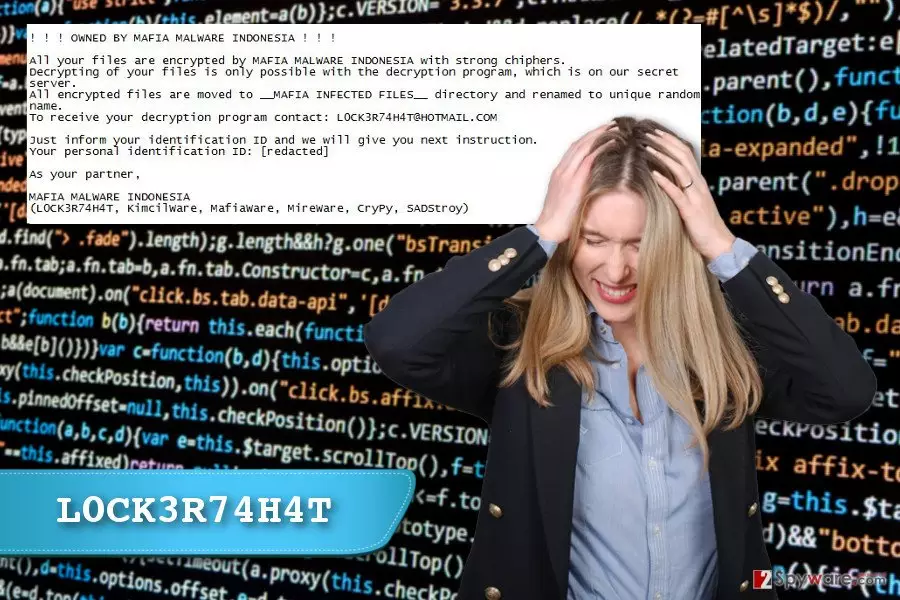
The L0CK3R74H4T virus is a renamed version of the SADStory ransomware. This recently discovered crypto-malware hasn’t attacked any computer users yet. However, you should be aware of the fact that new file-encrypting virus might attempt to damage files on your computer. Meanwhile, malware researchers are working on a decryptor in case of emergency. An interesting fact about L0CK3R74H4T ransomware is that in the ransom note developers admit that they have already tried to threaten cyber community with other viruses. The hackers team called “Mafia Malware Indonesia” confessed to being responsible for creating such file-encrypting viruses as KimcilWare, MireWare, MafiaWare, and CryPy. Fortunately, this gang of hackers is unskilled, and these ransomware viruses haven’t caused much damage. Thus, it shouldn’t be hard to remove L0CK3R74H4T from the computer as well.
After infiltration L0CK3R74H4T ransomware virus encrypts targeted files and moves them to the new directory called “__MAFIA INFECTED FILES__.” These records are also renamed with a random name. Once the data encryption is over, the virus delivers a ransom note where criminals ask to contact them via email address L0CK3R74H4T@hotmail.com. The ransom message also includes victim’s identification ID that users are supposed to send to the crooks to get data recovery instructions. Authors of the L0CK3R74H4T virus want victims to purchase decryption key which is stored on the “secret” server. Thus, doing that is not recommended[1] for several reasons. First of all, they might not have the decryption software. Second of all, they may not have intentions to restore your files. Sadly, they might be only interested in taking your money. Third of all, they might provide dangerous software to retrieve your documents. As a result, you might face more computer-related problems. Thus, we recommend protecting your PC and privacy by performing L0CK3R74H4T removal with a help of FortectIntego. Once the virus is gone, you can restore your files from backups or try our prepared additional data recovery methods.
What strategies do hackers use to infiltrate computers?
Developers of the file-encrypting viruses often apply similar distribution and infiltration strategies.[2] Though, the biggest chance to encounter L0CK3R74H4T malware and other ransomware viruses is to click on a malicious email attachment. We want to point out that even safe looking Word, Excel or PDF documents might include a payload. Thus, you should not rush opening email attachment. First of all, attentively read the message several times, look for the grammar or spelling mistakes, check credentials, etc. These little details might reveal cyber criminals.[3] L0CK3R74H4T hijack might also occur when you visit an infected website, click on the malware-laden ad or install a bogus software update. Thus, you must be careful and critical. Not all ads or links should be clicked even if they are placed on the legitimate website.[4] What is more, don’t forget to keep all installed software up-to-date and strengthen your computer’s security with anti-malware program. Lastly, you should also make data backups[5] because no one can be 100% protected from the malware.
Removal guidelines for the L0CK3R74H4T ransomware virus
L0CK3R74H4T ransomware should be treated like the ordinary file-encrypting virus. Thus, its elimination requires using professional security tools. Please, do not think about manual virus removal option. Only experienced malware researchers are capable of doing that without causing damage to the computer. Thus, ordinary computer users should remove L0CK3R74H4T using malware removal programs such as FortectIntego, SpyHunterCombo Cleaner or MalwarebytesMalwarebytes. Before installing one of these programs, you should restart your computer to the Safe Mode because the virus might prevent from accessing security tools. Below you will find instructions that help to disable the virus and run a full system scan. After L0CK3R74H4T removal, you can plug in the device where you store data backups. If you do not have them, try additional methods to restore encrypted files. They are presented below.
Did this guide help?
3 comments
Zeke
Indonesian hackers should learn to create better viruses. This one is a failure too
Rohana
i dont understand why have they launched a renamed version of the ransomware?
Arthur
The appearance of new file-encrypting viruses make me think about storing backups in five different locations...