

Mikoyan ransomware encrypts your downloads and asks for 1 Bitcoin
Mikoyan virus is a poorly programmed ransomware program[1] that attempts to encrypt user files on a computer that it manages to get in. During the encryption procedure, the malicious program launches a window called MIKOYAN ENCRYPTOR, which says “Your downloaded files had been encrypted with an AES-256 encryption key.” The rest of the message obliges the victim to send 1 Bitcoin[2] to criminals’ virtual wallet address, and contact frauds via email (mikoyan.ironsight@outlook.com), otherwise the files will be encrypted with RSA-4096. In fact, the message makes no sense at all. The ransom note from frauds says that the files were encrypted, but then it says that data will be re-encrypted again. We suggest you remove Mikoyan ransomware without a doubt, especially because files corrupted by this virus can be restored for free. Before using a decryption tool created by a malware analyst Michael Gillespie, you should scan your computer with anti-malware software. For this purpose, our team recommends using FortectIntego software.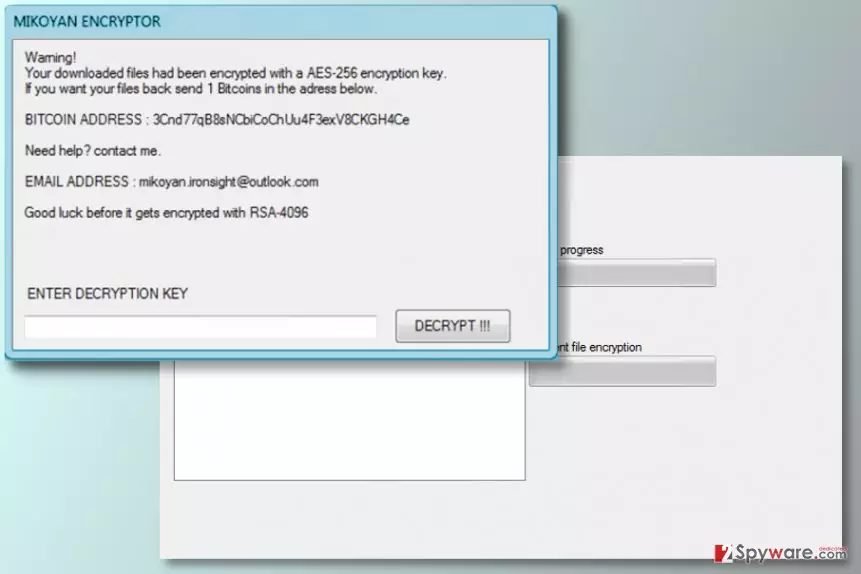
We must point out that many signs show that this ransomware was developed by an amateur programmer. First of all, it is based on an open-source[3] ransomware code, which means that the crook did not develop this malicious program from scratch. Next, the message of the ransom note looks confusing. The virus claims that it encrypts “downloaded files,” which we believe means “Downloads” folder. In fact, files stored in this folder can be recovered extremely easily since everything in this folder can be downloaded from certain web pages or social media. However, to save you some time, malware analysts have created a decryption tool that was called StupidDecrypter considering the mentality of criminals who created easily-decryptable ransomware viruses. Before running this tool to recover encrypted downloads that now have .mikoyan file extensions, you should complete Mikoyan removal. Instructions on how to eliminate ransomware-related files from the system were added to this post – make sure you follow them carefully!

Facts about ransomware distribution
Research shows that viruses that fall into the same category as Mikoyan ransomware are distributed in several ways that malware developers were using for years. Some of them are newer, although the old ones, such as spam, prove to be the most efficient ones. Briefly speaking, the majority of ransomware gets installed by computer users only, of course, victims usually do not realize that opening an email attachment can result in a computer infection that takes all personal files hostage. Ransomware can also be installed with the help of exploit kits that are placed on malicious websites. Exploit kits usually make use of an outdated software in victim’s computer and use security vulnerabilities to install malicious programs on the system. Finally, ransomware can be installed with the help of malvertising[4] or scams like “The HoeflerText wasn’t found.”[5] A good way to protect your files from damage is to install a good security software and create data backups in time.
What programs can be used for Mikoyan ransomware removal?
Security researchers recommend using anti-spyware or anti-malware programs for Mikoyan removal. To be precise, our team usually suggests FortectIntego or SpyHunterCombo Cleaner software, although MalwarebytesMalwarebytes can also work well. Restarting the computer in a Safe Mode with Networking is also a recommended move because it helps to disable the virus and allows running the malware removal tool without facing any unexpected interruptions.
Did this guide help?
Be the first to comment