

SecretSystem ransomware emerges as a weak attempt to imitate infamous viruses
Secret System (also known as Ransomeware_Final) virus has entered the marked to hunt for users’ data. Its technical specifications reveal that it might be related to CloudSword, JohnyCryptor or CryptTear. The former virus, CloudSword, was spotted at the end of January this year. It functions as a sophisticated threat as it disguises under FedEx false alerts and targets a wide range of files. According to its instruction file, which was named both, in English and Chinese, character meaning “warning,” alerted victims to transfer files within 5 days in order to prevent personal data from elimination. After encryption, the victims will notice that all of their files contain .slvpawned and .crypted file extensions. The current version of the malware does not seem to be as powerful as the original one as it is already decryptable[1]. You will find the decrypter below the article. The virus instructs victims to create bitcoin wallet, and transfer bitcoins amounted $500. In addition, the malware warns users not to close the program. Otherwise, their files will be deleted. In case users encounter any difficulties, they should contact the perpetrators via putraid1900@gmail.com_orfb.com/Anonymous.404.NF. Even. There is no need to follow any of these demands as you should simply remove SecretSystem and decrypt your files. As for elimination, FortectIntego or MalwarebytesMalwarebytes might be effective.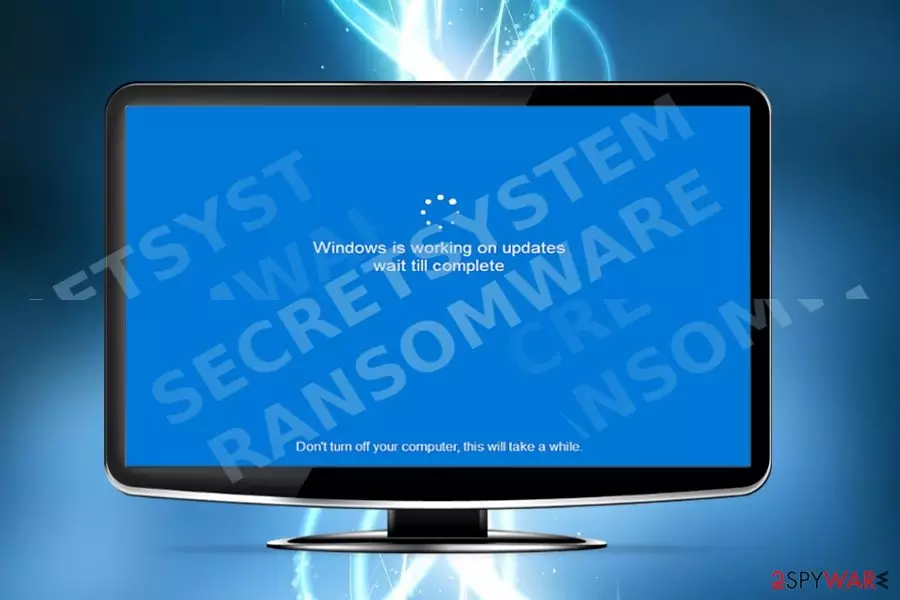
The malware paralyzes the system via its SecretSystem.exe executable file. The virus employs AES encryption key to encode files. Interestingly, that the malware may not launch its specific GUI, but it manifests interesting behavior. While encrypting files, the malware may shut down the system and display “Windows is working on updates wait till complete.” At the bottom of the screen, other line displays “Don’t turn off your computer, this will take a while.” If you are used to constant Windows OS updates, you may notice that this reboot screen differs from the original one. The below line is written in a different font. Usually, original Microsoft alerts are written in full verb forms without contractions. Thirdly, you will never see a line “wait till complete.” Thus, it hints the presence of SecretSystem malware. Contrary to instructions, reboot the system to interfere with the process. Even if this advice is too little too late, perform SecretSystem removal.
Infiltration techniques of the malware
Besides above-mentioned peculiarity, the malware does not seem to contain other unusual features. Taking into account the distribution method of CloudSword, Ransomeware_Final hijack may also occur when users extract corrupted email attachments. Beware of emails which are supposedly sent from tax report or governmental institutions. Such emails are often written in alerting manner urging you to take immediate action. Instead, look for grammar mistakes, altered logos, and typos. Do not open any attached documents without verifying the identity of a sender. Note that recent Google Docs scam may also involve your contacts[2]. Thus, if you receive an invitation to share a document, be cautious. In addition, SecretSystem ransomware may also attempt to sneak into the system via corrupted exploit kits hidden to torrent or other illegal file sharing domains. Note that the virus is detectable as Generic.Ransom.CloudSword.BD9494DC, Ransom.JohnyCryptor, Ransom_CRYPTEAR.SM. To lower the number of risk factors, update your system security applications and be vigilant.
SecretSystem termination steps
Even if you get infected with this malware, there is no need to give into distress. Remove SecretSystem virus with one of an anti-malware tool. If the malware prevents you from running the application, make use of the below instructions. If you reboot the system into Safe Mode, you will be able to access key functions of remove SecretSystem from the device. Lastly, if you spot its executable file running in Task Manager, end its task.
Did this guide help?
Be the first to comment