

Wanna Subscribe 1.0 pretends to be a version of infamous WannaCry
Wanna Subscribe is another fake version[1] of WannaCry ransomware that has recently caused chaos in on online community. This piece of malware is written in Java and currently, cannot encrypt files. On the affected device, it runs a program window that includes a ransom-demanding message and a timer. In the lock screen authors of the virus tell about encrypted files and claims that the only possible way to recover data is to use criminals’ offered tool. Typically, ransomware viruses ask to transfer particular amount of Bitcoins. However, Wanna Subscribe 1.0 asks to subscribe to particular YouTube channel in order to restore files. As we already mentioned, this fake file-encrypted virus is unable to corrupt data. Thus, there’s no need to help some shady people build YouTube audience and become famous on The Web. Following WannaCry’s example, the ransom note claims that victims have three days to complete the orders and the times provided in the lock screen shows how much time people have. However, if they wait for longer than seven days, their files are supposed to be lost forever. It’s doubtful that such thing can happen. But you should not hesitate and let this strange malware to stay on your PC. Remove Wanna Subscribe immediately with the help of FortectIntego.
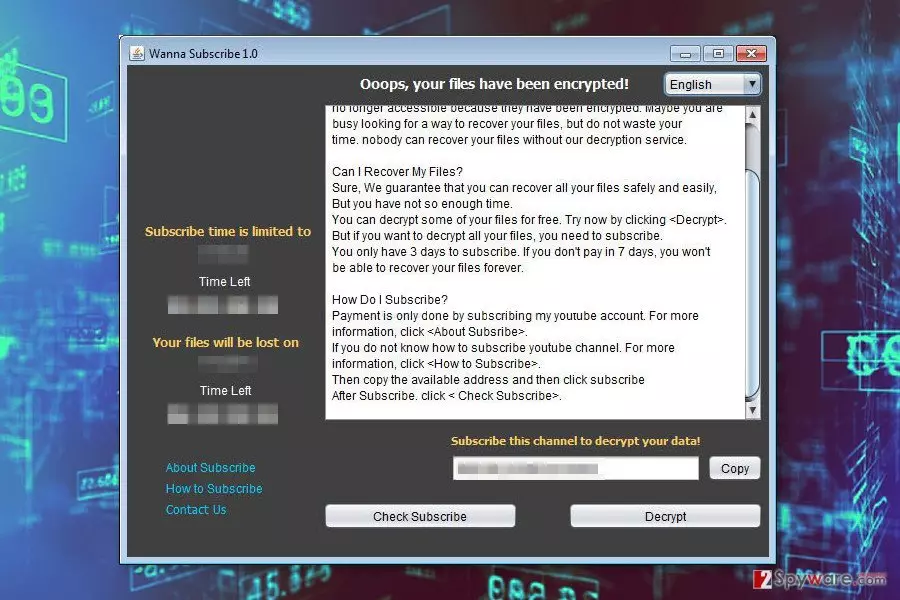
Authors of the fake ransomware allow users to decrypt few files for free in order to see that their offered software is actually working. However, there’s no need to try this tool or subscribing to YouTube channel. As you already know this cyber infection does not encrypt files. Thus, you should focus on Wanna Subscribe removal. Nevertheless, it seems harmless; it still may open the backdoor for other malware and allow other cyber threats to enter the system. As a result, you may suffer from a real file-encrypting virus. Thus, scroll down to the end of the article where you can find a detailed explanation how to get rid of this parasite.
Ransomware distribution techniques
The specific distribution method of Wanna Subscribe 1.0 is unknown. Developers might be using multiple strategies in order to infect as many devices as possible. Thus the payload might be distributed via malicious spam emails, malware-laden ads, bogus software updates and downloads. It’s doubtful that this virus employs the same Windows vulnerabilities as WannaCry. Though, it’s just a fake version of dangerous ransomware that wants to convince people that they are dealing with a recently emerged cyber threat. However, if you want to avoid[2] Wanna Subscribe hijack, you should not rush opening email attachments, and clicking any links or buttons. Always double-check the information and make sure that you can actually trust the sender. Also, you should avoid browsing through high-risk websites, clicking on ads and other online offers especially if they look too good to be true. Moreover, avoid installing software and its updates from unknown domains and file-sharing websites. What is more, Wanna Subscribe should be detected by major security programs. Thus, you strengthen your computer’s security with an antivirus program and make data backups if ransomware managed to hijack the system.
Removal of Wanna Subscribe ransomware virus
Nevertheless, this ransomware may not seem like a serious threat; you should not depreciate complexity of the virus. It’s still a complicated malware that should be terminated from the device properly. Thus, you need to remove Wanna Subscribe using reputable malware removal program. We highly recommend installing FortectIntego or SpyHunterCombo Cleaner and running a full system scan with one of these tools. We can assure that these programs are capable of detecting all malicious files and programs entirely. However, you should know that malware may prevent you from installing or accessing security tools. In order to run automatic Wanna Subscribe removal, you have to restart your computer to the Safe Mode with Networking as shown in the instructions below. Then, you will be able to get rid of the virus.
Did this guide help?
Be the first to comment