

Kamil ransomware starts its second round of attack
“Your files have been blocked” virus, alternatively labeled as Kamil malware, functions as a file-encrypting threat. Its first signs have been already detected on May 29, 2017.[1] Due to the lack of analysis, its genealogy was unknown at the beginning, but now the malware shows more signs similar to Crypren virus. Similar to the former virus, the current version requires 50 dollars in exchange to the files. The ransom note instructs affected netizens to create a bitcoin wallet, purchase bitcoins of necessary value and then transfer them to the specified address. Furthermore, it also appends certain file extension – .lock – to affected files. The perpetrators warn not to delete the software as it may lead to irreversible loss of the files. It is a common strategy to scare victims, so we suggest you not to waste energy, but instead, save it for “Your files have been blocked” removal. For that purpose, you may use FortectIntego or MalwarebytesMalwarebytes.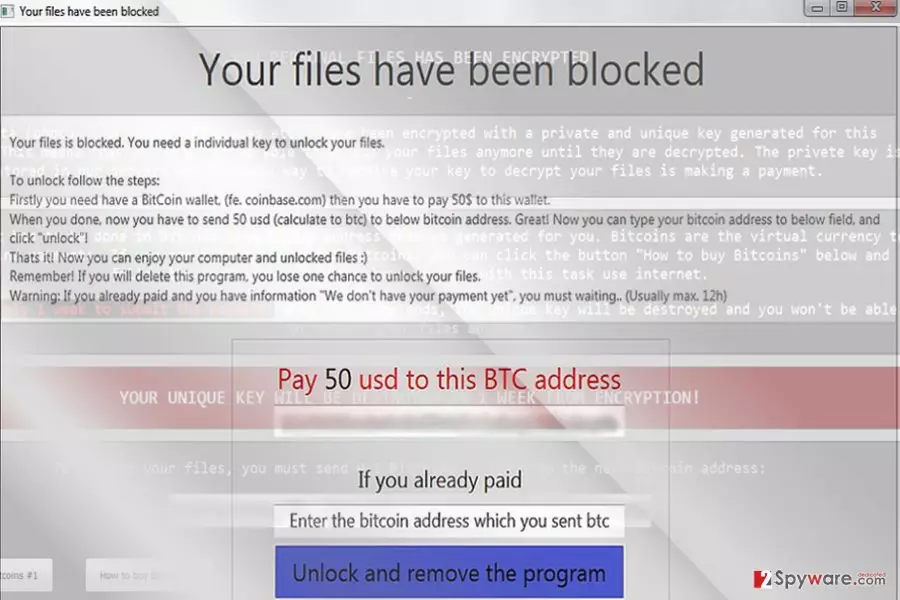
Though the malware is already out in the wild for a week already, in the beginning, it presented quite a riddle for IT specialists. Fortunately, it is already detectable by a number of anti-virus tools. Further analysis reveals that it might have elements of HiddenTear. It explains the fact why “Your files have been blocked” malware is decryptable even though the process takes a couple of hours. If you are wondering how the malware managed to break into your PC, you may have accelerated Kamil hijack by opening a corrupted spam email attachment. Then, it connects to Command and Control server to download the remaining part of the ransomware payload. You may not notice any of its signs except slower PC processes. On the one hand, it is fortunate that the virus leaves its distinctive mark – .lock file extensions. This fact lets users detect the malware sooner. In contrast to the ransom note instructions, we do not recommend remitting the payment to unlock the files. The message notes that payment confirmation takes up 12 hours. However, no one gives guarantees that the payment procedure is processed successfully. Remove “Your files have been blocked” virus rather than foster naïve hopes.
Ransomware distribution channels
Kamil malware is suspected of spreading through two transmission ways: spam emails[2] and trojans. Elaborating on the former method, it disguises under important.exe. Therefore, it might be delivered along with a supposed tax report or invoice notification. Alternatively, you may be asked to review further details about an undelivered email or parcel. Do not fall for such common bait. Inspect carefully the email for any ransomware hints: grammar mistakes or typos. Only when you are sure of the sender’s identity, open the attached documents. Note that “Your files have been blocked” malware functions via Trojan-Ransom.Win32.Crypren.adsz, Trojan-Ransom.Filecoder (A), or Win32.Trojan.Crypren.Ljuj. Ensure your PC protection with cyber security software. The firewall may be of use as well.
Options to eradicate “Your files have been blocked” ransomware
Regardless whether the malware is poorly coded or possesses a highly exquisite structure, manual elimination option is never an option. It also applies to “Your files have been blocked” removal process. Launch an anti-spyware app. Update it for the program to detect and eliminate all elements and malware registry keys. In case you cannot remove “Your files have been blocked” virus from the first attempt, below guidelines contain valuable tips how to gain access to key system functions and then finish the termination process. Check bonus recovery instructions at the bottom of the page as well.
Did this guide help?
Be the first to comment