

BeethovenN ransomware starts playing a “symphony” with your files
“BeethovenN virus” defines a ransomware which infiltrates a computer and appends .beethoveN file extensions to encrypted files. While the title of the threat brings a smile for IT experts, affected users may not be in high spirits at all. It is perfectly understandable since it still functions as a computer virus wreaking havoc on the system. This malware turns out to be another sample based on the HiddenTear virus[1]. It seems that the malware is still under development. Moreover, the ransom note reflects that the developer enjoyed himself while programming the malware as every sentence on the ransomware software ends with a note rather than a dot. Furthermore, the perpetrator also leaves its distinctive registry keys among system files, e.g. HKCU\Environment\SAVETHETREES. It seems that the felon is not only a fan of Beethoven‘s music but promotes ecology as well. Leaving aside professional interest, you might be interested only in one thing – BeethovenN malware removal.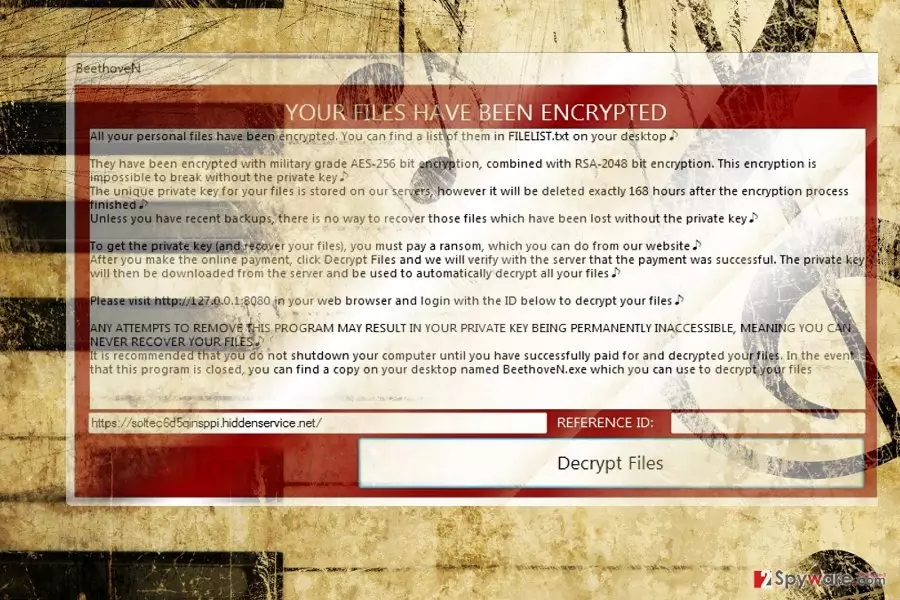
Further analysis reveals references to Chopin composer as well. Besides the user’s interface application, FILEUST.txt is placed on local folder and desktop. It contains the same information as the software. It greets users in a polite manner and informs that their files are encoded by using AES-256 and RSA-2048 encryption techniques. It continues warning users that the decryption is impossible without obtaining the private key. Interestingly, that it mentions that backup copies are the only one way to restore files. Victims should connect to indicated the http address and transfer the ransom. After that, users may shift to another page of the software where the developer expresses gratitude mockingly for decrypting the files. The ransom note also mentions that users should make haste as the decryption key will be stored only for 168 hours. It also offers an optional function of “rescan” if not all files encoded files were not decrypted at the first attempt. Furthermore, BeethoveN malware also indicates another website https://soltec6d5qinsppi.hiddenservice.net/. However, neither of the provided websites function, thus, paying the ransom may be futile. Instead, proceed to the guide to remove BeethovenN virus.
Transmission peculiarities of the malware
Speaking of its distribution methods, the virus does not possess any exceptional features. It preys on victims while they are browsing corrupted domains[2], for example, torrent sharing or gaming web pages. Do not exclude spam emails as well. Furthermore, its BeethoveN.Infected.Final.NoObfustication.exe file might be disguised under fake software update. Do not rush to open the spam emails to avoid BeethovenN ransomware hijack. Similar email messages provoke you into the opening to execute the attached files. Be vigilant and make sure that you update not only cyber security applications but system apps as well. For instance, FortectIntego or MalwarebytesMalwarebytes assists not only in terminating the infection but in rooting out its registry keys as well.
BeethovenN termination steps
Though the perpetrator obviously made this malware as a joke, he still manifests sufficient knowledge of programming. Thus, the malware is still able to inflict damage to a device and personal files. Before proceeding to decryption options, make sure you remove BeethovenN virus permanently. You may use malware elimination tools to put an end to the ransomware. In case you cannot complete BeethovenN removal, take a look at the below guidelines.
Did this guide help?
Be the first to comment