

Developers of NSMF ransomware asks to pay more than $13.500 for data recovery
NSMF is a new ransomware[1] that encrypts files using AES cryptography. It belongs to the group of Hidden Tear based viruses and during data encryption appends .nsmf file extension.
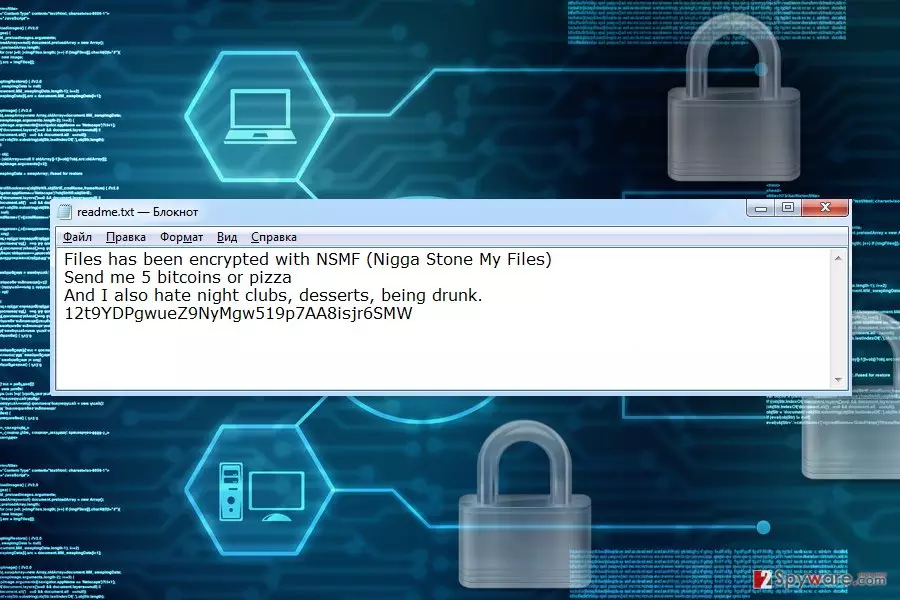
Following data encryption, malware drops a ransom note called readme.txt. The message does not look like a real letter from cyber criminals. It sounds more like a joke.
The ransom note informs that user’s files were encrypted by NSMF (Nigga Stone My Files). In order to get back access to the data, users have to pay 5 Bitcoins or send a pizza. However, location, where pizza's order should be delivered, is not provided.
Currently, 5 Bitcoins equals to more than $13.500. Thus, hacker asks for an enormous amount of money. However, does not provide clear instructions about the transaction. It seems that paying the ransom is not a data recovery option.
Furthermore, developer of the ransomware talks about things he or she hates. It includes night clubs, desserts and being drunk. What victims can do with this information we cannot tell. However, we are certain that once you read this ransom note, you have to remove NSMF from the PC using FortectIntego.
Nevertheless, the ransom demanding message does not seem real; the virus is actually capable of encrypting files. It aims at the most popular file extensions and might encrypt Microsoft Office, various multimedia, databases, archives, etc.
One .nsmf file extension is added to each of the targeted files; victims cannot open and use them. However, it might be possible to restore data from backups, using Hidden Tear Decrypter or other third-party software.
Nevertheless, data recovery seems like the most important task; it’s not. First of all, you have to focus on NSMF removal. Only then you can look up for the best recovery solution.
Ransomware elimination is important because this cyber threat makes computer’s system vulnerable and might open backdoor. Thus, your PC might suffer from other cyber attacks.

The most common ways to get infected with ransomware
Authors of the NSMF virus is suspected of using multiple distribution methods:
- malicious spam emails and their attachments;
- fake downloads;
- malvertising.[2]
These three distribution strategies are common among cyber criminals. Thus, you have to be aware of these methods in order to avoid similar cyber threats in the future.
Malicious spam emails are the most popular ransomware distribution technique. Crooks use social engineering techniques and send thousands of different phishing emails that include malicious links or attachments. Once they are clicked/opened, the payload is executed on the system.
Before opening Word, PDF or other safe-looking files, you have to look up for suspicious details that might identify a dangerous content. Usually, email services mark such emails as dangerous. However, crooks are getting better and better in bypassing security filters.
NSMF might also be distributed as a fake program on various file-sharing websites, P2P networks or torrents. If you need to install particular software, please choose credible download sources, such as publisher’s site.
When browsing the web, you might encounter numerous online ads. Nevertheless, they might promote useful stuff; some of them might include malware.
We recommend staying away from online ads that notify about won prizes, delivers security alerts or delivers huge discounts for expensive products because they are usually dangerous.
Instructions for NSMF removal
As we have already mentioned, NSMF removal is the most important task after ransomware attack. Trying to figure out how to pay the ransom and transfer thousands of dollars to criminal may lead to a huge financial loss.
After the attack, you need to disable the virus by rebooting the computer to Safe Mode with Networking. Then install reputable malware removal tool and run a full system scan with the help of it.
If you are not sure which tool to choose, you should take our advice and remove NSMF either with FortectIntego or SpyHunterCombo Cleaner.
Did this guide help?
Be the first to comment