

Random6 ransomware – a virus which uses BitMessages to reach its victims
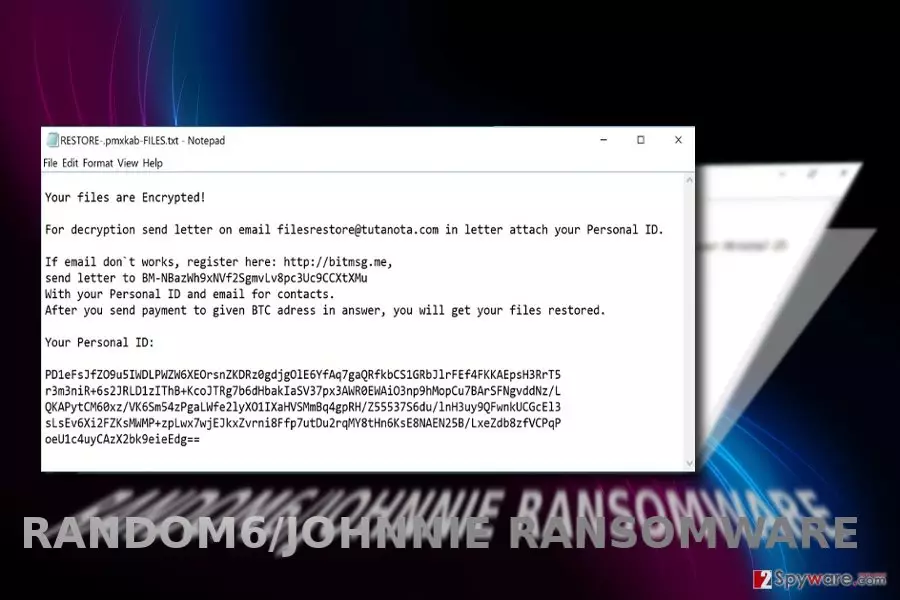
Random6 is a ransomware type virus which can encrypt user's files once it infects the system.[1] Files that were affected by this virus as marked by changing their name to a unique characters' combination – [random_characters].[6_character_ID].
Furthermore, Random6 ransomware drops either RESTORE-extension-FILES.txt or RESTORE-[6_character_ID]-FILES.txt document on victim's desktop to warn him/her about the current situation. Typically, victim is introduced with the encryption of files and them asked to pay a specific ransom. It should be sent to filesrestore@tutanota.com together with a specific victim ID.
It is clear that the ransomware assigns specific ID to every infected computer in order to mark its victims. However, there is no guarantee that you, after paying the required ransom to filesrestore@tutanota.com will receive a code that helps you recover your data. We highly recommend ignoring the demands of Random6 virus because there are lots of cases when victims were left with nothing after paying.[2]
At the moment, it is technically not possible to retrieve a decryption code. Nonetheless, daily researches on this ransomware virus raise the chances of data retrieval without paying demanded ransoms. However, before you start the recovery process (you can use backups to get your files back) you should initiate Random6 removal. To speed up the process, use FortectIntego.
Can't get through the email? Use BitMessages
Victims who cannot get through the perpetrators via the indicated email address, should sign up and send the message to the account of the hacker.
The ransom note also mentions payment in bitcoin, however, no actual sum is indicated. The malware is also set to change the computer background into background.png. The threat is set to behave as a screen locker. If you cannot control the computer, press the combination of Alt+F4.
Luckily, the ransomware does not employ an elaborate encryption technique – only Bas64. It suggests that random6/Johnnie malware might be decryptable. The analysis reveals that the malware tends to append these 4 file extension files[3]:
- RESTORE-.llawex-FILES.txt
- RESTORE-.dkdfln-FILES.txt
- RESTORE-.pmxkab-FILES.txt
- RESTORE-.upzbrf-FILES.txt
Regarding the technical specifications, it seems that the malware via created rather as a joke or a test version. It is worth mentioning that there was another crypto-malware called JohnyCryptor released last year.
Anyway, related or not, you should hurry up to remove Random6 malware. Sometimes, restarting the device helps to interfere with the encryption process.
Ways to distribute crypto-malware
Observing this virus, it is likely to infect users via trojans placed in corrupted torrent files. Alternatively, it is possible to encounter the malware after downloading a fraudulent application or clicking on the link.
More elaborate ransomware threats target netizens via browser extensions or exploit kits. You should not also forget Locky and Cerber distribution campaigns—spam emails. In order to lower the chances of hijack and prevent infiltration of malware, you will not only need an anti-spyware application but retain vigilance.
Get rid of Random6virus
Regardless of the complexity of a file-encrypting virus, it does not recommend eliminating it manually. For that purpose, you will require a cyber security tool. If you cannot launch it, then you follow the instructions displayed below and remove Random6.
Rebooting to Safe Mode or performing System Restore will help you complete Random6 removal. These options grant you partial access to system functions. After you remove Random6/Johnnie virus, you can test some of the data recovery programs recommended under Bonus: Recover your data headline. Besides the US, the malware is active in Norway.
You can find more information about malware in the respective language in the Norwegian counterpart of 2-spyware.[4]
Did this guide help?
Be the first to comment