

ZeroRansom is another HiddenTear-based virus that seeks to extort victims by taking their files hostage
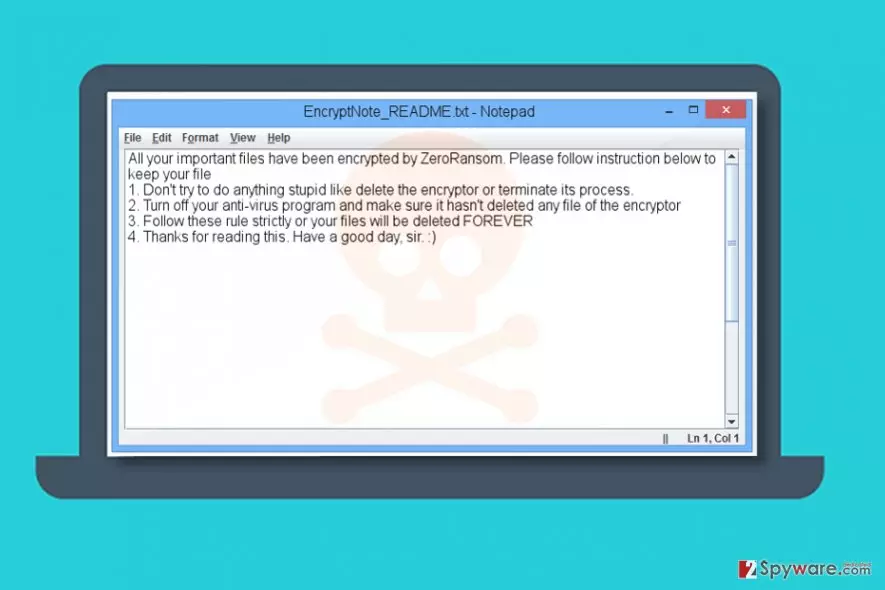
ZeroRansom is yet another ransomware virus that attempts to encrypt victim’s files. It is based on HiddenTear, an open source ransomware[1].
After infecting the computer, it scans the system for specific file types and encodes them. When encrypting a file, the virus will add .z3r0 file extension to it. The malware targets these file extensions:
.txt, .doc, .docx, .pdf, .ppt, .pptx, .xls, .xlsx, .dll, .db, .rar, .zip, .7z, .mp4, .mp3, .jpg, .png, .peg, .gif, .sln, .c, .cpp, .cs, .java, .jar, .bat
Once the virus finishes the encryption procedure, it creates and saves EncryptNote_README.txt file to every folder with encrypted files (including desktop). The file stores the following information:
All your important files have been encrypted by ZeroRansom. Please follow the instructions below to keep your files.
Don’t try to do anything stupid like delete the encryptor or terminate its process.
Turn off your anti-virus program and make sure it hasn’t deleted any file of the encryptor.
Follow these rule strictly, or your files will be deleted FOREVER
Thanks for reading this. Have a good day, sir. 🙂
The ransomware is developed by an inexperienced programmer that sends the encryption key via Gmail. Two email addresses associated with this virus are zerounix32@gmail.com and zerounix48@gmail.com.
If your files were encoded by this crypto-ransomware, do not try to contact criminals or pay the ransom to them. To remove ZeroRansom, you have to act carefully.

First of all, you want to reboot your computer into Safe Mode with Networking (see instructions below) to start your security program and let it do its job without encountering any interruptions. We do not recommend manual ZeroRansom removal method as it requires certain computing skills to be completed correctly.
Distribution methods
ZeroRansom spreads using the same means used in the distribution of any other malicious computer virus. It mostly travels via email spam[2], although you can also download it alongside software cracks.
To avoid installing malware, stay away from illegal downloads and try to avoid untrustworthy Internet websites. What is also important is that the ransomware can arrive in the form of an email attachment or link added to the message, so always think twice before opening such content.
Sadly, being careful only lowers the risk of catching a ransomware virus, but doesn't eliminate it. If you want to protect your PC from such viruses entirely, you should create a data backup and install a decent anti-malware program. What is also important, limit the use of remote desktop connections and use only robust passwords for them. For more security-related tips, check out NoVirus website[3].
Remove ZeroRansom from the system and try to recover your files
When a computer gets infected with ransomware, it is important to delete it before trying to restore your records. Therefore, remove ZeroRansom virus before you attempt to recover encrypted .z3r0 file extension files. We suggest using FortectIntego for the removal of this ransomware, although you can also use other programs listed below the article.
Do not delay ZeroRansom removal because otherwise, it will be impossible to continue using your computer safely. The malware can come in tandem with additional viruses, so you have to check your system thoroughly using a professional anti-malware tool.
Did this guide help?
Be the first to comment