

Oxar is an ordinary ransomware that uses AES cipher and demands a ransom in Bitcoins
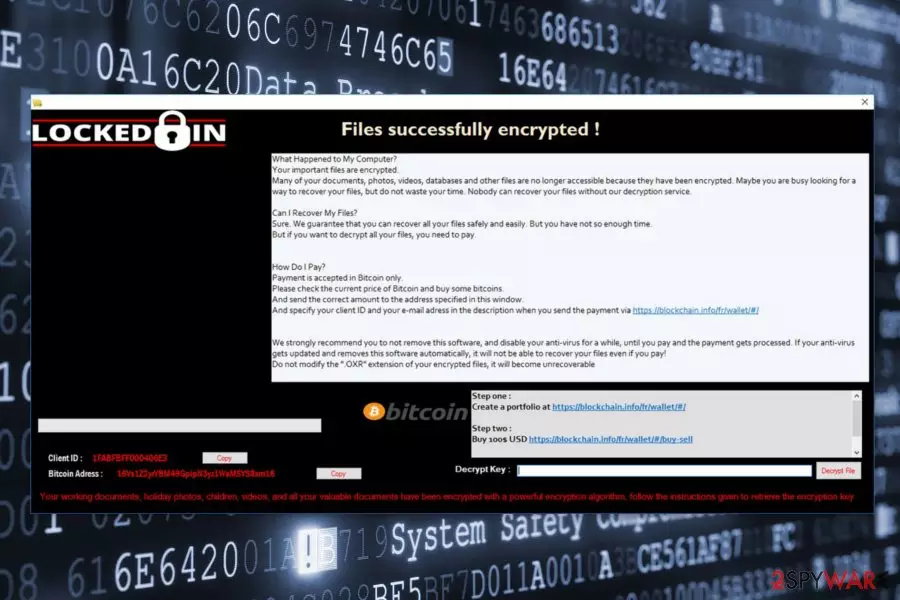
Oxar is a ransomware virus[1] that targets English-speaking users and seeks to lock their files to foist paid decryptor. It relies on AES-256 cryptography to encrypt files and generates a ransom note, which urges the victim to pay $100 in Bitcoins for a decryption software within 72 hours. The initial Oxar ransomware version appends .OXR file extension, but people can meet its modified versions that use .PEDO, .ULOZ, .FDP, and other extensions. The latest Oxar ransomware version has been found at the beginning of April 2018. It appends .FUCK file extension and is, therefore, dubbed as .Fuck file extension virus. It's built on a free HiddenTear ransomware source code, meaning that it can be decrypted.
| Name | Oxar |
|---|---|
| Type | Ransomware |
| Versions | .ULOZ, .PEDO, .FDP, Kappa, Fake Oxar, .FUCK |
| Danger level | High. Locks files, roots deeply into OS |
| Related files | Data Locker.exe, File Decryptor.exe, Cryptear.exe, Kappa Ransomware.exe, ransomware.exe |
| Decryptable | No |
| OS targeted | Windows |
| Ransom note | 1 What Happens with my files.txt |
| Download FortectIntego and run a scan to eliminate ransomware. Manual Oxar removal is not possible. | |
Following data encryption, crypto-malware triggers a pop-up window where it provides data recovery instructions. It seems that cyber criminals want to make users believe that they are dealing with the Locked-In ransomware virus. However, we can assure you that these viruses are entirely different.
Oxar malware is executed on the computer from Data Locker.exe or File Decryptor.exe file which spreads via infected email messages, bogus software, fake updates, etc. On the affected device, malware makes important changes in order to run with Windows startup. It might install malicious files and infect system process.
What is more, Oxar gives each of the victims a unique ID number that is provided in the ransom note. Once the preparatory work is over and malware strengthens its presence, it starts scanning the system looking for targeted files. Just like plenty other ransomware, this one also aims at 72 file extensions:
- Microsoft Office;
- OpenOffice;
- pictures;
- audio;
- video;
- documents;
- text files;
- databases;
- archives;
- etc.
Following data encryption process, Oxar ransomware delivers a ransom note in the program window. The latest Oxar version is known for injecting a text file What happens with my files.txt. The message informs about encrypted data and assures that victims can only recover the files using particular decryption software.

According to the ransom note, victims have “not so enough time” to get Bitcoins and transfer them to the provided address. People are asked to pay $100 in order to use decryption software. However, doing that is not recommended. No one can guarantee that criminals are willing to keep their promise and have working decryptor.
Crooks want to stop victims from scanning the system with antivirus. Undoubtedly, security software such as FortectIntego, SpyHunterCombo Cleaner, MalwarebytesMalwarebytes can easily remove Oxar from the device. Unfortunately, malware removal tools are not designed to recover encrypted data. Thus, in this case, crooks do not lie. It’s nearly impossible to restore data without specific decryptor.
Currently, the only effective way to recover your files is to use backups.[2] If you do not have them, please check our suggested alternative recovery options. Keep in mind that you need that you need to complete Oxar removal first. Only then you can safely look up for the best recovery solution.

Variants and imposters of Oxar ransomware
.ULOZ file extension virus. This variant of Oxar acts similarly to its predecessor: it uses AES encryption algorithm and demands to pay the ransom in the pop-up window. The only significant difference is an appended file extension. It adds .ULOZ suffix to the targeted data.
.PEDO file extension virus. Though the former impersonates Ableton Live Suite software as it functions via Ableton-live-Suite-v95-WiN-x86-x64.exe, the latter contains more intriguing features. .PEDO file extension malware transmits certain details of a victim's PC system to a remote File Transfer Protocol (FTP) server.
It also shares a similar feature as the former version of Cerber: it drops an audio message to the affected users. Guidelines how to recover the files are delivered in Instructions.txt and 1 What Happens with my files.txt. If you tend to check system processes in the Task Manager, you may cease further activity of the ransomware by shutting the task under Cryptear.exe file.

.FDP file extension virus. On August 8th, cyber security researchers spot a new virus' version that uses .FDP file extension for the encrypted records. The name of the ransom note wasn't changed in this Oxar variant – it still remains 1 What happens with my files.txt.
So far, malware analysts could not find a way to decrypt any version of encrypted files. At the moment, the virus remains undecryptable (using third-party tools). If you are wondering whether it is worth paying the ransom, we can answer this question for you – it is not.
Kappa ransomware virus. On August 21, researchers discovered a new test version of Oxar that runs on the computers from Kappa Ransomware.exe. Just like the original version, it also appends .OXR file extension to the targeted data. The malware works on the computer only if user’s operating system is installed on Drive C. Therefore, if your OS is installed on drive D, you should not worry about this ransomware attack.
Once all the files are encrypted, ransomware opens a black ransom-demanding window that answers three major questions. Developers explain about data encryption and claim that the only way to decrypt files is to pay the ransom in Bitcoins.
Users are supposed to send their Client ID number as soon as the payment is made. Crooks claim to send the decryption key in return. However, you should never pay the ransom for cyber criminals because it most of the time ends up with money loss.
Fake Oxar ransomware virus. On August 21, malware analysts have noticed a fake version of the Oxar ransomware. It spreads as ransomware.exe and appends .OXR file extension. However, the research has shown that these two viruses have nothing in common. The recent discovery is just an imposter.
Following data encryption, it installs instructions.exe file and delivers “File Decryptor | OXAR” window that includes an identical information from the original Oxar’s ransom note. However, this piece of malware demands to pay $20 and after the payment send an email to maitregauillaume@protonmail.com.
Nevertheless, the ransom is small; you should not waste your money and motivate some hacker-wannabes. You’d better remove the virus with reputable antivirus.

.FUCK file extension virus. At the beginning of April 2018, ransomware researchers spotted a new Oxar version in the wild. Dubbed as .FUCK file extension virus, the ransomware differs from the rest of other versions as it's based on HiddenTear source code.[3]
The payload is downloaded once the potential victim runs a File Decryptor.exe file. Upon successful infiltration, it targets the most popular file types and locks them with .Fuck file extension. Besides, it generates a ransom note What happens with my files.txt, which contains the following information:
What Happened to My Computer?
Your important files are encrypted.Many of your documents, photos, videos, databases and other files are no longer accessible because they have been encrypted. Maybe you are busy looking for a way to recover your files, but do not waste your time. Nobody can recover your files without our decryption service.
Can I Recover My Files?
Sure. We guarantee that you can recover all your files safely and easily. But you have not so enough time. But if you want to decrypt all your files, you need to pay.
How Do I Pay?
Payment is accepted in Bitcoin only. Please check the current price of Bitcoin and buy some bitcoins. And send the correct amount to the address specified in this window.
We strongly recommend you to not remove this software, and disable your anti-virus for a while, until you pay and the payment gets processed. If your anti-virus gets updated and removes this software automatically, it will not be able to recover your files even if you pay!
Once the payment is sent, send us an e-mail to the specified address specifying your “Client ID”, you will be sent your decryption key in return.
How to buy Bitcoins?
Step 1 : Create a portfolio on the Blockchain website at the address : https://blockchain.info/fr/wallet/#/signup
Step 2 : Sign in to your account you just created and purchase the amount shown : https://blockchain.info/wallet/#/buy-sell
Step 3 : Send the amount to the indicated Bitcoin address, once this is done send us an email with your “Client ID” you can retreive this in the file “instruction.txt” or “Whats Appens With My File.s.txt” in order to ask us the key of decryption of your data.Contact us at : spaghetih@protonmail.com
Send 20$ to Bitcoin at 1MFA4PEuDoe2UCKgabrwm8P4KztASKtiuv if you want decrypt your files !
Your Client ID is : [id]
The .fuck ransomware asks the victim to send 20 USD in Bitcoins. Before that, he or she is asked to email the crooks and provide a “Client ID.” Even though the ransom is funny if compared to, for instance, Vurten ransomware which demands to pay 10, 000 USD, we do not recommend paying it anyway.
According to the experts, this Oxar ransomware .Fuck version is decryptable. You can find a decryptor in NoMoreRandom.
DIstribution and infiltration methods of the ransomware virus
Malware mostly aims at English-speaking computer users. Thus, British,[4] Australian and American users should read this part of the article carefully. In order to drop malicious executable on the system, developers apply several strategies:
- infected email attachments;
- malicious links;
- illegal downloads;
- fake updates;
- malware-laden ads;
- exploit kits.
One of the main distribution methods is misleading emails[5] that include malicious attachment, link or button. Such letters usually urge to open infected content due to some serious issue. Typically, crooks pretend to be from financial institutions, banks, and other reputable companies. Before opening such content, you need to inspect the email carefully.[6]
Furthermore, in order to avoid Oxar, you should also stay away from suspicious file-sharing sites, P2P networks and other online sources that offer to download free content. We also recommend staying away from gaming, gambling, and adult-themed sites and keeping away from suspicious ads.
Keeping software and operating system up-to-date also minimize the risk of encounter file-encrypting virus. This cyber threat might use security vulnerabilities in order to sneak into a device.[7]
Elimination of the Oxar ransomware
The correct way to remove Oxar virus from the system is to use reputable security software. Crypto-malware is a complicated infection that might affect various system processes, download dangerous files and cause other serious problems.
To avoid bigger damage, you need to scan the device with FortectIntego, MalwarebytesMalwarebytes or another malware removal program. These tools can locate all malicious components and uninstall them gently from the PC.
If you cannot install or run your chosen security tool, please scroll down below. At the end of the article, you will find the detailed explanation how to run automatic Oxar removal.
Did this guide help?
Be the first to comment