

Cryptomix releases Noob ransomware variant
Noob 2017 ransomware is a new computer virus that comes from CryptoMix ransomware family[1]. As soon as Cryptomix Noob virus gets executed on the target machine, it launches a data-encrypting process that leaves all files useless. Besides, each file gets a .Noob file extension. You shouldn’t confuse this virus with NoobCrypt virus which emerged in 2017.
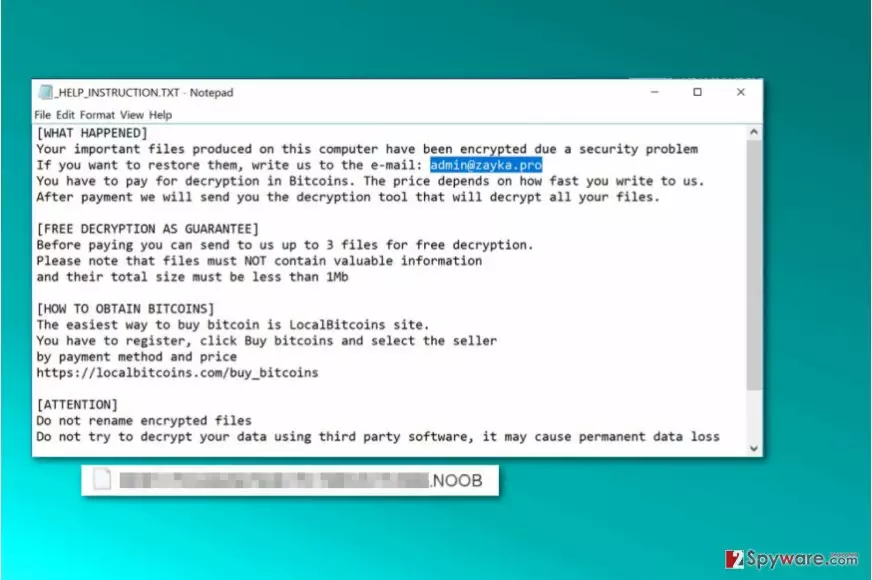
Once the data encoding process is complete, the virus creates and drops _HELP_INSTRUCTION.TXT file on Desktop as well as every folder with encrypted records. This file is known as the “ransom note,” or a message that contains instructions from cyber criminals.
The message doesn’t contain the exact sum of money that criminals demand paying, but it does contain an email address that victims need to write to.
Currently, active Cryptomix versions are closely associated with admin@zayka.pro email address, although different ransomware versions may provide different contact details.
The ransomware suggests that the victim can test the decryption key by providing three small encrypted files. This way, criminals seek to convince victims that it is worth paying the ransom. However, we do not recommend paying it; the chances are high that it won’t help you to recover encrypted files.
Therefore, instead of wasting your money, remove Noob virus as soon as you can. You may want to use anti-spyware or anti-malware software for its ransomware removal. One of the main reasons not to pay the ransom is the fact that malware analysts previously managed to crack this virus and create free decryption tools. Therefore, as long as there is hope to restore your files for free, you shouldn’t even consider the idea of paying up.
You can start experimenting and trying available data recovery options right after Noob ransomware removal. If you haven’t completed this task yet, use instructions provided below the article and a trustworthy anti-malware software like FortectIntego to complete this task.

Distribution of ransom-demanding viruses
The described virus, just like the rest of ransomware, is promoted via exploit kits (such as RIG[2]), email spam, RDP attacks, Trojans, malvertising and other illegal software distribution channels.
There is no magical way to protect your computer against all malicious viruses. Even having the most powerful anti-malware software won’t save you from ransomware attack if you do not follow other important virtual security rules. Therefore, we want to share our top tips on how to avoid ransomware.
- Do not open email attachments or URLs sent to you if you are unsure whether you know the sender or not. Besides, if the email comes from a company that you do not have any business with, bypass it as well. Opening suspicious content can lead to disastrous consequences, such as immediate data loss.
- Create a data backup. Data backup is the only thing that can save your files from a permanent corruption. Store data copies in a storage device that you can keep away from your PC (USB, hard drive, or CD).
- Use an up-to-date anti-malware software and keep all of your programs up-to-date, too. Regular software updates patch software flaws or, in case of anti-malware products, fill them with the latest malware definitions.
- Follow virus activity news online. One of great sources is VirusActivity.com site[3].
Remove Noob ransomware and restore encrypted records
You should only use professional anti-malware tools to remove Noob virus from your computer. We do not recommend you to play around and try to delete the ransomware manually because it is a highly sophisticated program that uses certain techniques to avoid detection. Thus, if you are not an experienced IT professional, you might overlook some of the malicious files because the malware tends to name its files after regular computer programs.
Using instructions provided below will help you to eliminate the ransomware. Remember that Noob ransomware removal should be taken seriously and you should be extremely attentive when trying to complete it. We suggest restarting your PC into Safe Mode with Networking to let the security software do its job without any interruptions.
Did this guide help?
Be the first to comment