

Blocking ransomware description
Blocking virus is a recently emerged version of the infamous BTCWare ransomware [1].The parasite is built using the code of the mentioned virus, only modifying a few basic details such as the ransom note, extensions, and contact email.
The current BTCWare Blocking virus variant drops ransom note-containing documents Info.hta and !#_READ_ME_#!.hta, appends encrypted files with [avalona.toga@aol.com].blocking extensions and indicates avalona.toga@aol.com as means of contacting the criminals.
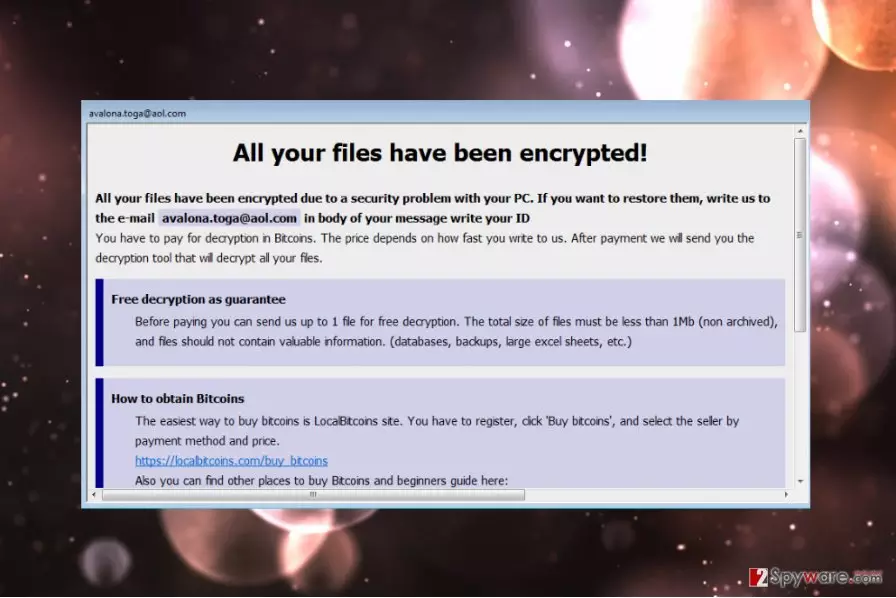
Intentions of the blocking ransomware virus appear to be serious. The criminals do not hesitate to compile a lengthy and informative ransom note, explaining how the encrypted files can be recovered. Below, you can see an extract from this note:
All your files have been encrypted!
All your files have been encrypted due to a security problem with your PC. If you want to restore them, write us to the e-mail avalona.toga@aol.com in body of your message write your ID
You have to pay for decryption in Bitcoins. The price depends on how fast you write to us. After payment we will send you the decryption tool that will decrypt all your files.
Later on in the document, the criminals lay down the conditions of test decryption, as a guarantee. Extortionists promise that they will decrypt one file for free before the victim pays the ransom.
The following chapters explain how to obtain Bitcoins, what not to do in order not to lose the files and, finally, provide the victims with a personalized ID number.
We do not recommend playing by the rules of the extortionists. They merely want your money and couldn’t care less about recovering your files. The best thing you should do is remove Blocking virus from your PC and make sure that it will not initiate any more modifications on your PC.

Indeed, Blocking problems do not end with data encryption alone. Once the parasite is one the computer, it starts making changes to the system. In particular, it may modify MBR (master boot record) [2] settings, create new malicious Registry entries enabling auto-execute functionality and interfere with the smooth operation of other installed programs, including antivirus utilities.
Blocking removal may not help recover your files, but it will sure stop these unauthorized activities from continuing. Besides, after you banish the evil-doer from your PC with FortectIntego or other trusted antivirus utility, you will be able to recover your files from backups safely or restore them following one of our experts suggested methods.
Proliferation of the virus
Blocking is a new cyber infection, so it is natural that it is still not particularly widespread. Nevertheless, it does not mean that the parasite is being distributed somehow differently than its more popular counterparts.
Developers of this virus may be promoting the malware via spam email attachments, exploit kits [3], fake software update downloads and other random links you may encounter while browsing in unreputable and illegal websites.
We are pretty sure you don’t want to find Blocking on your computer ever, so we want to point out a few steps which will help you avoid it:
- Stay on top of the system and installed software updates. This will ensure that all the vulnerabilities and security gaps are patched up and cannot be taken advantage of.
- Don’t download suspicious emails attachments, click on random links or ads online and always second-think whether it is safe to visit certain sites or initiate downloads.
- Finally, keep your system protected with antivirus or other security software. Run frequent scans of your system and enable firewall to protect you from unwanted encounters.
Blocking virus removal instructions
If you already have an antivirus utility installed, you can use it to initiate Blocking removal. Nevertheless, before you do that you should check what version of the software you are running and make sure it is the latest one.
In case you don’t own any security software, don’t try to remove Blocking virus manually or worse, leave it on your PC. Run your device in Safe Mode with Networking, download and run a professional malware removal software.
You will find all instructions how to enable the Safe Mode and decontaminate the threat below.
Did this guide help?
Be the first to comment