

WanaCry4 continues malicious tasks of the CryptoWire ransomware
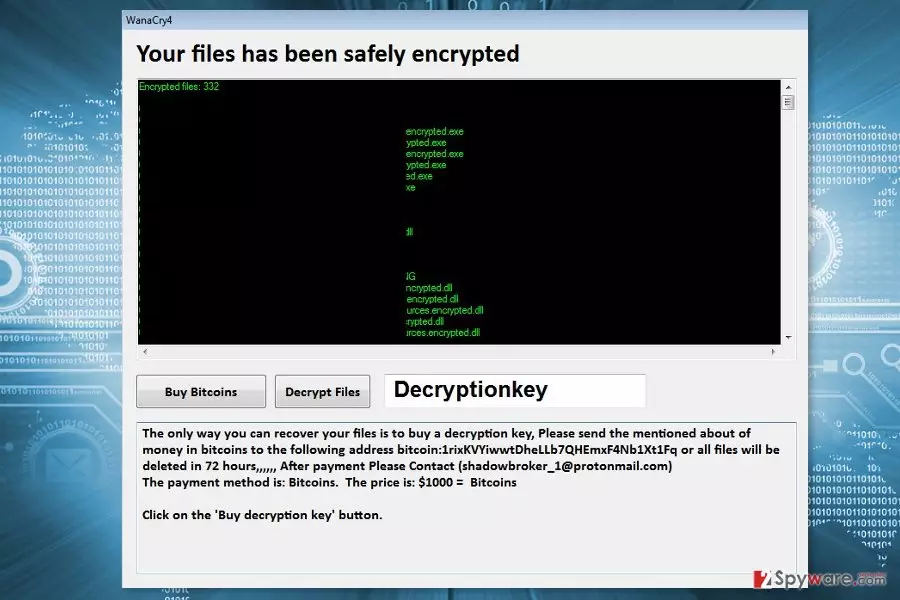
WanaCry4 is a new variant of CryptoWire. Nevertheless, it uses the name of WannaCry; they are not related. This recent cyber threat is an open-source ransomware that is executed from WanaCry6.4.exe.
According to the latest research data, the WanaCry4 virus seems to use AES encryption algorithm and append .encrypted file extension. Malware renames files by following this pattern :[original-filename].encrypted[extension].
Following data encryption, WanaCry4 ransomware delivers a program window that informs about encrypted files and notes that the only way to get back access to them is to pay $1000 in Bitcoins within 72 hours. To obtain the virtual currency, victims have to click “Buy Bitcoins: button and follow the instructions there.
Once the transaction is made, they have to contact authors of the ransomware via email shadowbroker_1@protonmail.com. However, you may never receive a decryption key from them. Therefore, you should not risk loosing your money.
Instead of paying the ransom, obtain a reputable antivirus or malware elimination software, such as FortectIntego or SpyHunterCombo Cleaner. It will help to remove WanaCry4 from the PC safely. Crypto-malware is a malicious program that makes the system vulnerable. Therefore, you should take care of your computer at least.
Currently, data recovery may not be possible. However, if you have backups, you can use them after WanaCry4 removal. What is more, at the end of the article, you can find alternative recovery methods that might be useful as well.

Spam emails, malicious ads and illegal downloads might spread the file-encrypting virus
Authors of this cyber infection might use multiple methods to spread malware payload. Ransomware might attack your device by using one of these methods:
- emails containing malicious attachments, links or buttons;
- eye-catching ads placed on dangerous and legal websites;[1]
- illegal/fake downloads or updates;
- exploit kits.[2]
As you can see, most of the time cyber criminals trick victims into downloading malicious content themselves. However, you should also update software and operating system to avoid the attack. Security experts from the LesVirus[3] note that installing security software and creating backups are crucial in malware prevention.
Security software is necessary for WanaCry4 elimination
In order to remove WanaCry4 from the PC entirely, you have to use reputable malware removal tool, such as FortectIntego, MalwarebytesMalwarebytes or SpyHunterCombo Cleaner. You have to run a full system scan with an updated software several times to be sure that all malicious entries are wiped out entirely.
However, if you cannot run automatic WanaCry4 removal, you have to follow the instructions below. They will show what actions you have to take in order to disable the virus and uninstall it automatically.
Did this guide help?
Be the first to comment