

Dian ransomware seeks to encode your data
Dian virus is the new variation of DCry ransomware which emerged imitating the notorious WannaCry malware. At the moment, there are three versions released which append .dcry, .qwqd or .dian file extension. Developers recently published DCRy 2.0 version as well.
Luckily, IT security specialist Michael Gillespie created DCry decrypter[1]. At the moment, it decodes the first two mentioned versions, but it may soon become useful in dealing with this variation soon.
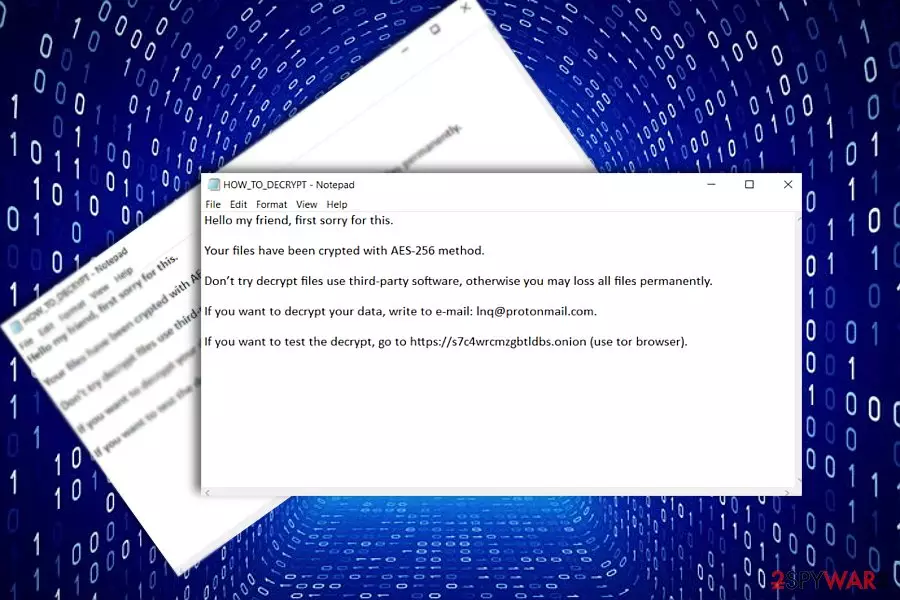
The original version drops its HOW_TO_DECRYPT.txt version file on the system. It includes scarce details informing victims that their files are encoded. In order to decode them, they need to contact the perpetrators via the indicated bbqb@protonmail.com. Speaking of Dian malware, it presents the text file with the same title.
In this case, it mentions that the data has been encrypted with AES-256 algorithm. In order to decode the files, victims should contact the felons via Inq@protonmail.com. The message also includes a link to a secret onion site.
It supposedly includes the decrypter. Though the developers say that victims can test the tool, the web page opens up with the ID bar and sign up options. It is not recommended to use the utility. It is not recommended to follow the demands as the decrypter is already released. Before you use remove Dian virus completely. FortectIntego or MalwarebytesMalwarebytes will come in handy in this process.
Imitating predecessors
DCry malware happens to be only one sample of numerous ransomware supposedly having relation to the former malware. Let us briefly remind that the original WannaCry managed to wreak havoc as it made use of EternalBlue vulnerability and infected systems with weak SMB protocols.
Its supposedly new versions such as CryForMe or DCry luckily do not possess such complexity. As the authors seem to have been really engaged in the ransomware market and release new versions once in two weeks, it is necessary to be vigilant. Make sure you perform Dian malware removal.
Distribution campaign remains obscure
While some more exquisite crypto-viruses are delivered with the assistance of botnets[2] and exploit kits, less complex threats use spam emails. Note that Dian hijack may occur if you carelessly open the attachment supposedly sent by an official institution. Do not rush open the attachment without double-checking the identity of the sender.
In addition, since Dian ransomware may attempt to assault your Windows as Trojan.Ransom.DCry or Gen:Variant.DCry.1, make sure your system is protected. Update your security applications regularly. Lastly, avoid clicking on links in the websites overcrowded with ads and fake download buttons. You should be wary of corrupted browser extensions.
Eliminate Dian ransomware
Once you notice your data inaccessible, remove Dian virus automatically. Note that manual attempts might turn out futile unless you are a programmer. In case you encounter any difficulties completing the procedure, reboot the PC in Safe Mode.
After Dian ransomware removal, take a look at the alternative decryption solutions or wait until the official decrypter will be updated. Let us warn you not to use the one promoted by the perpetrators. Not only US users, but for instance, Estonian users[3] should be vigilant not to encounter Dian hijack.
Did this guide help?
Be the first to comment