

Teamo ransomware leaves victims without data recovery option
Teamo (also known as Zika ransomware virus) is a cyber threat that is based on the HiddenTear project.[1]. The virus appends .teamo file extension and drops a “Hello Hi Hola como sea jaja.txt” file on the desktop. The ransom note in the text file is written in Spanish and English languages. However, the research says that it mostly aims at Spanish computer users.
However, authors of the Teamo ransomware does not provide a contact email, Bitcoin Wallet address or link to ransom payment website in the ransom note. It’s doubtful that crooks forgot to include such important details. Thus, security experts assume that malware might still be in development.
It is assumed that cybercriminals might improve and upgrade the virus. Security expert suspect that they might add a Trojan module that allows spying on victims or taking control of the device. Also, this Zika ransomware might be used for stealing sensitive information or installing other malware on the system.
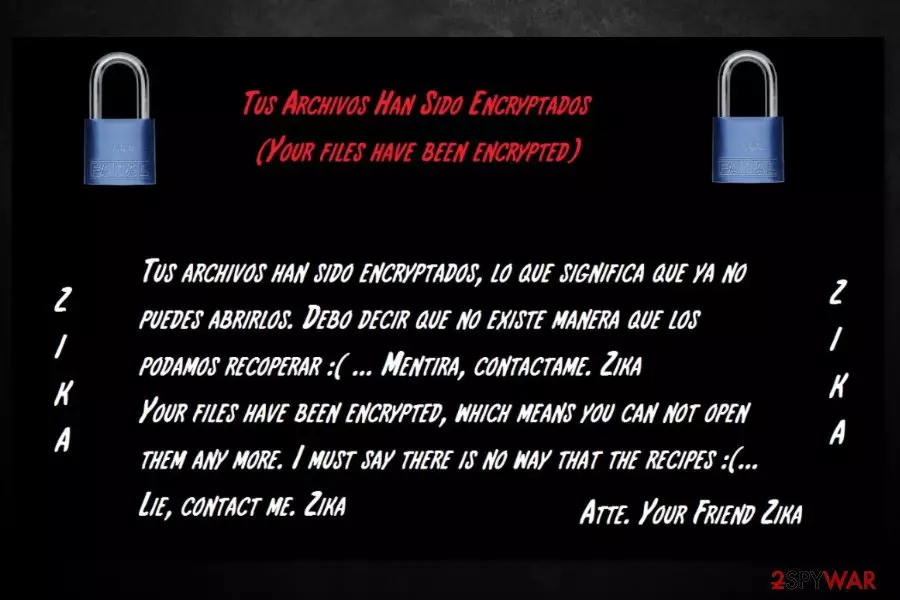
Currently, he file-encrypting malware encrypts lots of popular file types, including images, videos, music, backups, Configuration Files, and more. Following data encryption, Teamo virus also changes affect computer’s desktop picture with a threatening message in Spanish[2] and English languages:
Tus Archivos Han Sido Encryptados
(Your Files Have Been Encrypted)Tus archivos han sido encryptados, lo que significa que ya no puedes abrirlos. Debo decir que no existe manera que los podamos recoperar 🙁 … Mentira, contactame. Zika
Your files have been encrypted, which means you can not open them any more. I must say there is no way that the recipes 🙁 …
Lie, contact me. Zika
Atte. Your Friend Zika.
Unfortunately, there’s no way to restore encrypted files. HiddenTear decryptor might help, as well as some third-party software. However, there are no chances that all files with .teamo extension will be unlocked successfully unless you have backups. Thus, once you discover about ransomware attack, you should focus on Teamo removal and do not think about anything else.
You should obtain FortectIntego or another malware elimination tool to remove Teamo from the computer safely. The crypto-virus may have affected legit system processes, installed suspicious components and made entries in Registry. Thus, keeping it in the system is dangerous.

Possible ways to spread ransomware virus
Security researchers discovered that this crypto-malware spreads using several methods, such as:
- malicious spam emails,
- fake or illegal downloads;
- misleading updates;
- malvertising.
However, most of the time a malicious eda2.exe[3] payload is dropped and executed on the system when a user opens a malicious email attachment. Thus, you should be extremely careful with received emails. Stay away from spam, do not open unknown attachments even if they look safe and do not click links included in the email.
Following other security tips are also recommended: do not download illegal content, avoid file-sharing sites or torrents, install or update programs from official publisher’s sites. Additionally, do not browse through insecure websites and stay away from suspicious ads.
Remove Zika (Teamo) ransomware virus
Even though crooks left some critical mistakes in the ransom note, victims have to remove Teamo ransomware from the computer properly. After the attack, numerous malicious components may have been installed on your PC. Additionally, malicious code may have been injected into system processes. To wipe out and stop all these entries, you will need to get professional malware removal tools.
We recommend using FortectIntego or MalwarebytesMalwarebytes for Teamo removal. However, before installing security software, you should reboot the device to Safe Mode with Networking as shown below. It helps to disable the virus and run automatic elimination.
Did this guide help?
Be the first to comment